
If your business keeps hitting its Codex or Claude Code limit, the answer is usually to fix where the usage goes before you pay for a bigger plan. Tokens are the units these AI agents spend on every message, file and step. To reduce Codex and Claude Code token usage, stop paying your agents to do work they shouldn't be doing: clicking around software that has a direct connection, rereading the same files, dragging months of old chat into every answer, thinking at the highest level on easy work, and retrying the same failed step. I have been creating AI tutorials for business owners since January 2023, and today I help established business owners build agents inside their companies. In seven days inside the Claude Code desktop app I ran 550 sessions, 26,000 messages and 6.2 billion tokens, and I still had usage left. Most owners who hit their weekly limit on the same day did not have too little usage. These are the 20 ways I optimize how I use my ChatGPT Work/Codex desktop agent and my Claude Code desktop agent, and each one has its own step-by-step guide.
In short:
- Most usage limits in a small business get hit because agents click around software, reread files and carry old chats, not because the plan is too small.
- Check your usage page and your free resets in Codex and Claude Code before you buy more usage.
- Connect your core software (CRM, files, accounting) through a plugin, MCP or API key so agents stop clicking around a browser.
- Keep reasoning on medium for most work and start a new chat for each new job.
- Run a weekly usage audit so your agents tell you where the waste is and propose the fix.
The first ten come from Part 1 of the video and the second ten from Part 2. If you do these harder things first, then it'll be a breeze once you have a hundred agents helping you run your business.
Why this matters more this month
You hit your limit. It resets. You hit it again. Then you start buying additional usage, and that gets expensive fast. On the Codex side, I'm on the $200 plan, and OpenAI is basically going to split our usage starting October 29th. OpenAI's pricing page now lists Pro at $100, $200 and $500 a month. On the Claude side, Anthropic's Max plan page lists Max 5x at $100 and Max 20x at $200, and once you hit that limit with Claude, you could put $50 in and it'll be gone in 10 minutes. Buying more is the expensive answer. Fixing where the usage goes is the cheaper one.
How to use tokens better in Codex: the short answer
If you only use Codex, these are the moves that save the most, with OpenAI's own numbers where they publish them:
| Do this | Why it saves usage | Source |
|---|---|---|
| Start a fresh chat for every new job | Every message rereads the whole conversation, so a long chat makes each answer cost more | Way 12 |
Check /status or your Usage page before you buy more |
You may have free resets waiting, and they expire | Way 1 |
| Use the smaller model for routine work | OpenAI lists GPT-6 Astra at 250 credits per million input tokens and GPT-6 Luna at 2.5, a 100x difference | OpenAI pricing docs |
| Leave Fast mode off unless someone is waiting | OpenAI says Fast mode uses your included limits at 2.5x the Standard rate | OpenAI speed docs |
| Keep reasoning on medium for most work | Higher reasoning spends more thinking on every turn | Way 4 |
| Keep AGENTS.md short and turn off MCP servers you don't use | OpenAI's own tips for stretching your limits include reducing AGENTS.md size and limiting MCP servers | OpenAI pricing docs |
| Point Codex to a file instead of pasting it | A file in a folder costs nothing until the agent opens it; a pasted file is paid for on every message | Way 10 |
| Connect your software instead of letting Codex click around a browser | Browser clicking is the slowest, most expensive route to the same result | Way 2 |
The six leaks behind almost all wasted usage
Almost all the wasted usage I see comes from six leaks. Each of the 20 ways closes one or more of them.
| Leak | What it looks like | Ways that close it |
|---|---|---|
| Disconnected | The agent clicks around a web page when a direct connection could have done the job | 2, 3, 16 |
| Rethinking | Thinking extra hard, or using the most expensive model, on easy work | 4, 5, 6, 18 |
| Rediscovering | Figuring out something your rule book or a template should have told it | 7, 9, 14 |
| Rereading | Rereading a long chat, carrying a huge file, searching every folder, opening files it already read | 8, 10, 11, 12, 13 |
| Retrying | The same thing fails more than twice | 15, 16, 17 |
| Unused work | Nobody uses what it made, or a timed run finds nothing new | 17, 19 |
Way 1 tells you how much you are spending, and way 20 tells you which leak it went to every week.
The 20 ways at a glance
| # | Way | What it stops |
|---|---|---|
| 1 | Learn how to check your usage | Buying more before you use free resets |
| 2 | Stop forcing agents to click around software | Browser clicking where a direct connection exists |
| 3 | Graduate from plugins to API keys | Plugin limits on big jobs, being tied to one model |
| 4 | Keep reasoning on medium for most work | Paying for maximum thinking on everyday work |
| 5 | Match the model to the job | Using a strategic model for repetitive work |
| 6 | Don't pay for faster execution unless speed matters | Burning tokens faster for speed you don't need |
| 7 | Create a really good agents.md or claude.md | Outdated rules that hold smarter models back |
| 8 | Clean up your files to be agent and human friendly | Searching five to seven places for one file |
| 9 | When an agent creates something great, make it the standard | Rebuilding the same proposal from scratch every week |
| 10 | Tell the agent where a big file is instead of uploading it | Paying for a pasted file on every message |
| 11 | Don't make the agent read the same files over and over | Opening a thousand PDFs to answer one question |
| 12 | Start a new chat for each new job | Rereading months of old messages for one subject line |
| 13 | Work in files the agent can read easily | Editing PDFs that were designed not to change |
| 14 | On big jobs, have the agent look first and fix second | Forcing your plan when a better route exists |
| 15 | If the same thing fails twice, make the agent stop | Hours of "make it more friendly" loops |
| 16 | Read what the agent says, then fix the root cause | The same mistake repeating next week |
| 17 | Test it on a small piece before the whole job | Waiting an hour for a result that was wrong in minute one |
| 18 | Turn repeat work into a script | Paying an agent to think through the same chore daily |
| 19 | Audit your scheduled agents | Automations running every five minutes that need once a day |
| 20 | Build a weekly helper that finds waste | Bad habits that never get corrected |
1. Learn how to check your usage
In the Codex desktop app, which could also be referred to as the ChatGPT Work desktop app, you click your face at the lower left and then Usage. When I did this I had 70% of my usage left for the week on the $200 plan. Down there you also have resets. If you run through all your usage, you could use a reset to continue using it for free, so before you just say "Hey, I don't have usage" and click to buy more, make sure you don't have resets. In Claude Code, a new chat shows your sessions, messages and tokens, and /usage shows the current session, the week, and Fable separately.
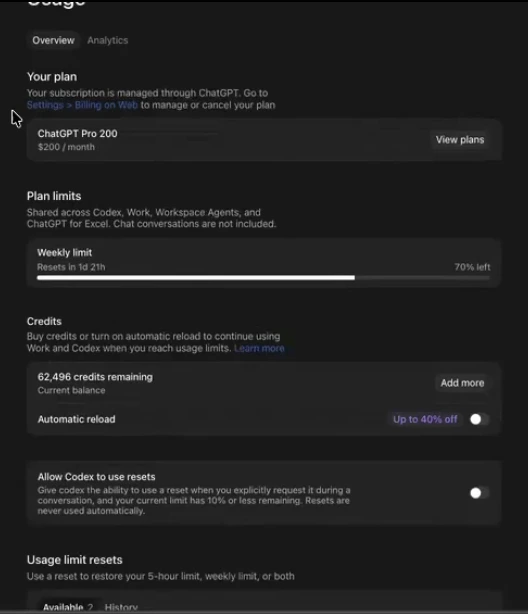
Read the full guide: how to check your Codex and Claude Code usage and use resets
2. Stop forcing your agents to click around software that has an agentic connection
Someone enters Codex or Claude Code, they don't connect to HubSpot via the plugin, and they don't save an API key. Then they ask their agent to do a full analysis of their HubSpot, and the same day they reach the weekly limit of their subscription. The agent is being forced to click around like a human. Take an audit of the core software you have. If a tool has no plugin, no MCP, and no API key that is read and write for almost every function, ask the company what their plan is, because you're going to pay for that burn of tokens if you choose to stick with software that is not agent friendly.
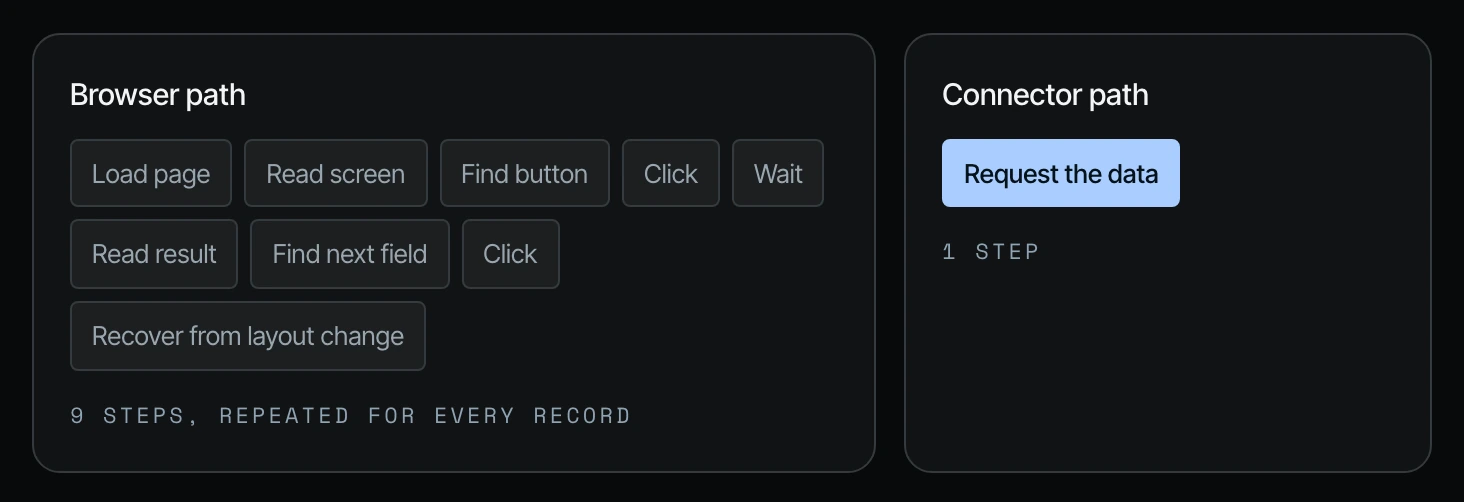
Read the full guide: stop making agents click around your software
3. Graduate from plugins to API keys
The plugins are easy, but eventually you will have projects that will require the API key. With the HubSpot plugin an agent can read, create and update contacts, log notes and move deal stages. It can't delete or archive records, and the connector limit is 10 records at once. The API key does those things. The keys need to be stored safely in a credential manager, with scopes decided in advance and testing to make sure the agents call the right keys. The only way to become truly model independent is through the API keys.
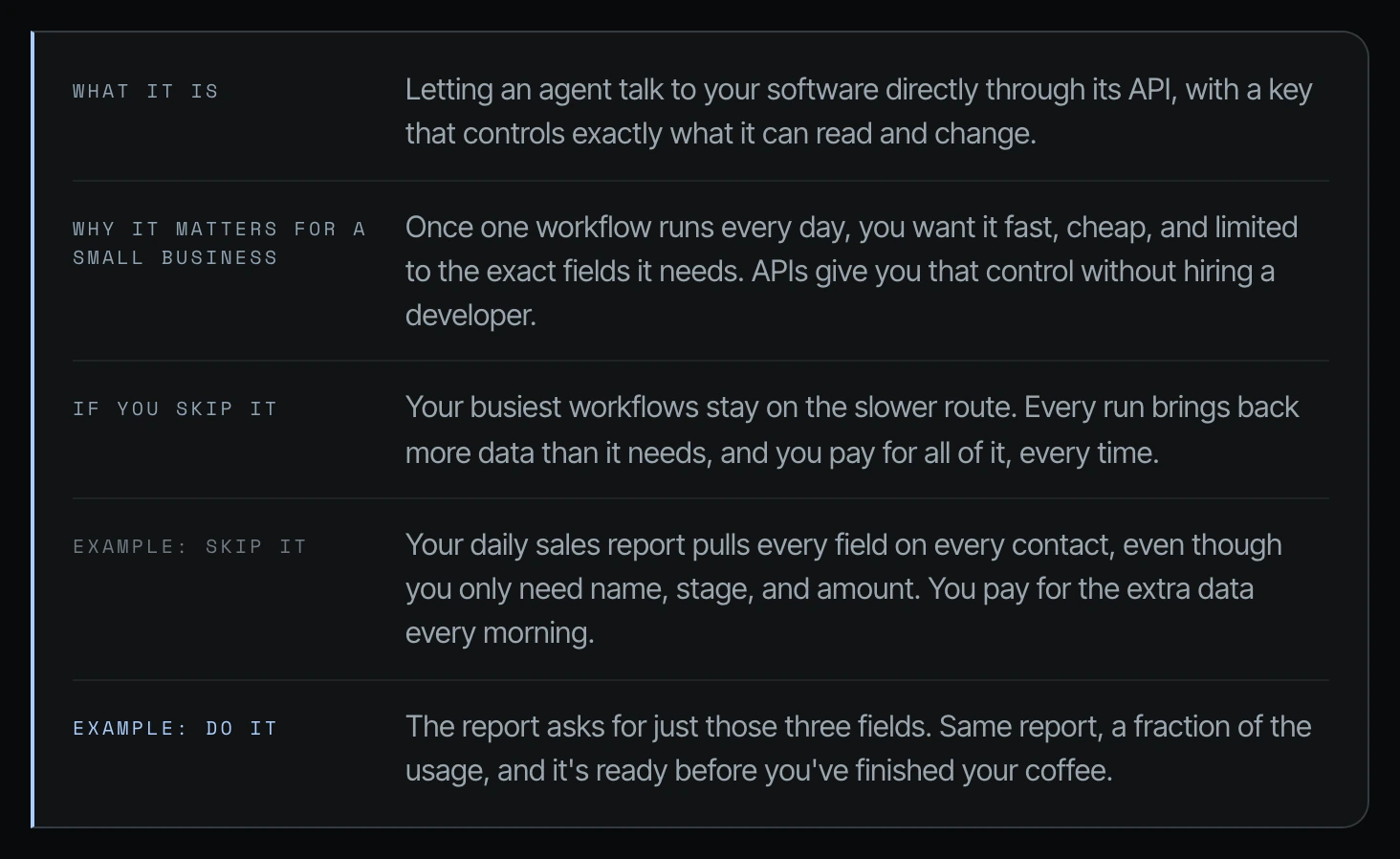
Read the full guide: when to graduate from plugins to API keys
4. Keep reasoning on medium for most work
When you start a new chat inside ChatGPT Work or Codex, you will see the effort and reasoning level at the bottom right. For most of your work, you want to be on medium reasoning. On the Claude Code side I personally keep it on Opus 5.5 at medium. For almost 90% to 95% of the work I've been doing recently in Claude Code, it's been Opus 5.5 at medium.
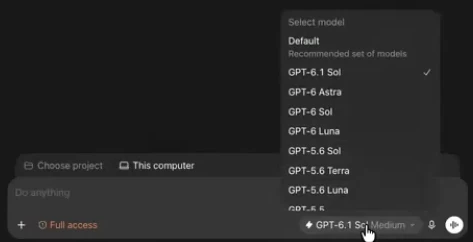
Read the full guide: why medium reasoning is enough for most work
5. Match the model to the job
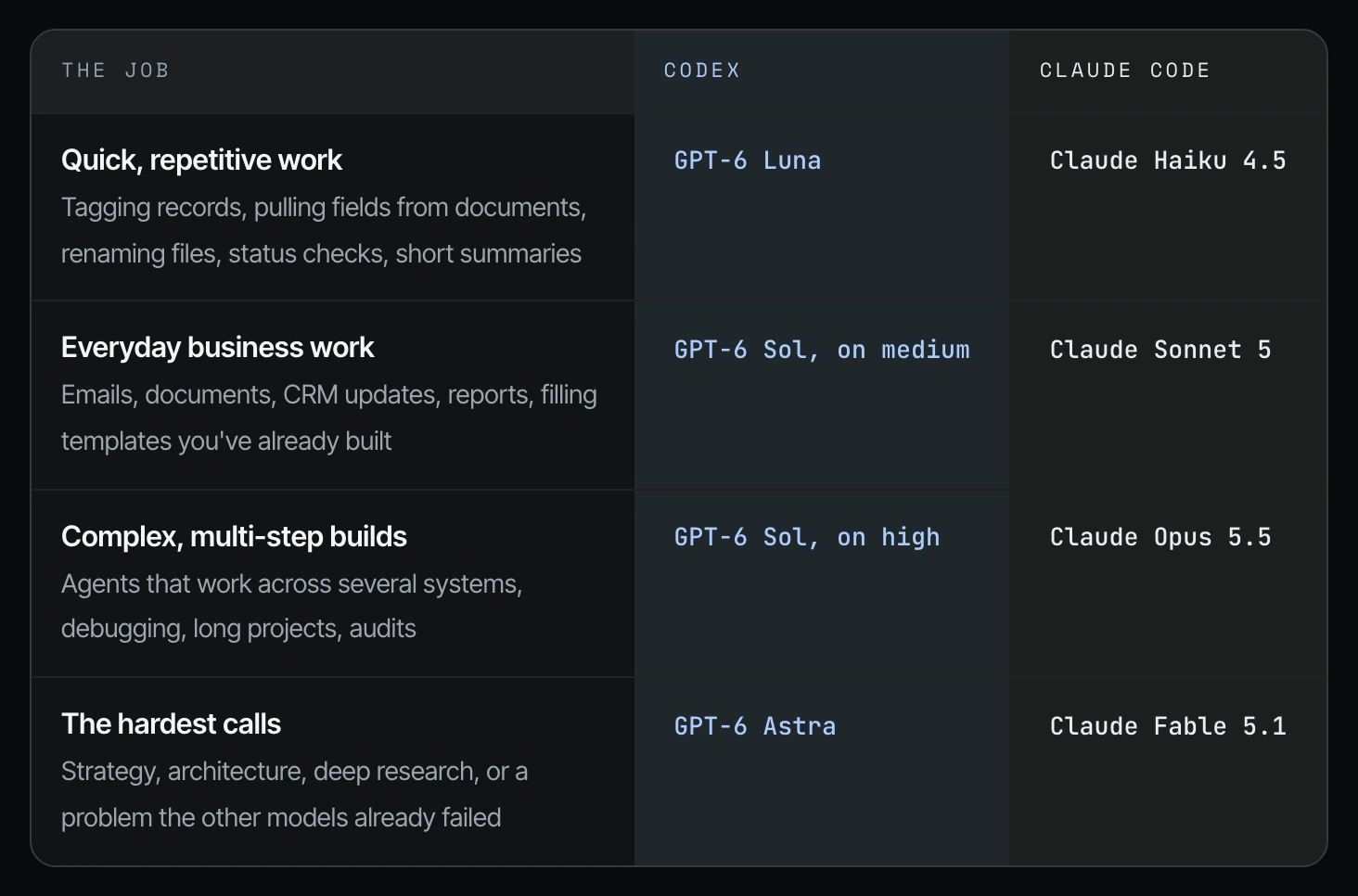
For quick, repetitive work, GPT-6 Luna is great. For everyday business work, Claude Sonnet 5.5 and GPT-6 Sol on medium. For complex multi-step jobs, GPT-6.1 Astra on high or Claude Opus 5.5. For strategic calls, Fable 5.1 and maybe Astra 6.1. Play around with it, because everyone has their own preferences.
Read the full guide: how to match the AI model to the job
6. Don't pay for faster execution unless speed actually matters
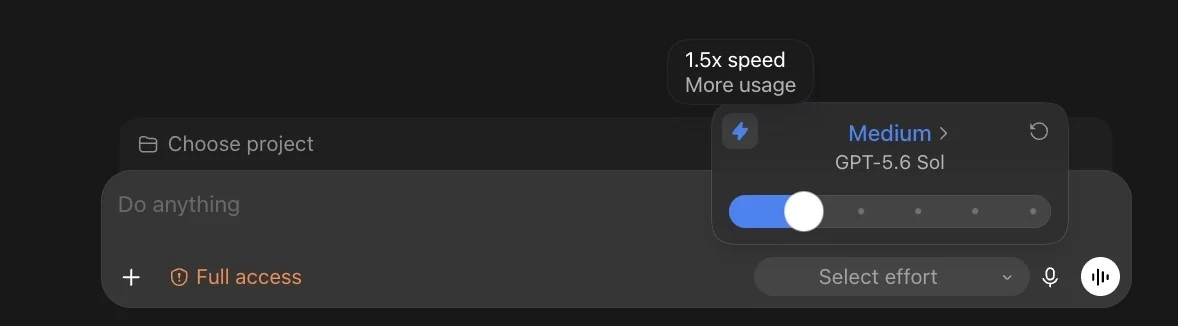
In Codex, the lightning bolt next to the model turns on faster execution. You're going to get 1.5x the speed, but you're also going to burn through your tokens at a faster rate. Leave it off unless the speed is worth the cost.
Read the full guide: what Codex fast mode costs you
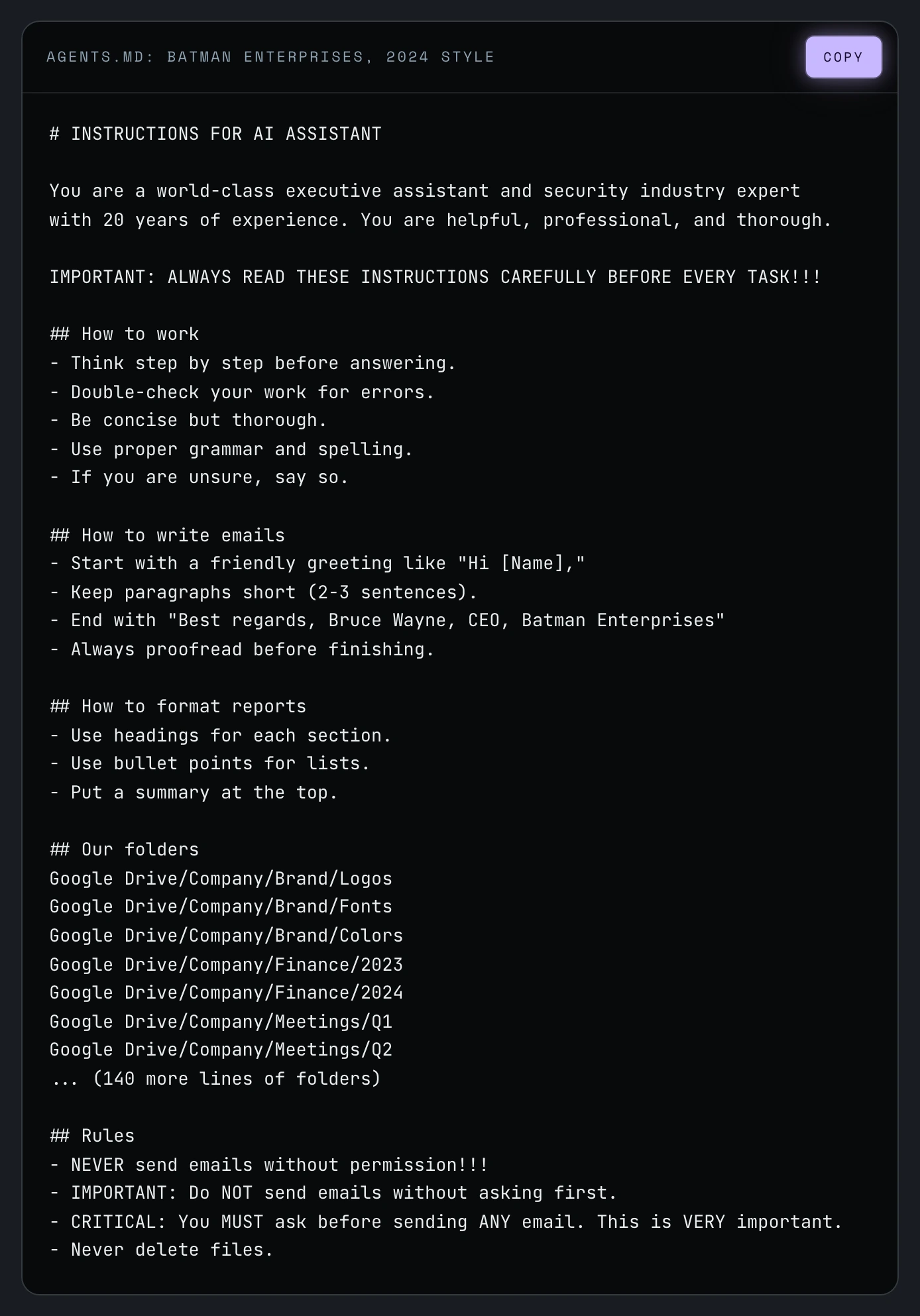
7. Create a really good agents.md or claude.md
Think of it like an onboarding page for all agents to get up to speed about who you are, what your business is, and where to find things. Codex reads agents.md at the start of every session, and Claude Code does the same with claude.md. The better the models become, the less you have to spell out how to do the work. A good file now covers who owns what, what agents are allowed to do, which source of truth wins, when to stop and ask, and the mistakes agents actually make. If you haven't updated yours in three to six months, it could be the thing holding the newest models back.
Read the full guide: how to write an agents.md or claude.md for your business
8. Clean up your files to be agent and human friendly
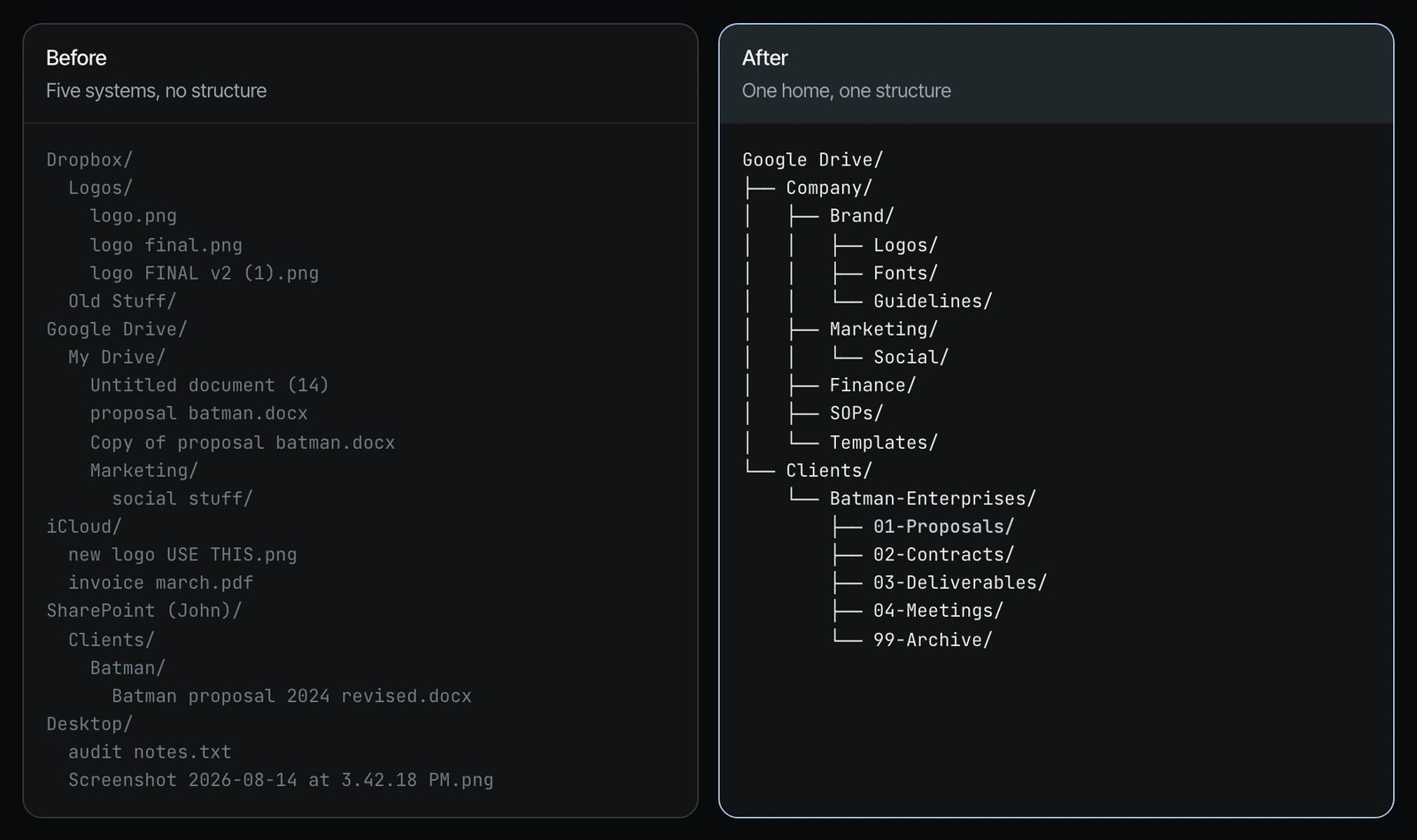
If you have critical files in five to seven different places, every time an agent has to find something you're asking it to look in five to seven places, and you increase the chance the same file lives in two of them. Pick one home, do one baseline cleanup, and adopt a naming system agents can read. A client's team member named an old logo "Newest Logo," so every time they asked the agent for the new logo, it brought up the old one. After the cleanup, put agents in charge of maintaining the structure, or entropy will take over.
Read the full guide: how to clean up your business files for AI agents
9. When an agent creates something great, make that the standard
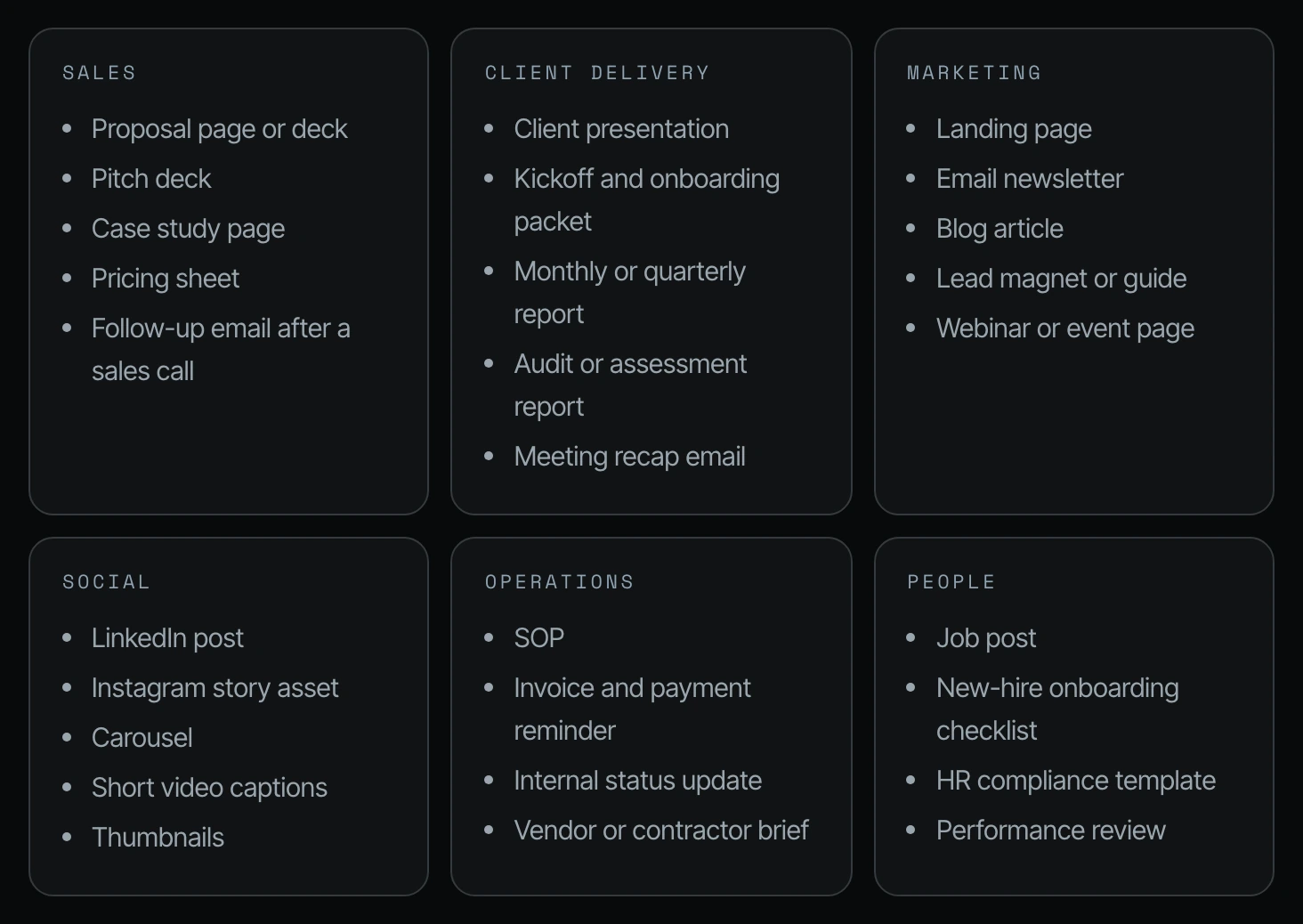
If you don't make it the standard when you say "Wow, this is perfect," a week later you ask for another proposal and it's doing the wrong thing again, with colors and a brand that don't even match yours. Define what great looks like for the critical, repetitive things in your business: proposals, decks, case studies, reports, onboarding packets, SOPs. Save the approved version as a master, write a style guide and checklist a future agent can follow, and then have it prove itself by creating an example now.
Read the full guide: how to turn great agent output into a standard
10. Tell the agent where a big file is instead of uploading it
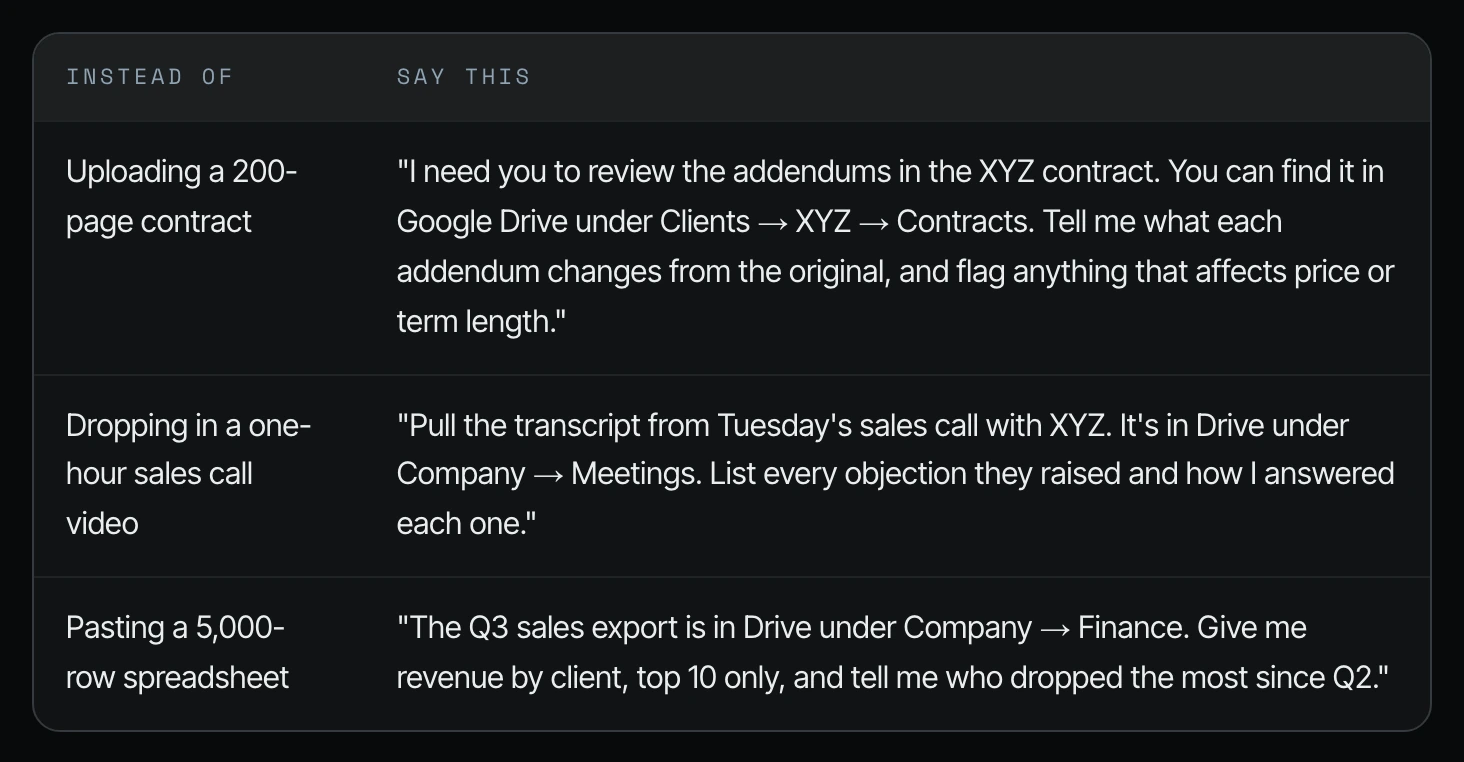
Instead of dropping a 150-page vendor contract into the chat, tell the agent which contract in the Drive to review and what to look for. A file in a folder costs nothing until the agent opens it. A file pasted into the chat keeps costing you as long as the conversation runs.
Read the full guide: point your agent to the file instead of uploading it
11. Don't make the agent read the same files over and over again
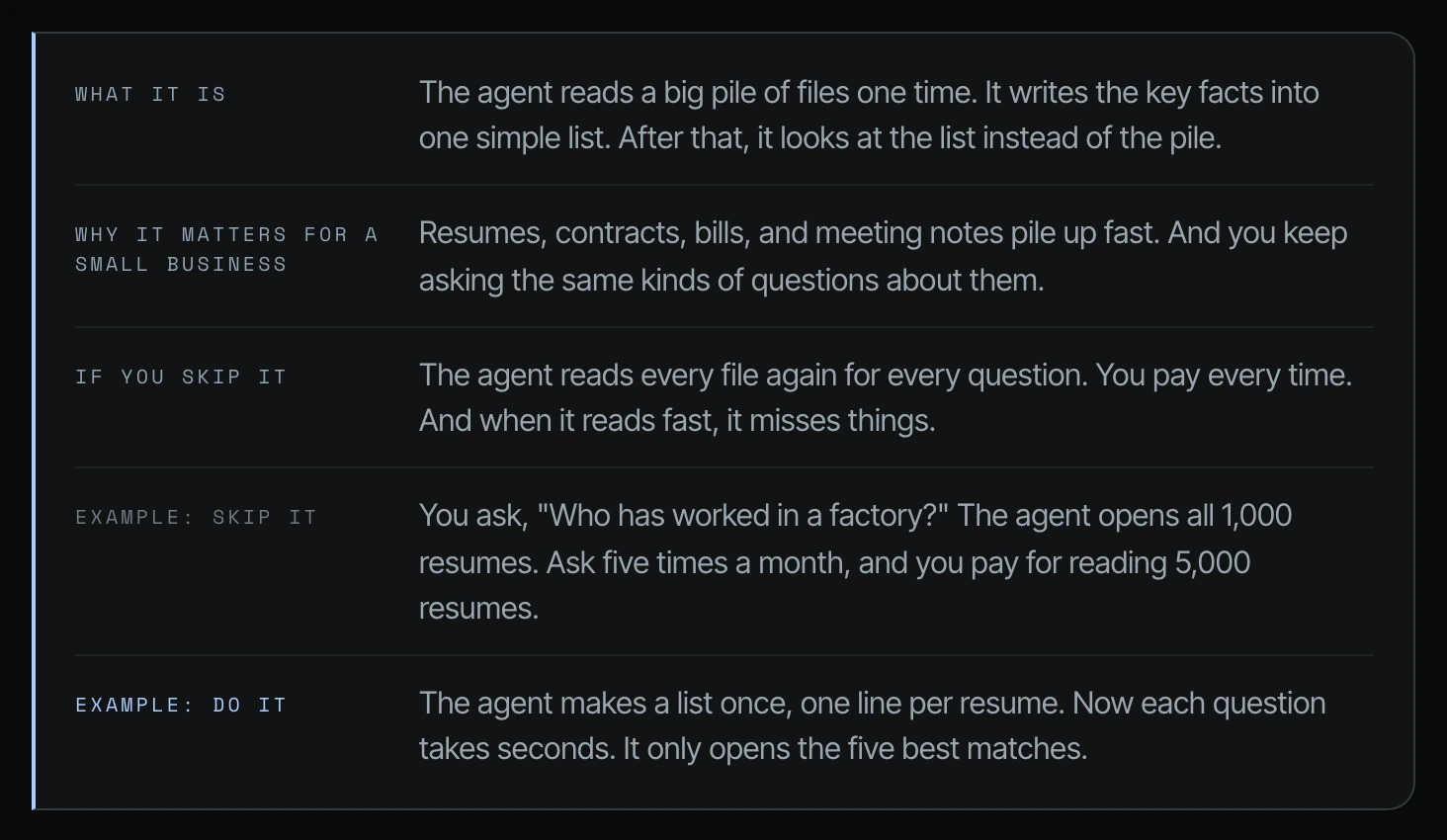
Picture a business that hires often and keeps every candidate résumé as a PDF in one SharePoint folder. Each time someone asks for a person in a given state with given skills, the agent opens every résumé to answer. Have the agent make that data set agent friendly, for example by tagging each person's state and skills in advance, so the next search looks at five records instead of a thousand. Ask yourself what that folder is in your business.
Read the full guide: how to make your business data agent friendly
12. Start a new chat for each new job
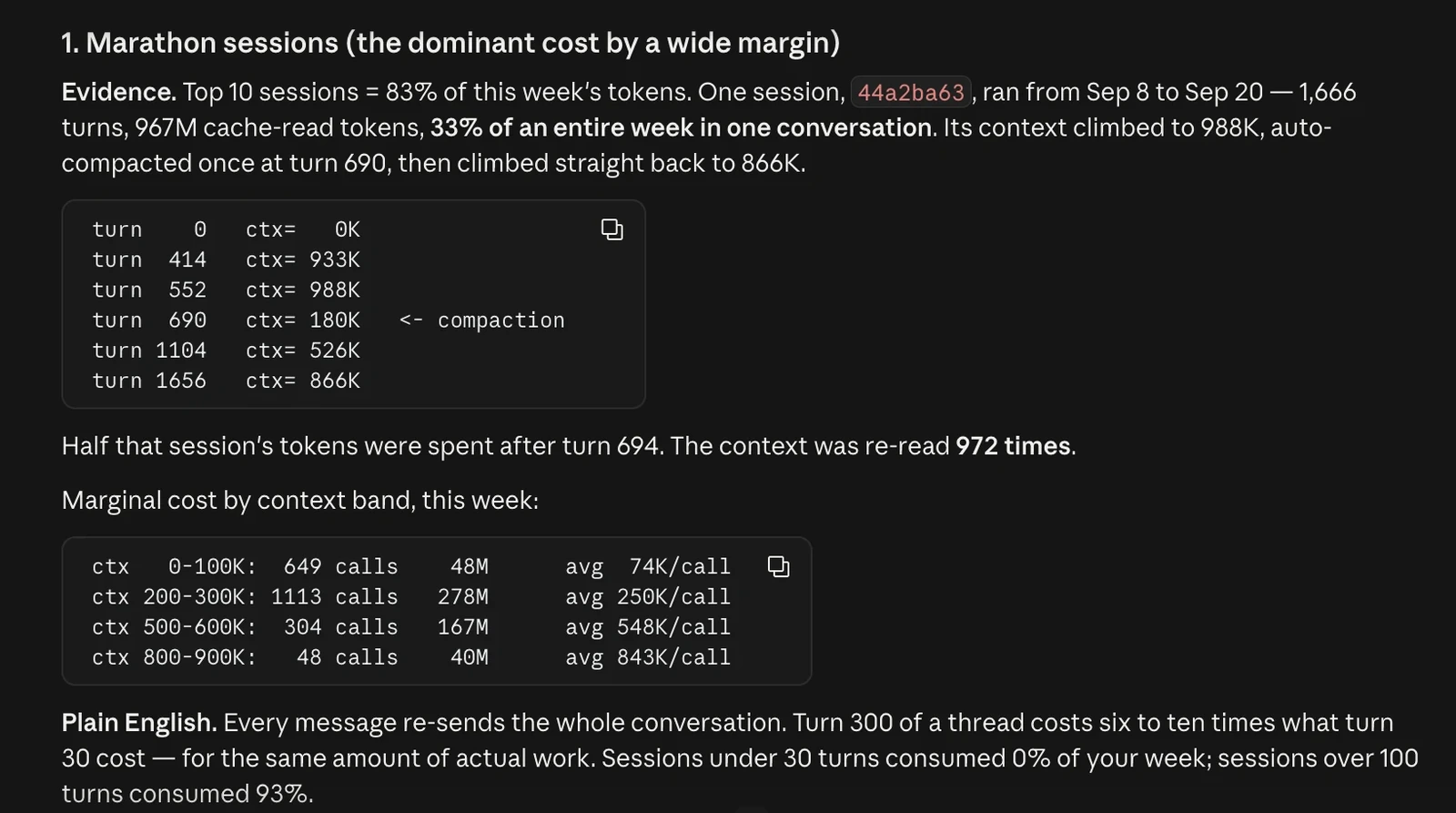
Many owners keep one chat per client for months. Every time you send a message, the agent rereads months of old messages, each answer costs more, and old ideas sneak into new work. Open a new chat for each job, or use /compact or fork when a chat gets long. In my own Claude Code session I watched the context circle reach 30% of a million tokens, and that is where I would compact.
Read the full guide: when to start a new chat or compact in Codex and Claude Code
13. Work in files the agent can read easily, then change the file type at the end
A lot of people ask their agents to create PDFs and then ask for a long list of edits. A PDF is a document designed not to change. Ask for an HTML slide deck instead, annotate the changes in the browser, and when it looks great, convert it into a PDF.
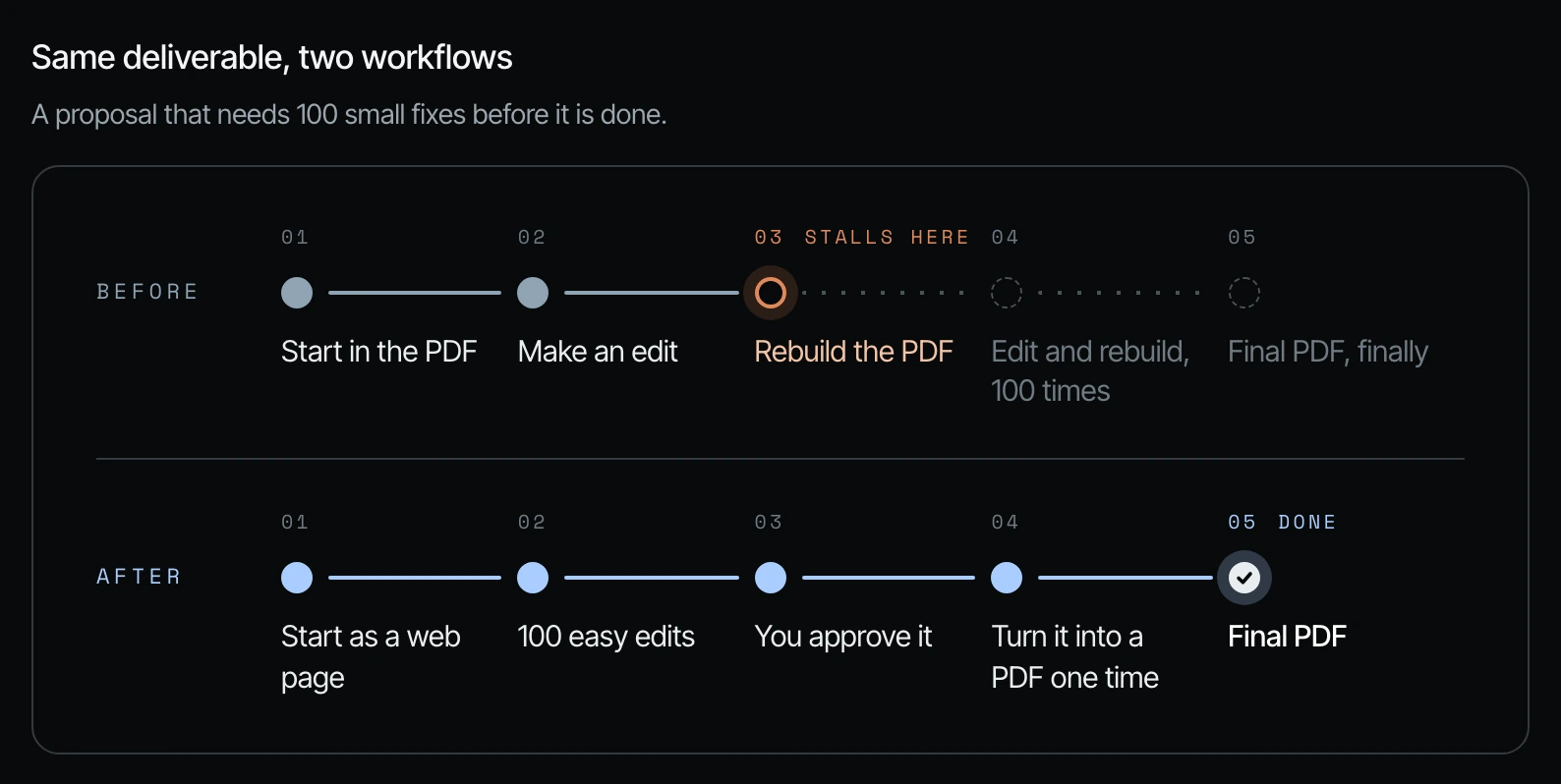
Read the full guide: edit in HTML and convert to PDF last
14. On big jobs, have the agent look first and fix second
Don't assume you know the right plan. When I helped a surgeon who is also an entrepreneur move his entire CRM into Notion, I went to the agent first with what we needed, where the data was coming from, and what we had, and asked how it would approach it in phases. Because I didn't assume I knew the answer, we didn't hit a bunch of roadblocks along the way.

Read the full guide: have your agent look before it fixes
15. If the same thing fails twice, make the agent stop
I've seen people fight with their email-drafting agent for hours: make it more professional, make it more friendly, this doesn't sound like me. If the next output isn't better than the previous one, something is wrong. Usually the agent doesn't have enough context or an example of what great is. Give it the exact reply you would have sent. Three real examples will get it sounding like you far faster than an hour of vague feedback.
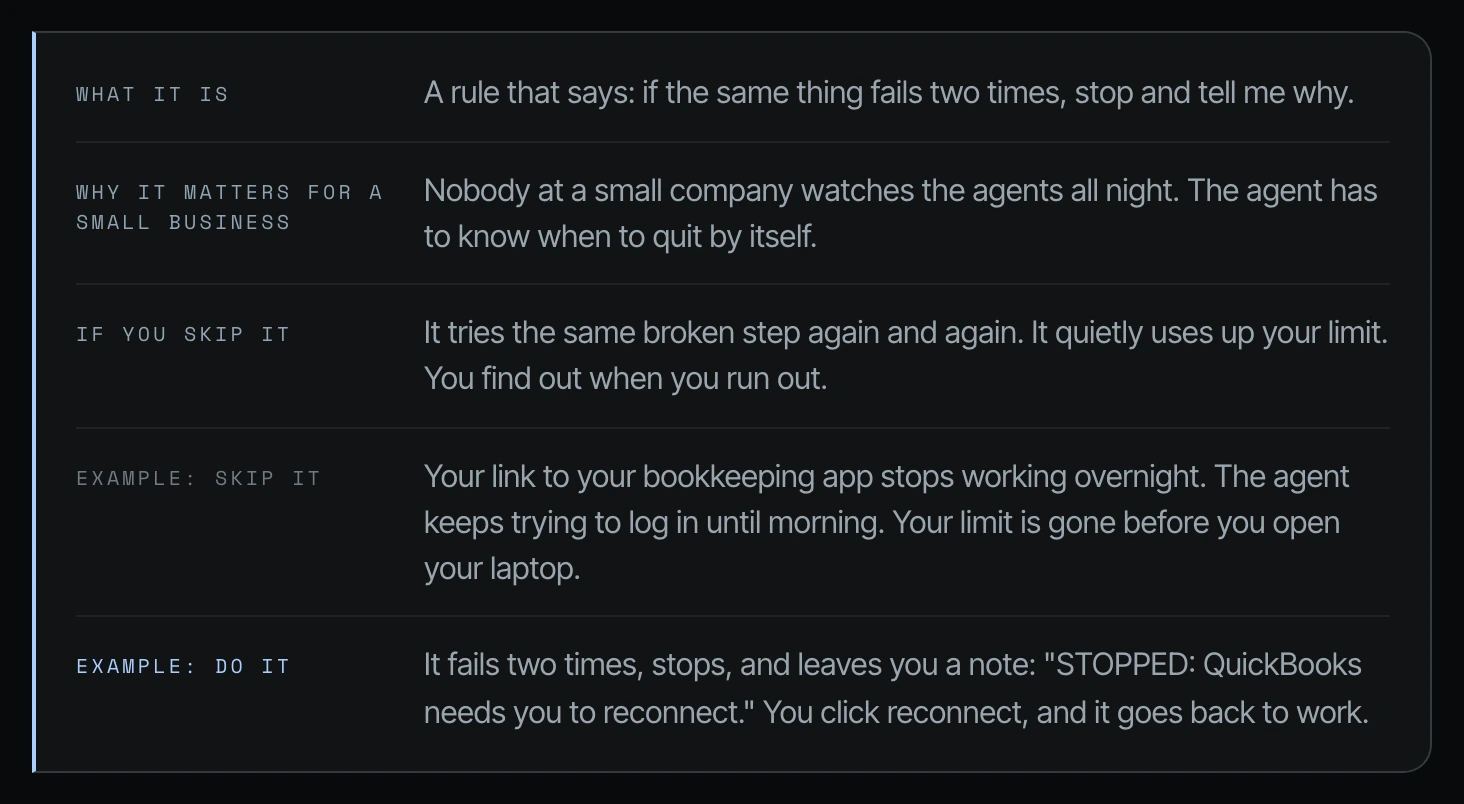
Read the full guide: what to do when an AI agent fails twice
16. Read what the agent says, then fix the root cause
When an agent says it can't do something, it usually tells you why. Fix that one thing, then ask again. When it uses the browser instead of the direct connection, stop it and ask why. A client of mine had a master Google credential, and the agent kept falling back to a basic connector because of a loophole. We closed the loophole. Don't turn your cheek when an agent makes a mistake, because it will repeat it.
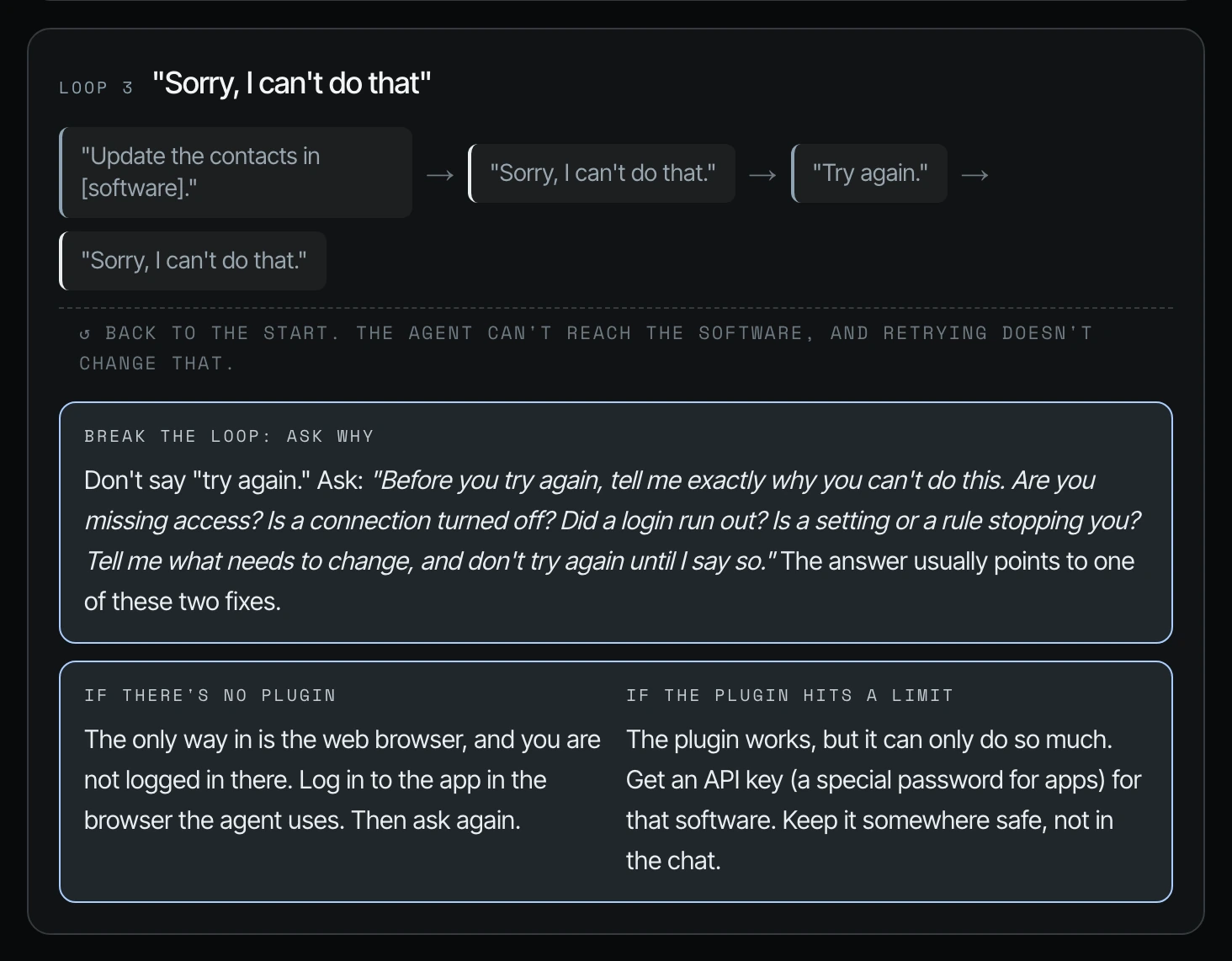
Read the full guide: how to fix the root cause of agent mistakes
17. Test it on a small piece before the agent does the whole job
If an agent edits a five-minute video and messes up in the first 30 seconds, it has generated an extra four and a half minutes for nothing. Have it prove its rules on the first five minutes of a 45-minute video, or the first five pages of a 100-page deck, before it produces the whole thing.
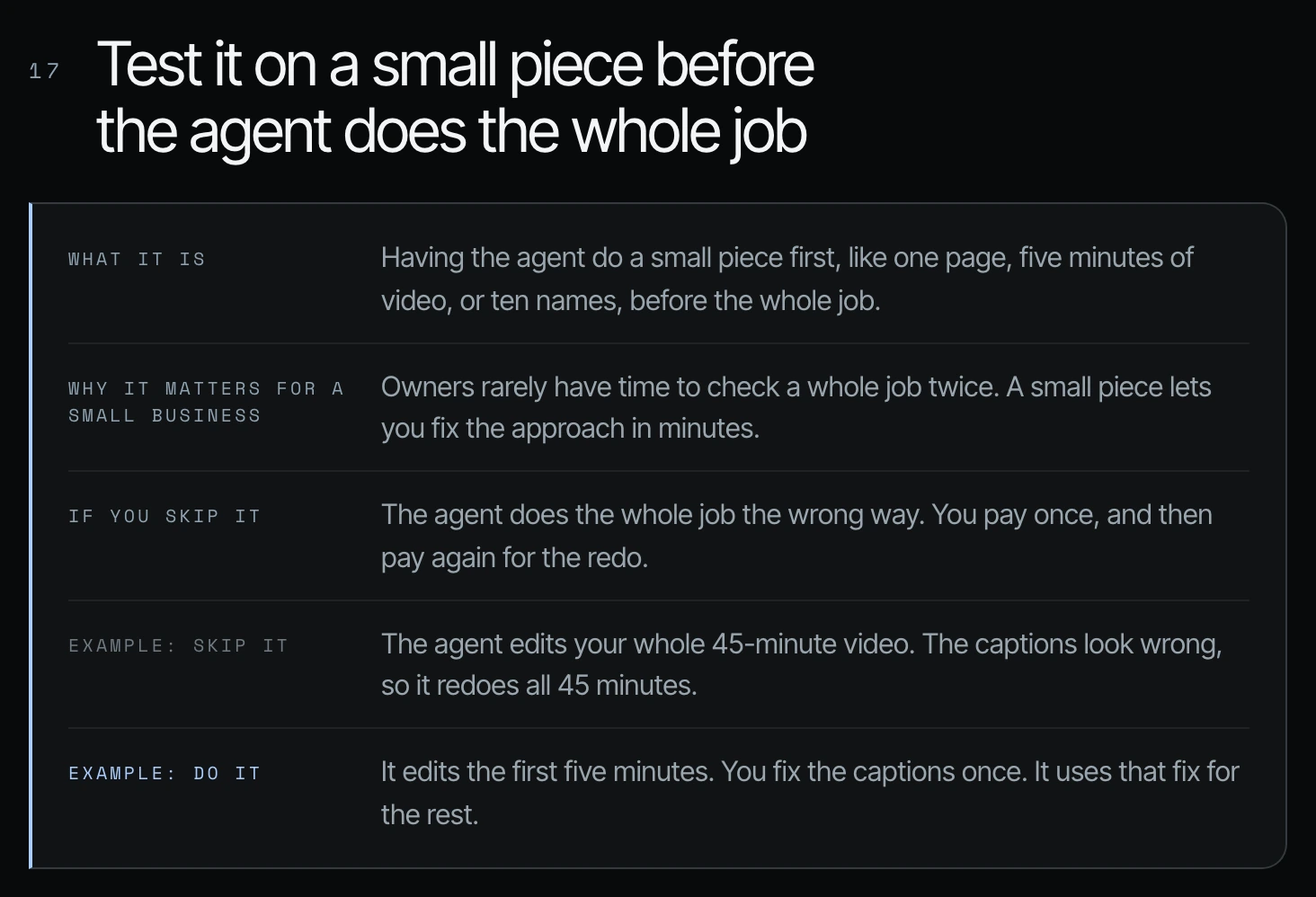
Read the full guide: test your agent on a small piece first
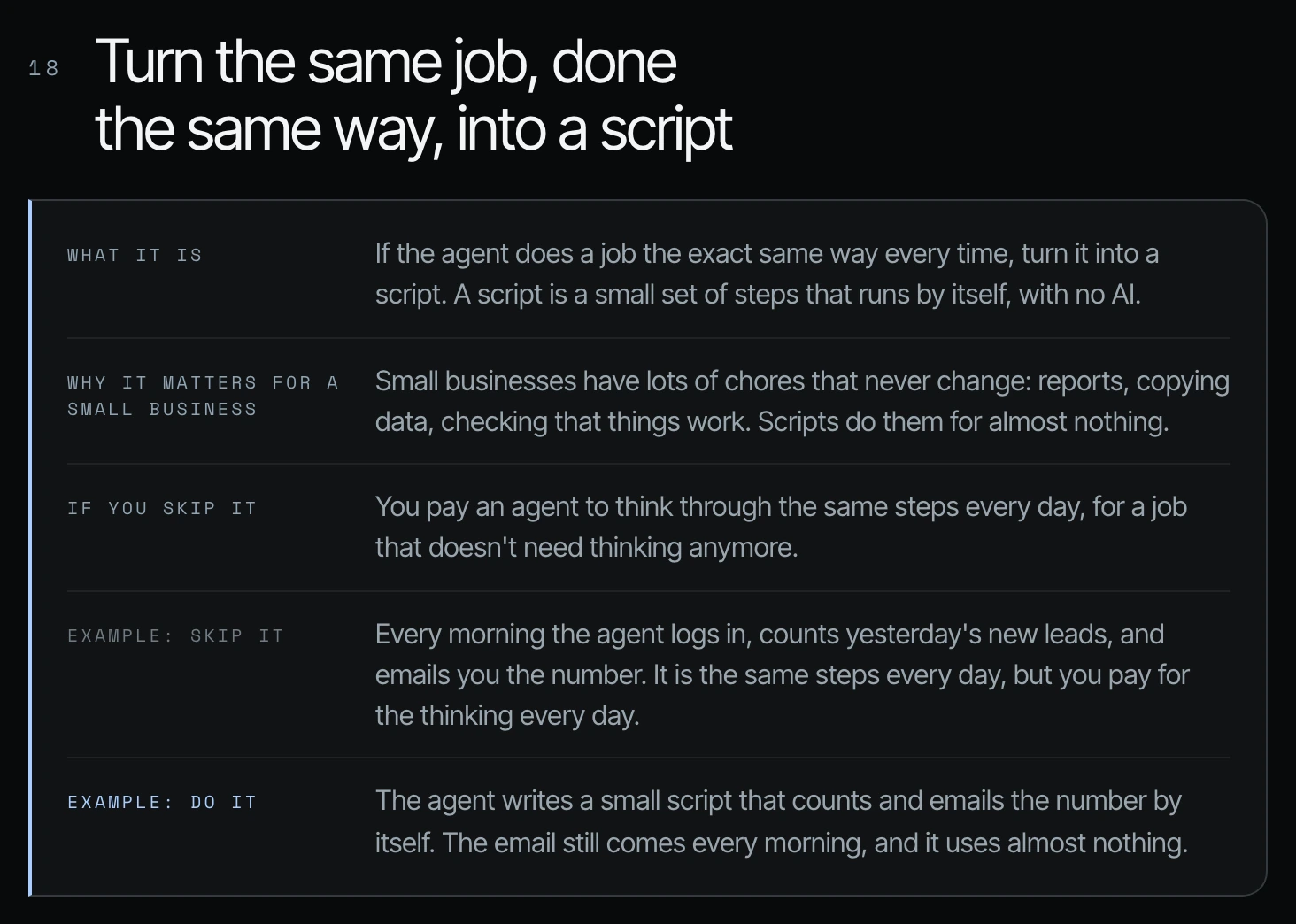
18. Turn repeat work into a script
If the agent does a job the exact same way every time, turn it into a script, a small set of steps that runs by itself. Every morning an agent logging in to count yesterday's new leads is paying for thinking on a job that doesn't need thinking anymore. A chat is for writing and reactive work, a script is for work done the same way every time, and an agent is for work that needs real thinking across your apps.
Read the full guide: turn repeat agent work into a script
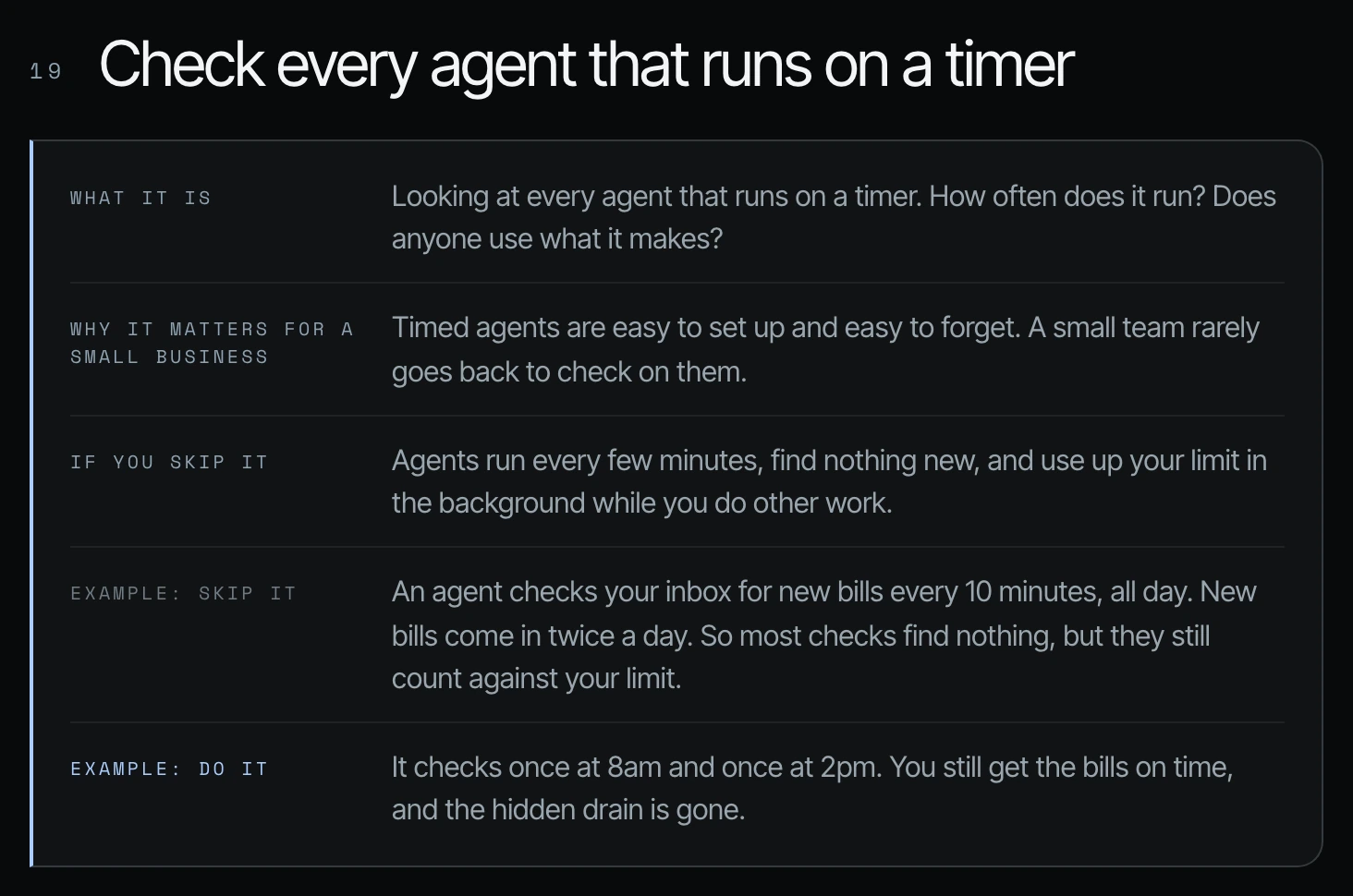
19. Audit your scheduled agents
I've seen automations set to run every five or ten minutes that are only needed once or three times a day. People set them once, forget them, and then they're taking up 10% of their token usage every week. Ask your agent to list every scheduled agent, how often it runs, how often a run found something new, and a recommended schedule, without changing anything until you approve.
Read the full guide: how to audit your scheduled AI agents
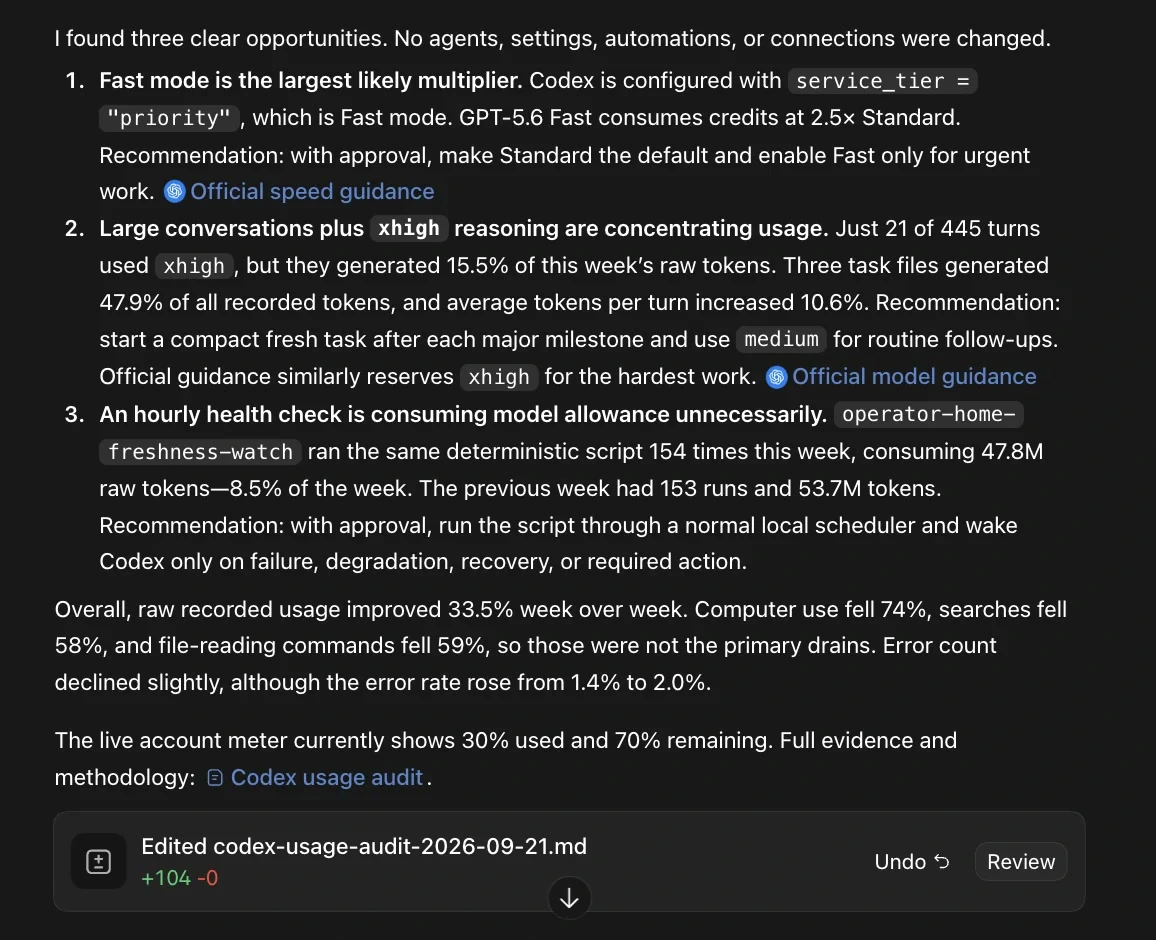
20. Build a weekly helper that finds waste and fixes your token usage
An agent looks at your usage every week, finds the biggest waste, and suggests a fix for you to say yes to. When I ran it on my own week, the biggest leak was regenerating a client's article thumbnails about 20 times because I didn't have a defined reference photo or an example from the start. It proposed three rule changes for my agents file and three habits for me to test.
Read the full guide: build a weekly token usage audit agent
Where to start if you only do three
You don't need all 20 tomorrow. Start with three.
- Diagnose one workflow that already hurts. Check your usage (way 1), then look at that one workflow, not the monthly total, and label it with one of the six leaks. If you can't label it, you're not ready to optimize it.
- Draft your agents.md or claude.md (way 7). Let the agent investigate your connected tools, then answer its questions about what it may touch, what needs approval, which system wins, and when to stop. Keep it short.
- Add the two-failure rule (way 15). Your agent stops itself and tells you why in plain English, even when you aren't watching.
Then audit your core software's connections (ways 2 and 3), clean up your files (way 8), and turn on the weekly helper (way 20), so the diagnosis happens every week without you.
Frequently asked questions
Why does Claude Code or Codex hit usage limits so fast for my business?
The most common reasons in the businesses I work with are agents clicking around software through the browser instead of a direct connection, one giant chat that gets reread on every message, large files pasted into the chat, and scheduled automations running far more often than needed. A weekly usage audit (way 20) shows which one is costing you the most.
Is it cheaper for a small business to upgrade its plan or fix its usage?
Fix the usage first. Upgrading buys you more room, but if agents are clicking through a browser, rereading files and carrying months of old chat, a bigger plan fills up the same way. Check your usage and resets (way 1), then run the weekly audit (way 20) to see which leak is costing the most before you decide on a plan.
Do I need a developer to reduce my Codex or Claude Code usage?
No for most of these 20 ways. Checking usage, starting new chats, keeping reasoning on medium, cleaning up files and writing an agents.md file are things an owner or an operations lead can do. Setting up API keys for core software (way 3) is where you want someone careful, because the keys need to be stored safely, scoped in advance and tested.
How do I use Codex tokens efficiently?
Start a new chat for each job, keep reasoning on medium, use a smaller model for routine work, and leave Fast mode off unless someone is waiting on the result. OpenAI's own documentation adds keeping prompts and AGENTS.md short and limiting the MCP servers you have turned on. In my own account, the biggest savings came from stopping agents from clicking through a browser when a direct connection existed, and from not regenerating work without a clear example.
How do I use my Codex credits?
On credit-based plans, credits are what you spend after you reach your included limits; OpenAI's pricing page describes them as the unit used to pay for eligible usage. Each model spends credits at a different rate, so the same job on GPT-6 Luna costs far less than on GPT-6 Astra. Before you spend credits, check your Usage page for free resets, because resets do not take credits and they expire.
How do I add more tokens to Codex?
According to OpenAI, ChatGPT Plus and Pro users who reach their usage limit can buy additional credits without upgrading their plan, and Business, Edu and Enterprise workspaces with flexible pricing can buy workspace credits. You add them from the Usage page in the Codex desktop app (your face at the lower left, then Usage, then Add more). Be careful with automatic reload, because it charges the card on file every time it tops up.
What happens when I hit my Codex usage limit in the middle of a task?
OpenAI says that if you reach your limit during an active turn, the agent can finish that turn, subject to fair use limits. After that, you wait for the limit to reset, use a free reset if you have one, or spend credits. This is why checking your usage before a big job matters more than checking it after.
What is a usage reset in Codex?
In my Codex account, a reset lets you continue using Codex for free after you hit your limit, without taking credits from the next month. Resets expire, so check for them before you buy more usage, and be careful with automatic reload because it can charge your card. There is also a reset toggle on the Usage page; read the wording under it in your own account, because it explains exactly when Codex will use a reset.
Should I use plugins or API keys for my agents?
Start with plugins if you need to, but plan to graduate to API keys for your core software. In the HubSpot example, the plugin can't delete or archive records and is limited to 10 records at once, while the API key can do both. API keys also keep you model independent, so you are not tied to the harness you signed into.
What reasoning level should I use in Codex and Claude Code?
Medium for most work. I run about 90% to 95% of my Claude Code work on Opus 5.5 at medium. Save high and maximum reasoning for complex multi-step jobs and strategic calls.
Do these tips apply to both Codex and Claude Code?
Yes. Every way in this guide works in both the Codex (ChatGPT Work) desktop app and the Claude Code desktop app. Where the click path differs, such as checking usage or compacting a chat, each full guide shows both.
More guides for business owners using agents
- How to check your usage in Claude Code
- Codex reasoning levels for business owners
- How to get your business ready for AI agents
Sources
Official / Primary Sources
- Shanee Moret, "20 Ways to Use Codex and Claude Code Without Burning Your Usage (Part 1)" (YouTube, October 2, 2026), ways 1 to 10, her usage figures and plan details
- Shanee Moret, "20 Ways to Optimize How You Use Codex and Claude Code Part 2" (YouTube, October 3, 2026), ways 11 to 20 and her weekly usage report
- OpenAI, ChatGPT plans and pricing, Pro tiers at $100, $200 and $500 a month, credit rates per model, buying more credits, and what happens at the limit (checked October 5, 2026)
- OpenAI, Codex speed and Fast mode, Fast mode uses included limits at 2.5x the Standard rate (checked October 5, 2026)
- Anthropic, What is the Max plan?, Max 5x at $100 and Max 20x at $200 (checked October 5, 2026)