
To audit your Codex automations and Claude Code scheduled tasks, list every agent running on a timer, how often it runs, and how often a run found something new, then slow down the ones that rarely find anything. I've seen forgotten schedules quietly take about 10% of a business's weekly usage. I help established business owners build agents inside their companies, many of which run on a schedule. You will probably find at least one you can run less often, and that decreases your usage.
In short: - Shanee has seen automations set to run every 5 or 10 minutes that were needed once or three times a day, taking about 10% of the owner's token usage (the share of the plan's AI allowance used) every week. - Run the schedule audit prompt to list each one with how often it runs and how often a run found something new in the last 30 days. - Match each timer to how fast the business problem changes: late bills each morning, file tidying once a day, the customer list once a week.
Part of the series: How to Reduce Codex and Claude Code Token Usage: 20 Ways. This is way 19. Previous: Turn repeat agent work into a script · Next: Build a weekly token usage audit agent
1. Audit your Codex automations and scheduled agents
A scheduled agent is any agent, automation or task you set to run on a timer, like every morning or every ten minutes, without you starting it. In Codex, OpenAI's docs describe recurring tasks that run in the background and are reviewed in the app's Scheduled section (OpenAI docs). Claude Code can schedule work in the cloud, in its desktop app, or with /loop inside an open session (Anthropic docs).
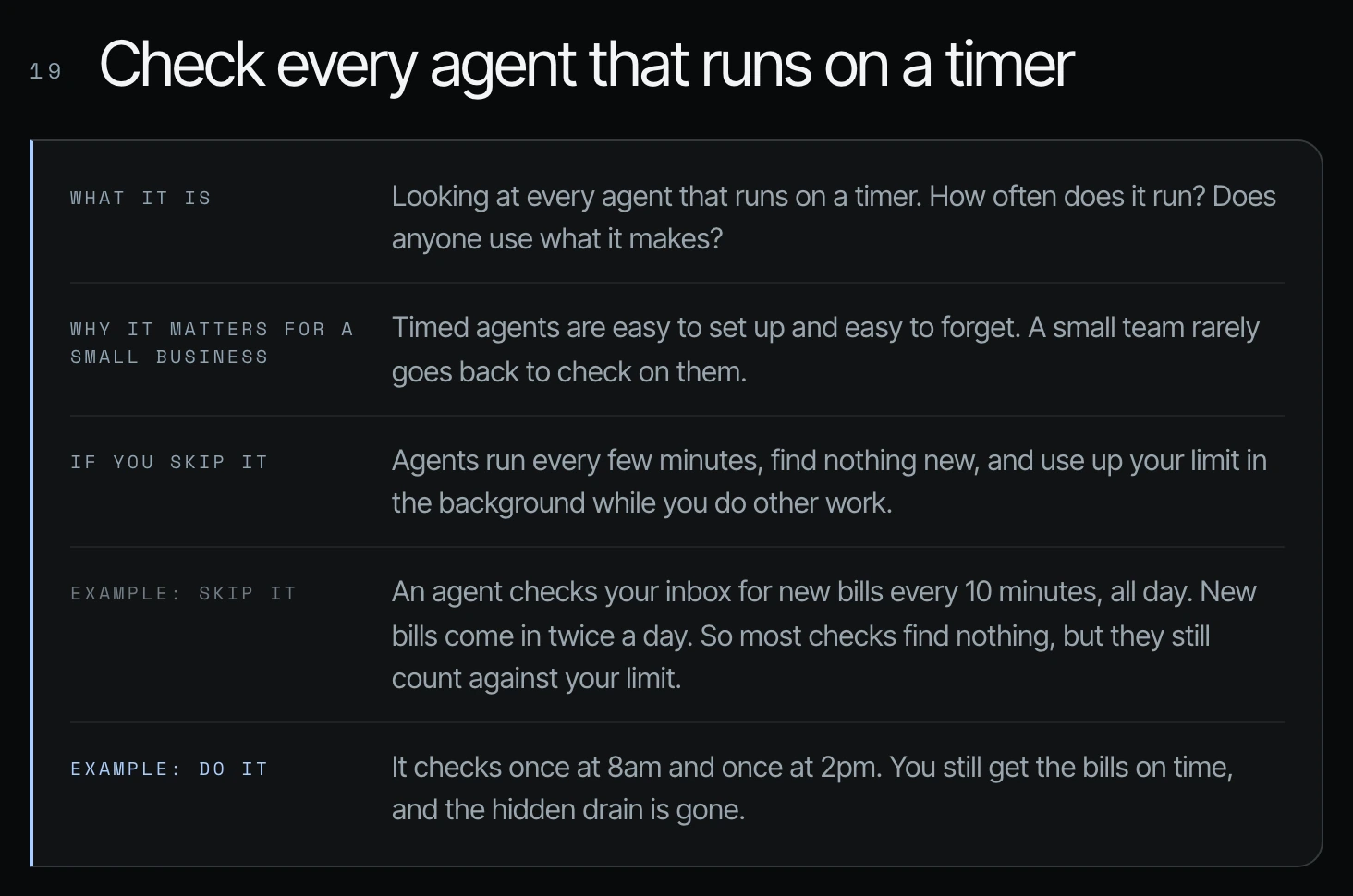
I've seen people that have automations that are on every five minutes or 10 minutes that they really need for only maybe once a day or three times a day. They'll set it once, they'll forget it, and then the next thing that they know, it's taking up 10% of their token usage every single week.
Why scheduled tasks drain your usage in the background
The example on Shanee's slide: an agent checks your inbox for new bills every 10 minutes, all day. New bills come in twice a day, so most checks find nothing, but they still count against your limit. If it checks once at 8am and once at 2pm, you still get the bills on time and the hidden drain is gone.
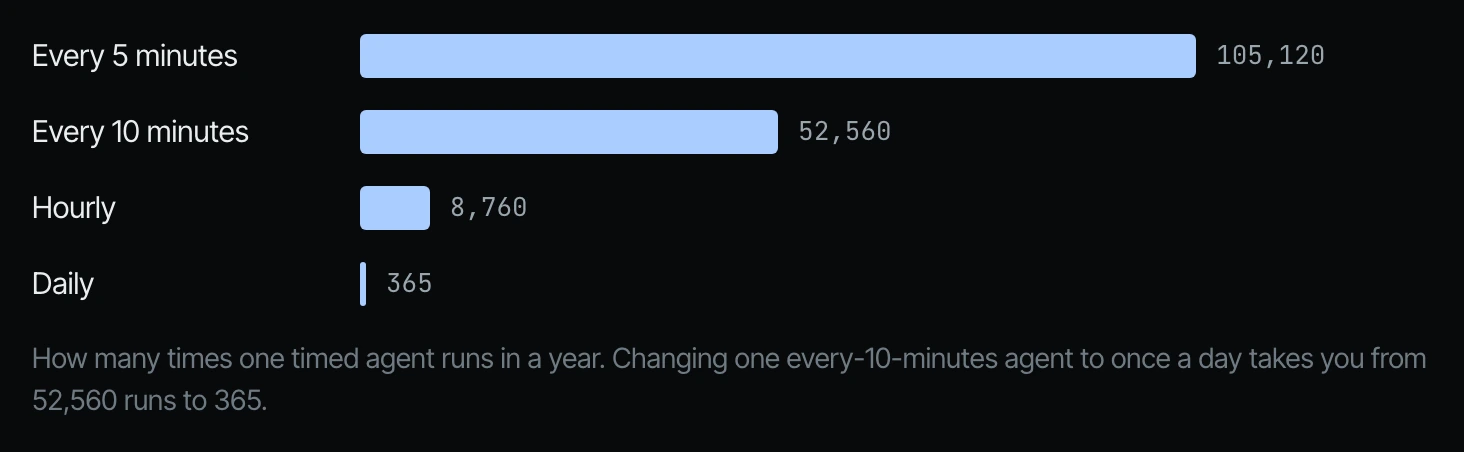
An agent can run every five or ten minutes. That doesn't mean it should. If it checks 144 times a day and finds nothing new 143 times, that is a lot of wasted checks.
| How often one timed agent runs | Runs in a year |
|---|---|
| Every 5 minutes | 105,120 |
| Every 10 minutes | 52,560 |
| Hourly | 8,760 |
| Daily | 365 |
2. Run the schedule audit prompt
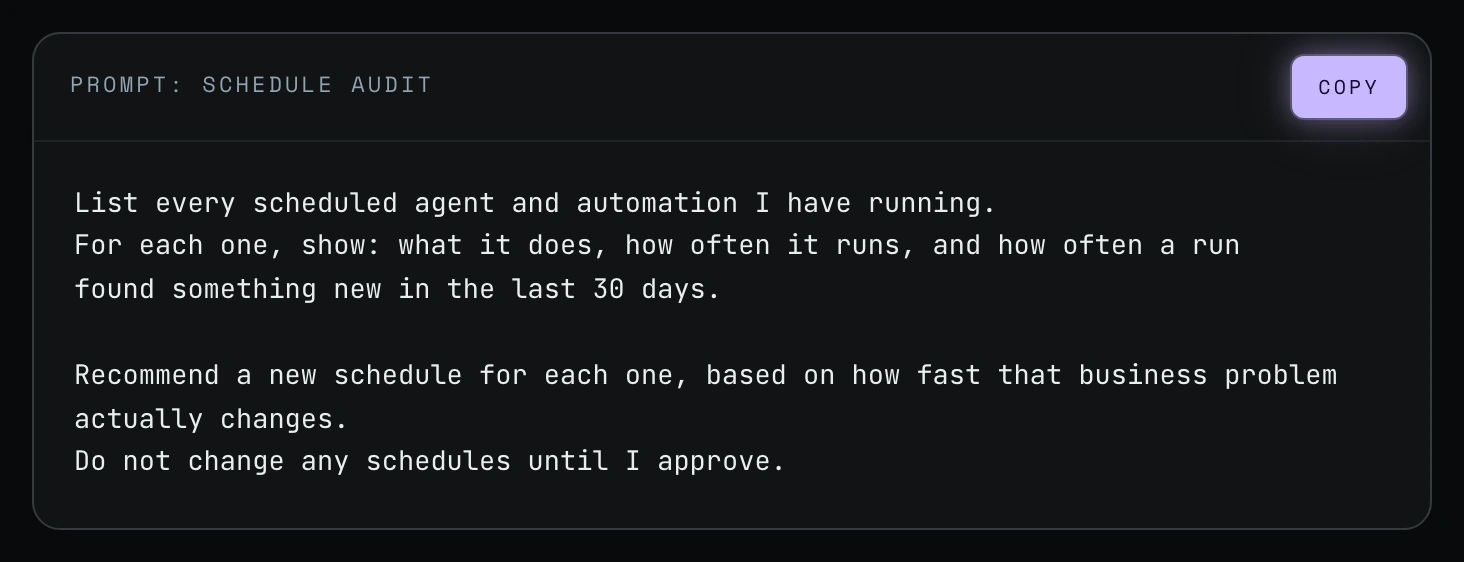
You need to do an audit of your scheduled agents. You need to see which ones are on a schedule and which ones need to be on a schedule. Shanee put the prompt on screen with a copy button. Here it is to copy:
List every scheduled agent and automation I have running.
For each one, show: what it does, how often it runs, and how often a run
found something new in the last 30 days.

Recommend a new schedule for each one, based on how fast that business problem actually changes.
Do not change any schedules until I approve.
How to audit scheduled tasks in Codex or Claude Code
Step 1. Open a new chat (see way 12) and paste the prompt.
Step 2. Read the list. For each agent, look at two numbers side by side: how often it runs, and how often a run found something new in the last 30 days.
Step 3. For each recommendation, ask: what would really happen if the agent waited another hour, day, or week?
Step 4. Approve the new schedules you agree with. The prompt tells the agent not to change any schedule until you approve.
3. How often should a scheduled agent run? Match it to how fast the business problem changes
The prompt asks for a new schedule based on how fast that business problem actually changes. Shanee's field guide gives a few starting points:
| Agent | A schedule that usually fits |
|---|---|
| Chases late bills | Each morning |
| Tidies files | Once a day |
| Checks your customer list | Once a week |
| Checks app passwords (Shanee's own build) | Every 6 hours, not every 10 minutes. Passwords don't run out that fast, and four checks a day is plenty |
And if a timed job does the same thing every time, it may not need to be an agent at all. Turn it into a script (way 18). In Shanee's own weekly report, an hourly health check ran the same script 154 times in one week and used 8.5% of her week (way 20).
Frequently asked questions
Can Codex run scheduled tasks?
Yes. OpenAI's Codex documentation describes scheduled tasks that run recurring work in the background, and you review active, paused and completed tasks and recent runs in the Scheduled section of the app (OpenAI docs). Checks that find nothing still count against your limit, so audit the schedule.
Can Claude Code run scheduled tasks?
Yes. Anthropic's Claude Code docs list three options: cloud routines, desktop scheduled tasks that run on your machine, and /loop for repeating a prompt inside an open session, where recurring tasks expire after seven days (Anthropic docs).
How much usage can a forgotten schedule cost a small business?
About 10% of weekly token usage, in the cases Shanee has seen. Those were automations set to run every five or ten minutes that were only needed once a day or three times a day (22:35).
Will the audit change my schedules automatically?
No. The last line of the prompt is "Do not change any schedules until I approve." Codex or Claude Code only lists and recommends.
How often should I repeat the audit?
Run it once now. After that, the weekly helper in way 20 flags scheduled runs that found nothing as part of its regular report.
Related ways in this series
- Way 18: Turn repeat agent work into a script, for timed jobs that do the same thing every time.
- Way 20: Build a weekly token usage audit agent, which keeps checking your schedules every week.
- Way 1: Check your Codex and Claude Code usage and resets, to see your usage before and after you slow a schedule down.
- ChatGPT scheduled tasks are now free, for owners setting up timed tasks in ChatGPT itself.
- Back to the hub: How to Reduce Codex and Claude Code Token Usage: 20 Ways
Sources
Official / Primary Sources
- Shanee Moret, "20 Ways to Optimize How You Use Codex and Claude Code Part 2" (YouTube, 2026-10-03) , the scheduled-agent audit, the 10% weekly usage example, and the schedule audit prompt.
- Shanee Moret, "20 Ways to Optimize Your Token Usage in Codex and Claude Code" field guide (GrowthAcademy.Global, 2026) , the new-bills example, the runs-per-year figures, the schedule examples and the app-password check.
- OpenAI, "Scheduled tasks" (Codex documentation) , background recurring tasks and the Scheduled section. Checked 2026-10-05.
- Anthropic, "Run prompts on a schedule" (Claude Code documentation) , the three ways to schedule work and the seven-day expiry. Checked 2026-10-05.