
In Claude Code, use /compact when a chat gets long in the middle of a job, and /clear to start fresh when a new job begins (in Codex, /new or /clear). Every message in a long chat makes the agent reread the old ones, so each answer costs your business more of its plan.
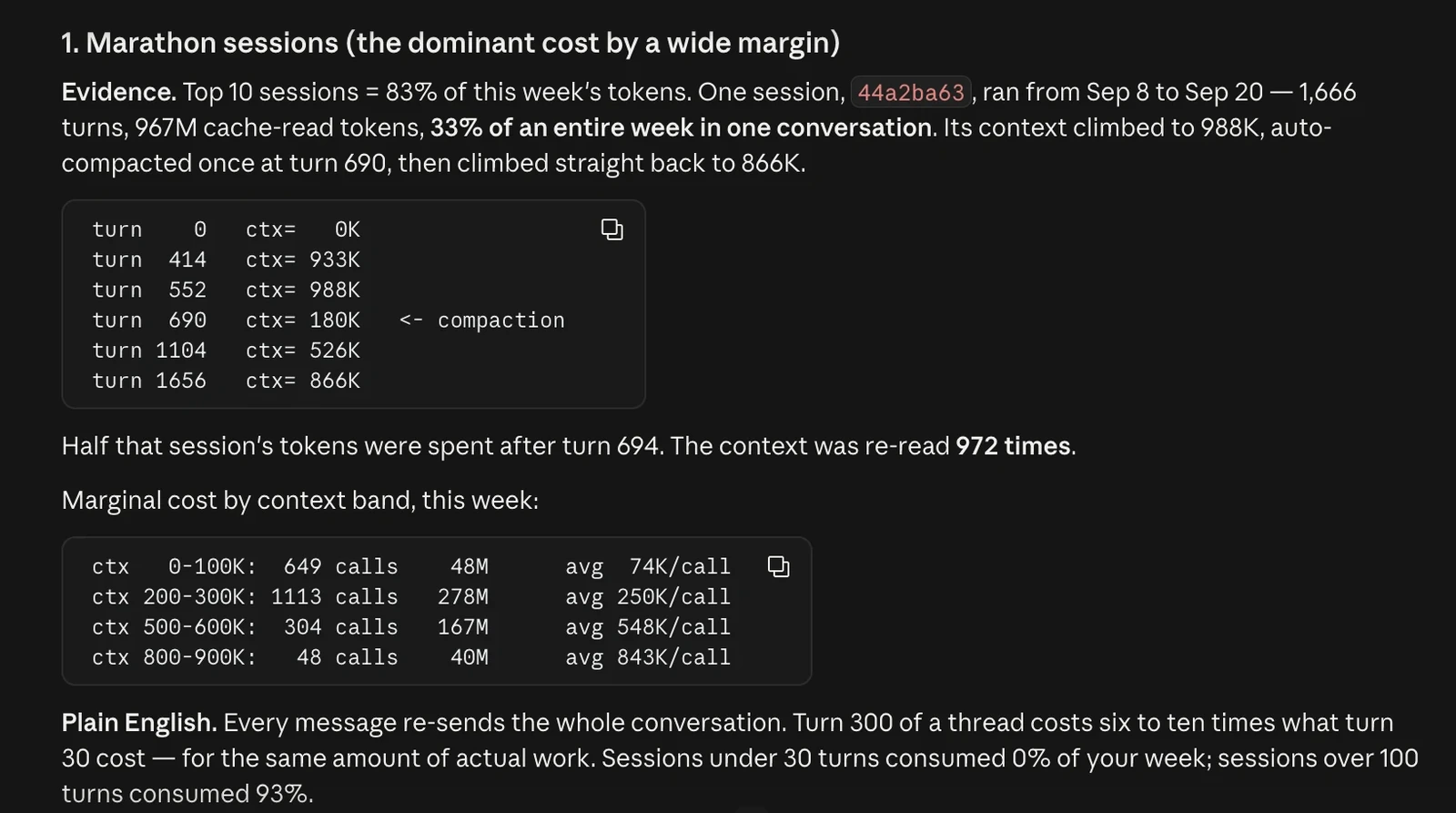
I have been creating AI tutorials for business owners since January 2023, and I run Claude Code on a Max 20x plan. When I ran a usage check on my own account, one chat had run from September 8 to September 20 with 1,666 back-and-forth messages, and that one chat used 33% of my whole week. Start a new chat for each new job. (Video, 03:37)
In short: - Every message in a long chat makes the agent reread the old ones, so each answer costs more of your plan. - Type /clear in Claude Code, or /new or /clear in Codex, when you start a new job. - Type /compact mid-job when the chat gets long (about 30% full in the video's example), before the context circle turns orange or red. - Before you leave a chat, save decisions and lessons in a file, because a compact summary leaves things out.
Part of the series: How to Reduce Codex and Claude Code Token Usage: 20 Ways. This is way 12. Previous: Make your business data agent friendly · Next: Edit in HTML, convert to PDF last
1. When to start a new chat in Claude Code or Codex: one chat per job
I see a lot of people that are in chats that have 25 million or a billion tokens (the units your plan measures usage in). They're at the end, and what you're doing is just using up your usage. With how good the models are, especially if you have the right infrastructure on the back end, you don't need to stay in the same chat for the same thing. Your agent should know what's going on even if you start a new chat about something you referenced 10 chats ago. (03:37)
Many owners keep one chat per client for months, and it makes you feel good, but it's actually making your agent use up your usage, and it's inefficient. Every time you send a message, the agent rereads months of old messages. Each answer will cost more. (04:09)
Old ideas sneak into new work
You're now thinking forward and improving your operations to have an agentic infrastructure across the board. Old ideas, and old rules you've already replaced, will sneak into the new work, which is something you really can't afford. (04:41)
Let's say you've used one chat for marketing since spring. Today you ask for one email subject line. The agent first rereads six months of old stuff, so it slows everything down. Now you open a new chat for this week's email. The agent reads only what matters today, so the answer is faster and a lot better. (05:11)
What a marathon chat cost in my own account
My weekly usage audit (way 20 in this series) flagged marathon sessions as my biggest cost by a wide margin. That one chat got squeezed down once by an automatic compact, then grew right back. Chats with more than 100 messages used 93% of my week, and chats with fewer than 30 messages used almost nothing. In a long chat, message 300 cost six to ten times more than message 30, for the same amount of work.
2. /compact vs /clear vs /new: the commands in Codex and Claude Code
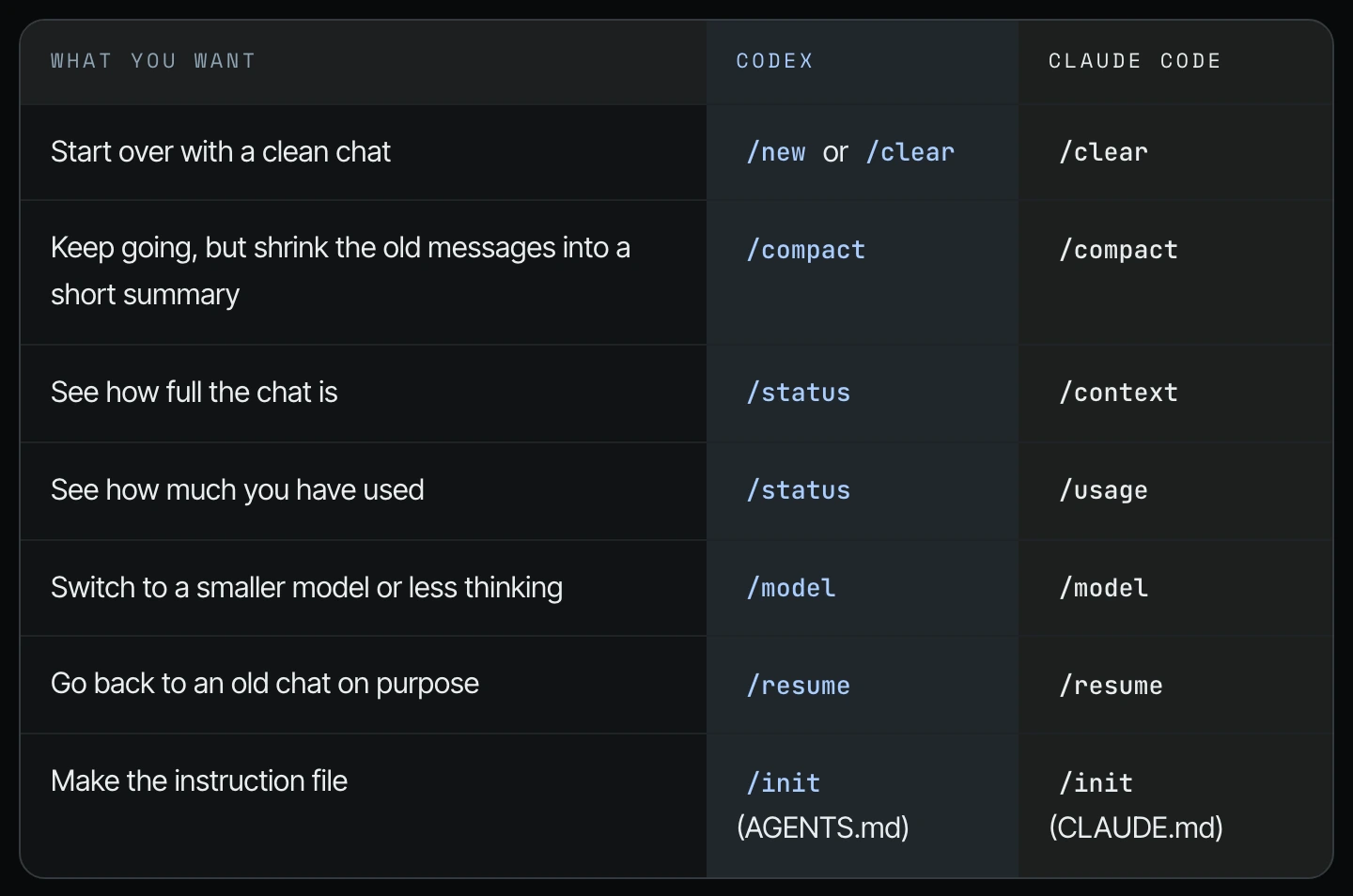
The commands are pretty much the same in Codex and Claude Code. Type them into the chat box. Here is the table from the guide I showed on screen:
| What you want | Codex | Claude Code |
|---|---|---|
| Start over with a clean chat | /new or /clear | /clear |
| Keep going, but shrink the old messages into a short summary | /compact | /compact |
| See how full the chat is | /status | /context |
| See how much you have used | /status | /usage |
| Switch to a smaller model or less thinking | /model | /model |
| Go back to an old chat on purpose | /resume | /resume |
| Make the instruction file | /init (AGENTS.md) | /init (CLAUDE.md) |
3. How to tell when the Claude Code context window is getting full
Whenever you're in a Claude Code chat (it's a little bit different in Codex, but the commands are pretty much the same), you'll see a circle at the bottom of the chat. (06:44)
Step 1. Look at the small circle at the bottom right of the chat box, next to the model name.
Step 2. Hover over or click the circle to open the context window panel.
Step 3. Read the context window line (the context window is how much of the chat the agent can hold at once). Right now my context window out of a million is 30%. I'm reaching 299,000 tokens here. This is where I would probably do /compact. (07:14)
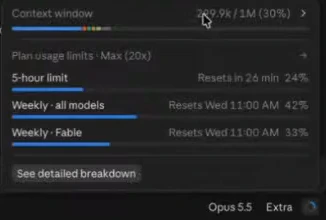
What you don't want is for it to reach the orange and the red, or for you to be in the middle of something and it just stops and compacts for a few minutes. (07:44)
4. How to compact a long chat with /compact
If you're in a chat that's getting very long, you've probably seen it stop and compact for a long time. In my experience it usually does this at around a million tokens. If you see a chat reaching that stage, you can enter /compact. (05:41)
Step 1. In the chat box, type a forward slash and start typing "com". The command menu filters as you type.

Step 2. Choose compact (or finish typing /compact) and press Enter.
Step 3. Wait for "Compacting session" to finish. It will compact the session so that my next command doesn't have to bring those 300,000 tokens into reading the next answer. It keeps what's most relevant. (07:14)
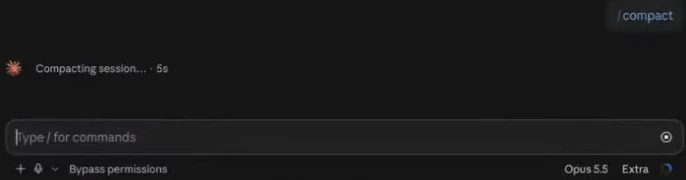
A compact makes a summary, and summaries leave things out. If you need something next week, save it in a file before you move on.
5. How to fork a conversation in Claude Code
The other thing I could do is fork, and just start a new chat. (07:44)
Step 1. Hover over a message in the chat to show its small action icons.
Step 2. Click the fork arrow. The tooltip reads "Fork from here: Starts a new session from this point. This one stays as it is."

Step 3. Continue the new job in the forked session. The original chat stays as it is.
6. How to start fresh in Codex with /new or /clear
To do this in Codex, you either do /new or /clear, or you get into the habit of compacting. You can do the same thing inside of ChatGPT. (05:11) The video does not show the Codex screen for this step, so use the command table above.
Step 1. Before you leave the old chat, have the agent write a short note of what matters into a file, like a project note or your AGENTS.md. Keep the lesson. You don't need to keep the whole chat.
Step 2. Type /new or /clear in the Codex chat box, or click New chat.
Step 3. In the new chat, point the agent to that note and start the next job.
Step 4. If you're in the middle of a job and the chat gets long, type /compact instead and keep going.
This is probably one of the biggest things draining your token usage if you're not staying aware of it. You want to start a new chat, or you want to compact. (07:44)
Frequently asked questions
What is the difference between /compact and /clear in Claude Code?
/compact keeps the same Claude Code chat going but shrinks the old messages into a short summary, and /clear starts over with a clean chat. Use /compact mid-job when the chat is getting long, and /clear when the job is done and the important parts are saved in a file.
When should I start a new chat in Claude Code or Codex?
Start a new chat in Claude Code or Codex for each new job. In Shanee's marketing example, a chat used since spring makes the agent reread six months of old stuff to write one subject line.
Why does a long chat use more of my Codex or Claude Code usage?
Every time you send a message, Codex or Claude Code rereads the old messages in that chat. In Shanee's own audit, message 300 cost six to ten times more than message 30, for the same amount of work.
What happens when the Claude Code context window is full?
Claude Code stops and compacts on its own, which can take a few minutes mid-job; in Shanee's experience this happens at around a million tokens. Type /compact yourself before the circle turns orange or red. In Codex, her command table lists /status to check and /compact to shrink.
How do I fork a conversation in Claude Code?
Hover over a message in Claude Code and click the fork arrow, "Fork from here." It starts a new session from that point, and the original chat stays as it is.
What does one never-ending chat cost a small business?
In Shanee's own Claude Code account, one chat with 1,666 messages used 33% of her whole week, and chats with more than 100 messages used 93% of it.
Related ways in this series
- Check your Codex and Claude Code usage and resets: see where your week is going.
- Point the agent to a file instead of uploading it: uploads ride along in every message.
- Write a good agents.md or claude.md: where carry-forward notes and rules live.
- Build a weekly token usage audit agent: the report that found Shanee's marathon chat.
- Back to the hub: How to Reduce Codex and Claude Code Token Usage: 20 Ways
Sources
Official / Primary Sources
- Shanee Moret, "20 Ways to Optimize How You Use Codex and Claude Code Part 2" (YouTube, 2026-10-03), supports the new-chat-per-job advice, the marketing chat example, the Claude Code context circle at 30% of 1M, /compact, fork, and /new or /clear in Codex (03:37 to 08:15).
- Shanee Moret's companion field guide shown on screen in the video, supports the command table and the marathon-session usage audit (1,666 messages, 33% of a week).