MCP vs API for agents comes down to reach: a plugin or an MCP (a standard way for a software company to hand an agent a set of actions) gives your agent only the actions built into it, while an API key lets the agent work with the software directly, with permissions you set. For a business building agents for the long term, plan on API keys.
I help established business owners build agents inside their companies, and I have clients running HubSpot and BigTime side by side where the API key has been extremely beneficial. If you want to build an agentic infrastructure for your business long term, I would start with the hardest thing first. Plugins are easy, but eventually you will have projects that need the API key. The API lets your agent delete, batch, sync and connect systems. It is also the only way to become truly model independent.
In short: - Plugins are stage one: easy to sign into, but limited to the actions built into them. - In Shanee's HubSpot comparison, only the private app token can delete records, handle more than 10 records at once, or export and sync large data sets. - Decide each key's scopes (permissions) in advance and store keys in a credential manager, never in a chat or doc. - Shanee says API keys are the only way to become truly model independent.
Part of the series: How to Reduce Codex and Claude Code Token Usage: 20 Ways. This is way 3. Previous: Stop forcing agents to click around software · Next: Keep reasoning on medium for most work
3. Graduate to API keys if you want an agentic infrastructure for the long term
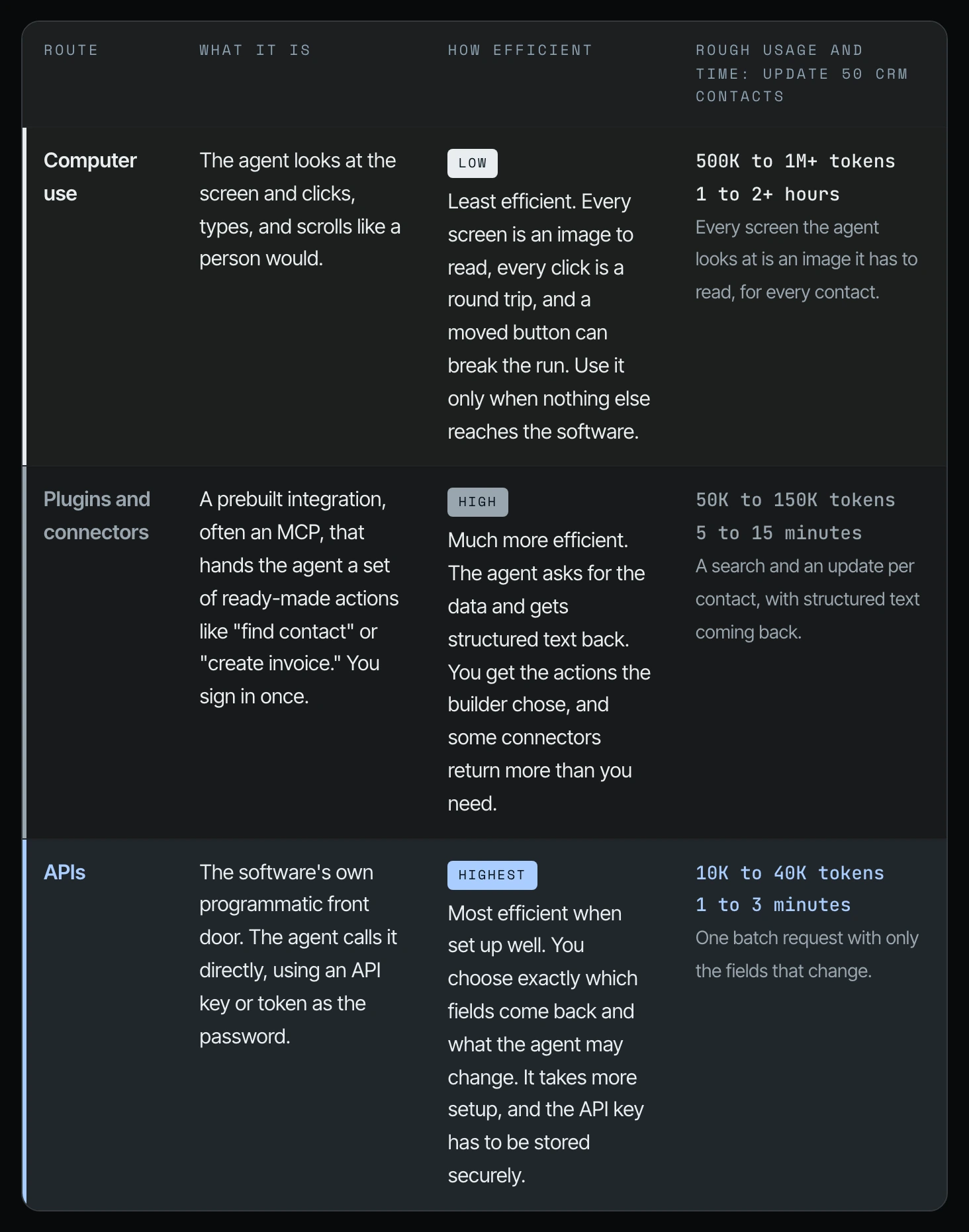
In plain terms, a plugin is the button you click to sign your agent into a piece of software. An API key (in HubSpot, a "private app token") is a password you create inside the software that lets your agent talk to it directly, with exactly the permissions you choose. Those permissions are called scopes.
This is the third way to optimize how you use your agents and, through that, your token usage. Yes, the plugins are easy, but eventually you will have projects and needs that require the API key. The last thing that you want is to be in the middle of one of those big projects and have your agent say, "I can't help you with that because of the limitations of this plugin" (12:03).
Why does an API key matter for a small business?
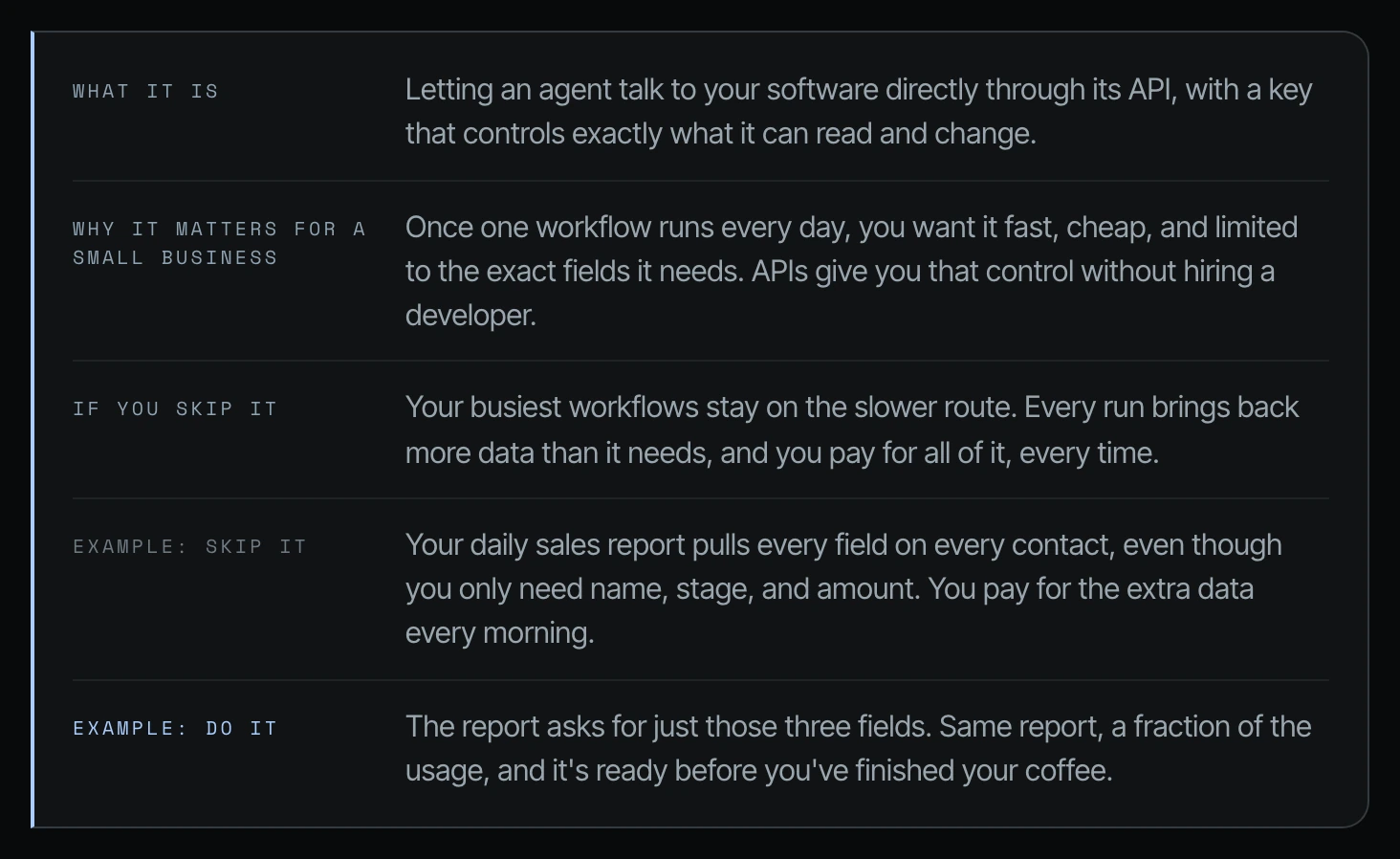
Once one workflow runs every day, you want it fast, cheap, and limited to the exact fields it needs. APIs give you that control. If you skip it, your busiest workflows stay on the slower route, or your agent tries to call capabilities of a plugin that aren't there (12:36).
| Skip it | Do it | |
|---|---|---|
| Daily sales report | Pulls every field on every contact, even though you only need name, stage and amount. You pay for the extra data every morning. | Asks for just those three fields. Same report, a fraction of the usage. |
Example from Shanee's field guide.
Plugin vs API: the HubSpot plugin vs a HubSpot private app token
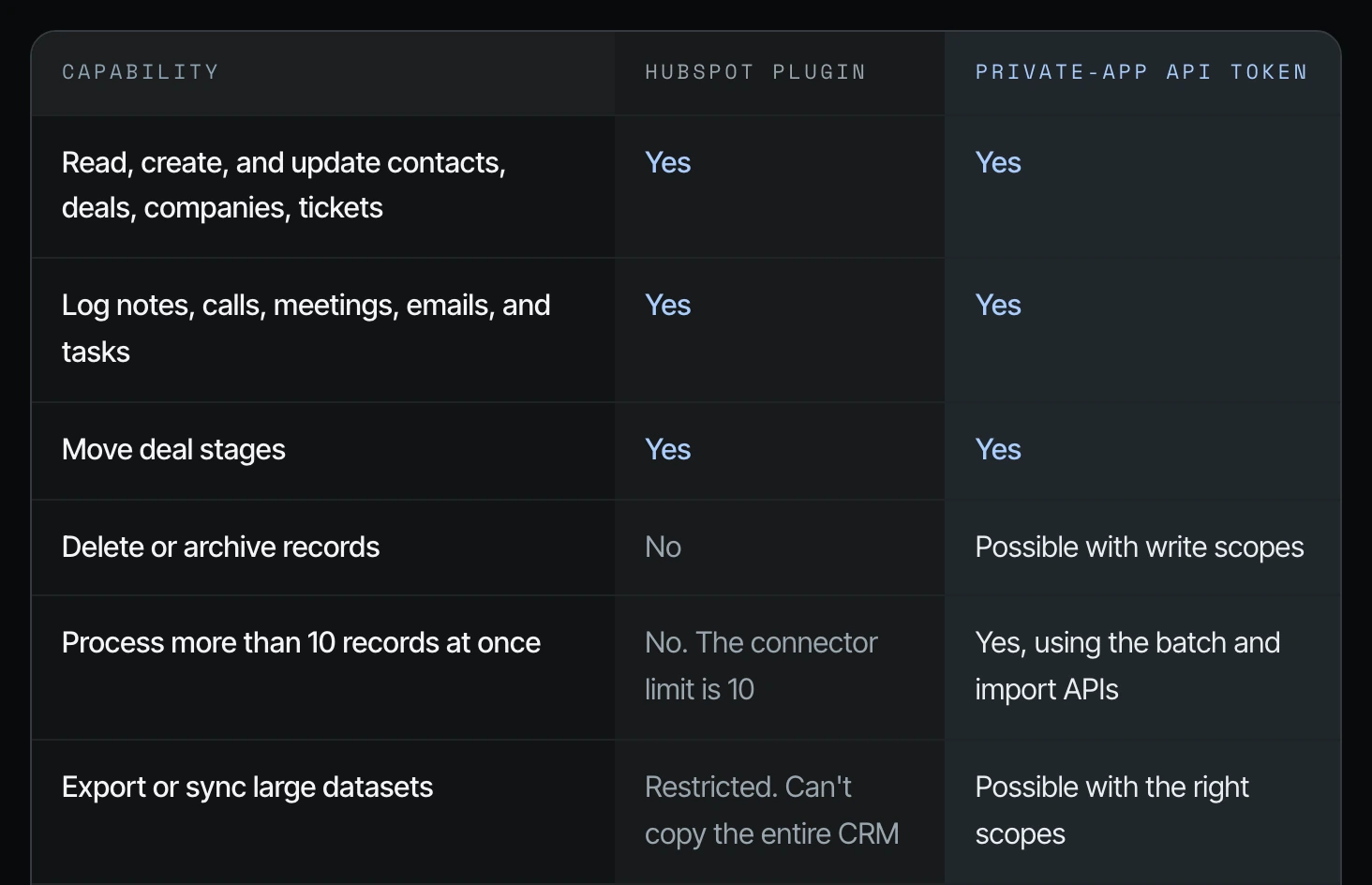
See also what a plugin is for AI agents. Here's a great example: the HubSpot plugin versus the private app API key token (12:36).
| Capability | HubSpot plugin | Private-app API token |
|---|---|---|
| Read, create, and update contacts, deals, companies, tickets | Yes | Yes |
| Log notes, calls, meetings, emails, and tasks | Yes | Yes |
| Move deal stages | Yes | Yes |
| Delete or archive records | No | Possible with write scopes |
| Process more than 10 records at once | No. The connector limit is 10 | Yes, using the batch and import APIs |
| Export or sync large datasets | Restricted. Can't copy the entire CRM | Possible with the right scopes |
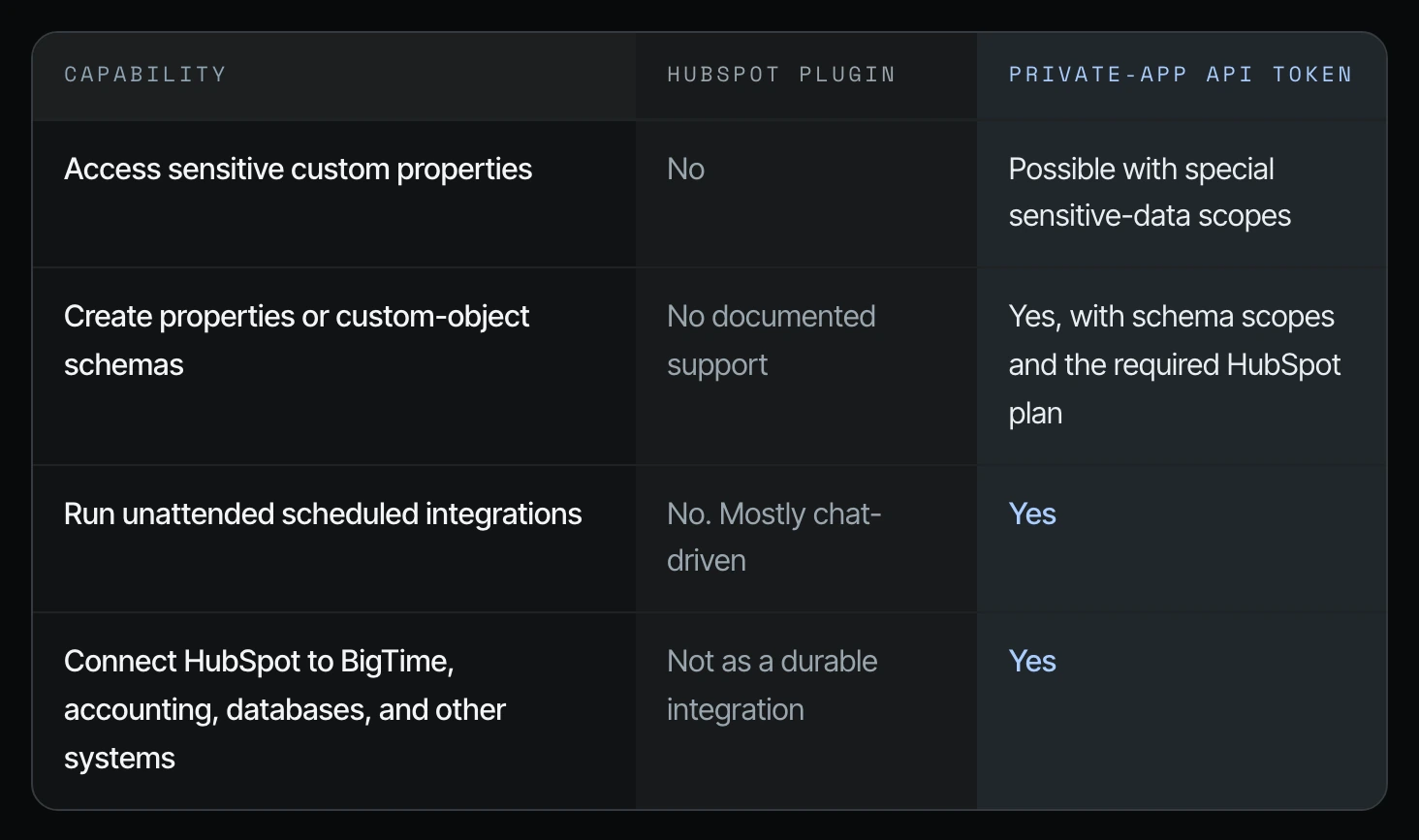
| Access sensitive custom properties | No | Possible with special sensitive-data scopes |
| Create properties or custom-object schemas | No documented support | Yes, with schema scopes and the required HubSpot plan |
| Run unattended scheduled integrations | No. Mostly chat-driven | Yes |
| Connect HubSpot to BigTime, accounting, databases, and other systems | Not as a durable integration | Yes |
Table as Shanee shows it on screen at 13:07. These are her findings, not HubSpot's published documentation; check your own HubSpot plan and scopes.
What each "no" means for your business
Delete or archive. If your agent ever needs to archive or delete things, it will need the API key, because the plugin can't do it (13:07).
More than 10 records at once. The connector limit is 10. If you've been in business for 10 or 20 plus years and you want to do a baseline analysis and audit of everything in your HubSpot, or move things in and out to start organizing it, it's going to take a lot longer with the plugin, because it's limited in how many records it can process at once (13:37).
Export or sync large data sets. This is huge. Let's say a key employee has a data set on their computer that was never uploaded to HubSpot, and you need to sync it. Or you need to export the last 20 years of clients to do some analysis. It's going to be extremely restricted with the plugin versus the API key (14:09).
Connect HubSpot to BigTime, accounting and other systems. I do have clients that have both HubSpot and BigTime, and the API key has been extremely beneficial for them (14:40).
In her field guide, Shanee lists where the API is most valuable:
- HubSpot-to-BigTime synchronization
- Large imports, cleanup, and deduplication
- Scheduled CRM maintenance
- Custom validation before writing
- Cross-system automations
- Full retry and audit logic
- Custom properties, associations, and object schemas
- Controlled exports and backups
How to store API keys and set private app scopes safely
The thing with keys is that they need to be stored safely in a credential manager. That needs to be done very carefully. The scopes need to be decided in advance, and there needs to be testing to make sure the agents are calling the right keys. Keep track of what they're doing, so that if something goes wrong, you can tell whose agent it was just by which key was used. Through other documentation and logging, you know exactly the context in which the agent made that decision (14:40).
| Where keys live | How the agent uses one | Keep access tight |
|---|---|---|
| A password manager or secrets vault, or your computer's keychain | The key is handed to one command at a time | One key per workflow, so you can shut one off without breaking the rest |
| Never in a doc, spreadsheet, email, chat, or agents.md | It stays out of the conversation, so it never shows up in chat history | Read-only or limited permissions wherever the software allows it |
| agents.md says where the key lives, never the key itself | Replace a key right away if it ever lands in a chat or file |
Key storage checklist from Shanee's field guide.
Add these rules to my AGENTS.md:

- API keys live in [my password manager / my computer's keychain].
  Never ask me to paste a key into the chat.
- When a task needs a key, load it for that one command only.
  Never print it, log it, or save it to a file.
- AGENTS.md may say where each key lives and what it's for.
  It never contains the key itself.
- If a key ever shows up in a chat, file, or log, stop and tell me
  so I can replace it.

Then list every API key our workflows use, where it should live,
and what it's allowed to do. Don't create or move any keys until I approve.
Prompt from Shanee's field guide.
API keys are how you become model independent
HubSpot is just one example. The same thing goes for every one of the core software tools that you have. It is extremely easy to just log in and click the plugin. That's stage one of using these things (15:10).
The long-term piece is that you want the API keys. If I log in to ChatGPT Work or Codex with a plugin, what if I need to switch to Claude? What if we need to become model independent and have an infrastructure like OpenClaw, where different agents run on different models? The only way to become truly model independent is through the API keys. If not, you're tied to the model that you're in, the harness that you're in (the app the agent runs in, like Codex or Claude Code), and the plugins you signed into within that harness (15:41).
If switching models is part of your plan, see how to switch between AI models and keep a backup plan.
Two examples from Shanee's field guide
- Her own websites. Cloudflare, where her websites live, has a plugin, but in her setup it can't publish a website update or clear the site's cache, which is most of what she needs. So her agents use a Cloudflare API key, kept in a key ring and handed to one command at a time.
- A client loading 4,094 contacts into Notion. Per her field guide, the Notion connector handled 100 records at a time and repeated every record back into the chat. The full load was estimated at around a million tokens and stalled at 103 contacts. A small script calling Notion's API directly can load the rest in about 25 minutes, with nothing coming back into the chat.
One more thing: turn off connectors you aren't using
Her field guide adds a related habit. Each connector you switch on can add its descriptions to what the agent carries at the start of a session, whether or not the task uses it. Turn on only what the work in front of you needs.
List every connector, plugin, and MCP server I have turned on.
For each one, tell me whether the work I actually do uses it.
Recommend which ones to turn off and which to keep on.
Don't change anything until I approve.
Frequently asked questions
What is the difference between MCP and API for agents?
An MCP gives an agent only the set of actions built into it, while an API key lets the agent work with the software directly under the permissions you set. In Shanee's GoHighLevel example, the MCP can't create or edit funnels. For long-term agent work in Codex or Claude Code, she recommends API keys.
What is the difference between a plugin and an API?
A plugin is a ready-made connection you sign into inside Codex or Claude Code, and an API key is a credential you create in the software itself, with the scopes you choose. In Shanee's HubSpot comparison, the plugin handles everyday record work, while the API token can also delete, batch, export and connect to other systems.
What is a HubSpot private app token, and which scopes does it need?
A HubSpot private app token is HubSpot's version of an API key, and its scopes are the permissions you grant it. In Shanee's comparison, deleting records needs write scopes, sensitive properties need sensitive-data scopes, and custom objects need schema scopes. Decide scopes in advance and keep them narrow.
Should a small business start with plugins or API keys?
Shanee recommends starting with the hardest thing first if you're building agents for the long term. If a workflow will run every day, touch large amounts of data or connect two systems like HubSpot and BigTime, set it up on an API key from the start.
Is it safe to give an AI agent an API key?
Giving an agent an API key is safe only when the key is stored in a credential manager, given the narrowest scopes it needs, tested, and logged so you can trace which agent used which key. Never paste a key into a Codex or Claude Code chat.
Related ways in this series
- Stop forcing agents to click around software: audit which of your tools have a plugin, an MCP or an API.
- Write a good agents.md or claude.md: where your key rules and permissions belong.
- Turn repeat agent work into a script: scripts that call APIs directly use no chat tokens at all.
- The full guide: How to Reduce Codex and Claude Code Token Usage, 20 Ways
Sources
Official / Primary Sources
- Shanee Moret, "20 Ways to Use Codex and Claude Code Without Burning Your Usage (Part 1)" (YouTube, 2026-10-02) , the HubSpot plugin vs API token comparison, the BigTime client example, key handling and model independence.
- Shanee Moret, "20 Ways to Optimize Your Token Usage in Codex and Claude Code" (GrowthAcademy.Global field guide, 2026) , the skip-it/do-it example, the "most valuable for" list, the key storage checklist and prompts, the Cloudflare and Notion examples, and the connector check.