To create a skill in Claude Code or Codex, take a proposal, deck or checklist your business already approved and tell the agent to save it as a locked master, write a skill (saved instructions an agent loads only when the job calls for it) and a checklist, then prove it with a sample, so you stop paying to re-teach it. I have been creating AI tutorials for business owners since January 2023, and I help established business owners build agents inside their companies. I see a lot of people completely ignore this one, and they don't create standards. When an agent creates something great, make that the standard. The agent saves it as a template, a skill, or a checklist, so the next agent starts from it instead of starting over. And the leverage you have as an established business owner is that you probably already have that standard. (Video, 27:20)
In short: - When an agent produces something you approve, have it save a locked master, a skill that explains when to use it, and a checklist. - If you already have a proposal or deck that works, hand it to the agent and have it write down why it works. - Start with outputs you make more than once a month.
Part of the series: How to Reduce Codex and Claude Code Token Usage: 20 Ways. This is way 9. Previous: Clean up your business files for AI agents · Next: Point the agent to a file instead of uploading it
1. Define what great looks like for the critical things that repeat in your business
If you have a standard for what you want your proposals to look like, then you don't need to create it. You don't need to go back and forth with the agent an hour at a time. You have the standard. The agent just needs to know that that's the standard. (27:50)
If you're a new business, you may spend an hour getting it to look exactly how you want it to look. Or maybe as an established business owner you want to update the look a little bit. But if you don't make it the standard when you're like, "Wow, this is perfect," then a week later you ask the same agent to build another proposal and it's doing the wrong thing again. Or it's giving you colors and a brand that don't even match yours, and then you spend another hour doing the same thing. Nobody has that amount of time. (28:23)
So after the great first proposal, or if you have the existing standard, the agent needs to know that that is the source of truth, the standard, the template for that particular thing, so that the next one comes out right. This is critical.
Why this saves usage
Every time an agent relearns your fonts, colors, and layout, you pay for that relearning. A standard is captured once and reused. If one person on your team defines a standard every week, that's amazing, and those gains add up. (29:26)
2. Claude Code and Codex skills examples: the standards your business should have
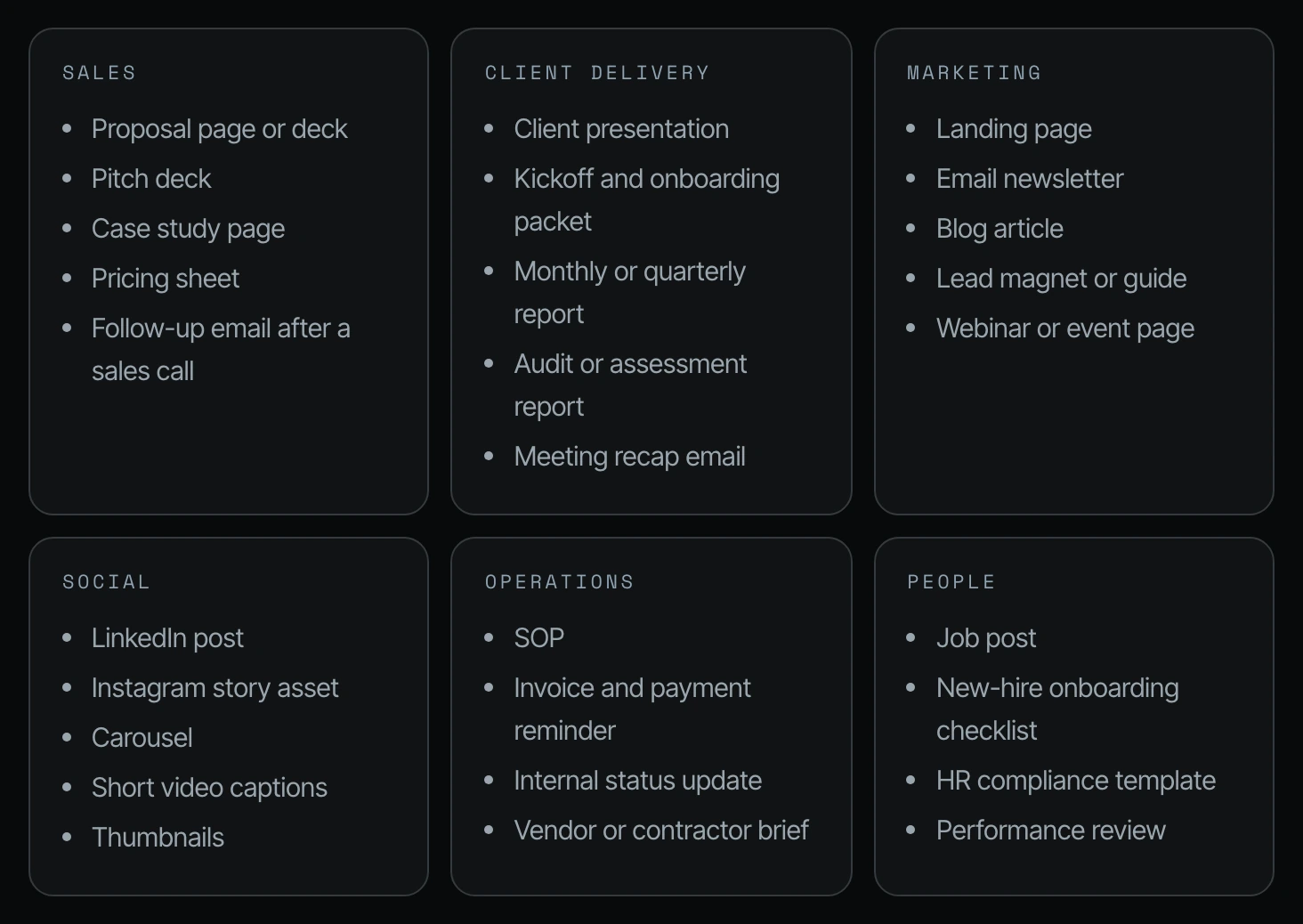
This could be applied to proposal pages, pitch decks, case study pages, pricing sheets, follow-up emails, client presentations, kickoff and onboarding packets, monthly or quarterly reports, audit or assessment reports, meeting recap emails, landing pages, email newsletters, blog articles, lead magnets or guides, and webinar or event pages. Social posts as well. Operations: SOPs, invoice and payment reminders, internal status updates, vendor or contractor briefs. People: job posts, new hire checklists. Everything should become a standard once it gets to that point. (28:55)
Here is the full list from the guide I showed on screen. The rule on the page: if you make it more than once a month, it deserves a standard. Start with the ones you make most often.
| Sales | Client delivery | Marketing |
|---|---|---|
| Proposal page or deck | Client presentation | Landing page |
| Pitch deck | Kickoff and onboarding packet | Email newsletter |
| Case study page | Monthly or quarterly report | Blog article |
| Pricing sheet | Audit or assessment report | Lead magnet or guide |
| Follow-up email after a sales call | Meeting recap email | Webinar or event page |
| Social | Operations | People |
|---|---|---|
| LinkedIn post | SOP | Job post |
| Instagram story asset | Invoice and payment reminder | New-hire onboarding checklist |
| Carousel | Internal status update | HR compliance template |
| Short video captions | Vendor or contractor brief | Performance review |
| Thumbnails |
Each one becomes a template plus a skill: what it looks like, how it's structured, what to avoid, and a checklist to run before it reaches you.
Once the CEO goes first, the beauty of this is that you can define the core things, and then the rest of the team adds the other little things.
3. How to create a skill in Claude Code or Codex with a "make this the standard" prompt
Here are three examples of what that prompt looks like in practice. (29:26) You can use each one in Codex or Claude Code.
Both tools store a skill as a folder with a SKILL.md file inside (Claude Code skills docs, Codex skills docs). The prompts below have the agent write that file for you.
Example 1: Make the HR template the standard
Here is the standard for the new hire checklist. Make it the standard every future agent uses. Do not change the approved version. Save the approved file as a locked master. And then it can even write a skill called new hire compliance that tells a future agent when to use it, what it means, and the source for every legal requirement. (29:56)
This new-hire compliance checklist is approved. Make it the standard
every future agent uses. Do not change the approved version.

1. Save the approved file as a locked master:
   Company → Templates → HR → HR_New-Hire-Compliance-Checklist_v1

2. Write a skill called "hr-new-hire-compliance" that tells a future agent:
   - When to use it: any new hire, in any role, in [state]
   - What it needs from me first: name, role, start date, full-time or
     part-time, exempt or non-exempt, remote or on-site
   - Which sections always stay, which change by role, and which are
     required by law and can never be removed
   - The source for every legal requirement, with the date it was checked
   - Where the finished file goes and how to name it:
     Company → HR → Staff → [Name] → YYYY-MM-DD_[Name]_New-Hire-Compliance_v1

3. Add a "Do not" list from this session: everything I rejected or
   corrected, and why.

4. Add a final check the agent runs before handing it to me:
   every required item present, every blank filled or flagged,
   and nothing marked as legal advice.

5. Add a review date six months from today. On that date, the agent
   re-checks the legal sources and tells me what changed.
   It does not update the template without my approval.

6. Add one line to AGENTS.md: "For any new hire, use the
   hr-new-hire-compliance skill. Never build this from scratch."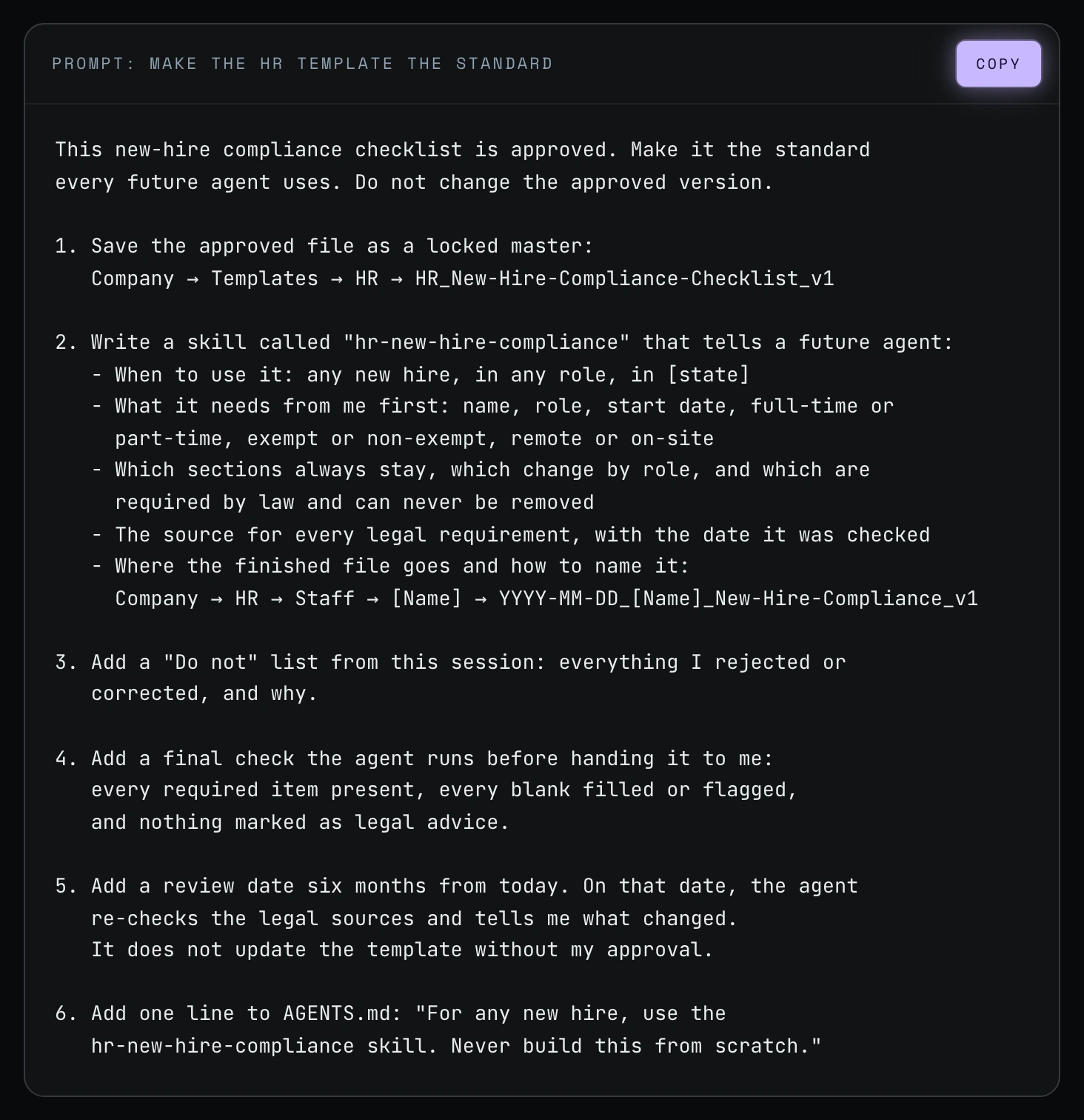
Example 2: Make the deck the standard
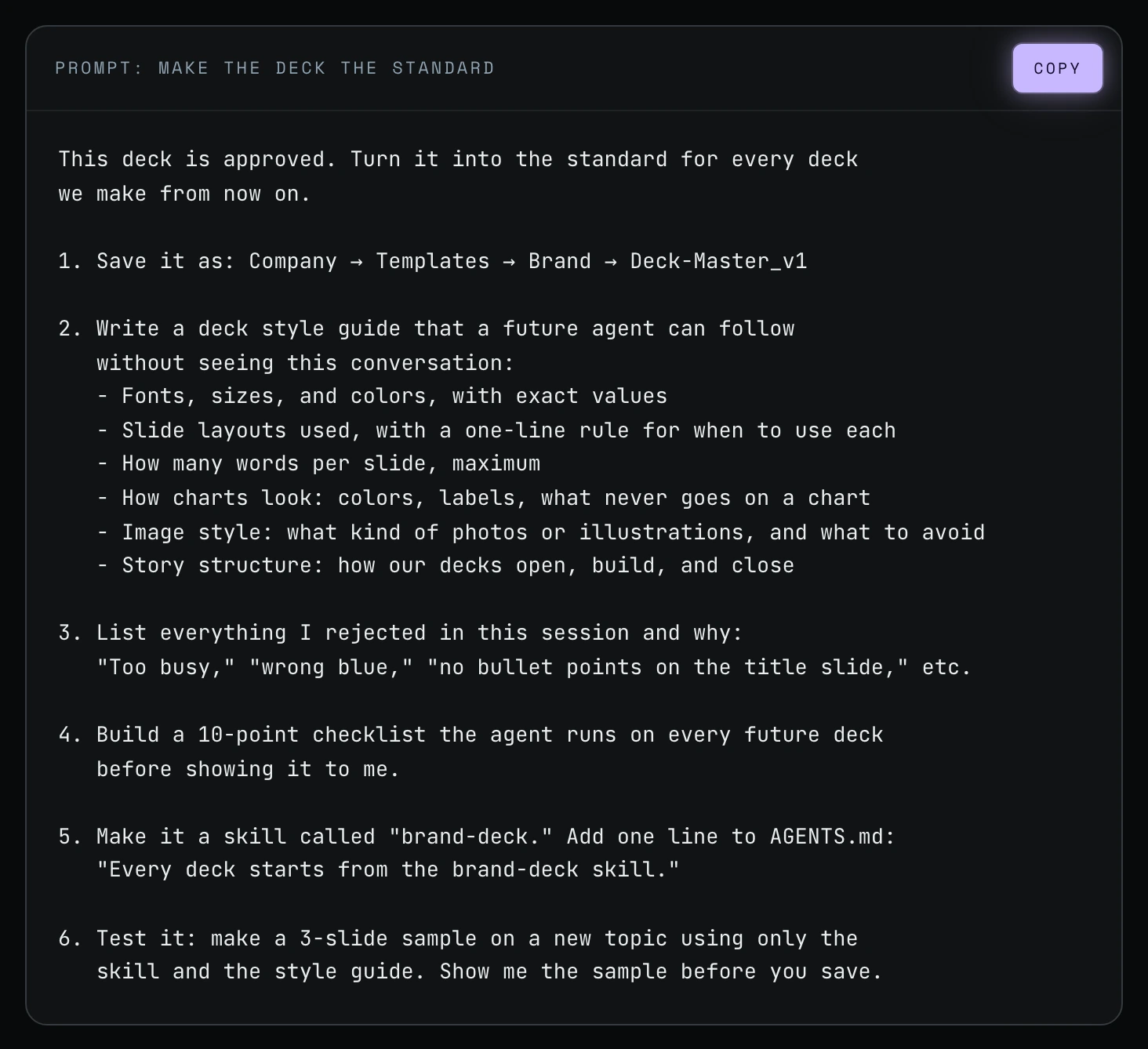
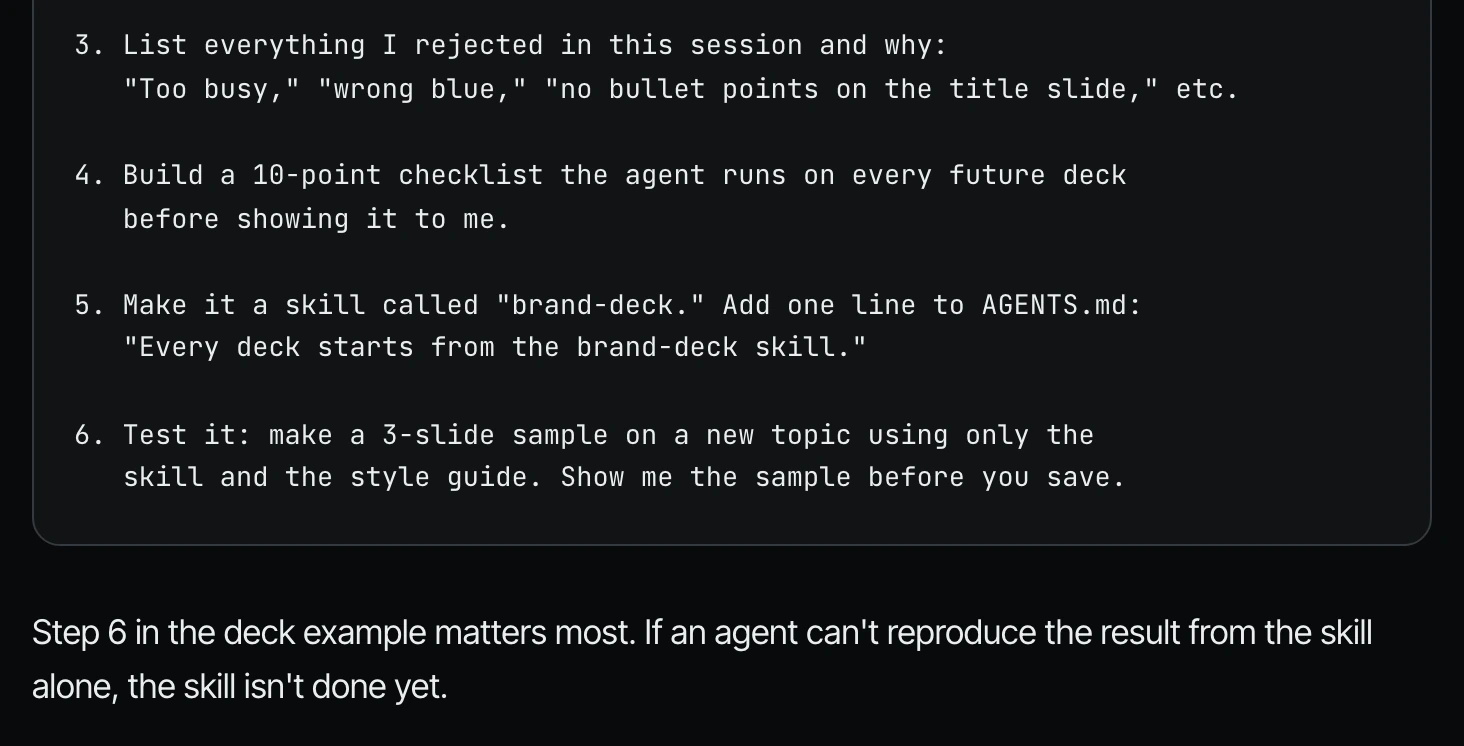
This deck is the standard. Turn it into the standard for every deck we make from now on. And you could have multiple decks. You could have a prospect proposal presentation deck. You could have a client continuation deck. Whatever it is, you need to make sure that those master standards are there. Save it as deck master V1, or prospect deck master, or webinar deck master V1, or client continuation deck master V1. Write a deck style guide that a future agent can follow without seeing this conversation. Build a 10-point checklist the agent runs on every future deck. Make it a skill, and then test it. (30:27)
This deck is approved. Turn it into the standard for every deck
we make from now on.

1. Save it as: Company → Templates → Brand → Deck-Master_v1

2. Write a deck style guide that a future agent can follow
   without seeing this conversation:
   - Fonts, sizes, and colors, with exact values
   - Slide layouts used, with a one-line rule for when to use each
   - How many words per slide, maximum
   - How charts look: colors, labels, what never goes on a chart
   - Image style: what kind of photos or illustrations, and what to avoid
   - Story structure: how our decks open, build, and close

3. List everything I rejected in this session and why:
   "Too busy," "wrong blue," "no bullet points on the title slide," etc.

4. Build a 10-point checklist the agent runs on every future deck
   before showing it to me.

5. Make it a skill called "brand-deck." Add one line to AGENTS.md:
   "Every deck starts from the brand-deck skill."

6. Test it: make a 3-slide sample on a new topic using only the
   skill and the style guide. Show me the sample before you save.
Example 3: Turn a standard you already have into the standard
This is the established-business shortcut. You probably already have assets that work: the pitch deck that closes clients, the proposal that gets signed, the onboarding email clients thank you for. You don't need an agent to invent a standard. Hand it the one you have and have it write down why it works. This third prompt appears in the guide on screen; I did not read it aloud in the video.
I have a [pitch deck / proposal / onboarding email] that already
closes clients. It's at [file path or Drive link].
Don't copy it into the chat. Read it where it lives.

STEP 1: STUDY IT (read-only)
Don't edit, move, or rename the original. Work out what makes it work:
- Structure: sections, order, and roughly how long each one runs
- Voice: tone, sentence length, words we use and words we avoid
- Visuals: layout, fonts, colors, how images and numbers are shown
- What changes per client and what never changes

STEP 2: ASK ME
One question at a time, only about what you couldn't tell from the file.
Always ask:
- Which parts are non-negotiable, and which are flexible?
- Why does this version close deals? What have clients responded to?
- What should an agent never do with this format?

STEP 3: WRITE THE STANDARD
Save it as a skill or template in [Company → Templates, or your skills
folder] with:
- When to use it
- The required structure, in order
- Voice and design rules, stated once each
- The client-specific details to fill in
- A short checklist to run before handing a draft to me
Keep it under 80 lines. Point to the original file as the reference
example. Don't paste the original into the standard.

STEP 4: HOOK IT UP
Add one line to AGENTS.md: "For [pitch decks], use [path to standard]."
Don't put the rules themselves in AGENTS.md.

STEP 5: TEST IT SMALL
Build one draft for [a past client] using only the standard.
Show me where it differs from the original so we can tighten the
standard before any agent uses it on live work.
4. Prove it: have the agent create an example now
This is very important, and it's something people miss. You don't just want to say, "Hey, save this as a standard," and maybe create a skill for future agents or someone on your team to use. You want to say, "Prove it to me by creating an example deck now." (30:27)
Then whatever it gets wrong, you want to tweak and refine. You don't want to blindly trust it, because then your salesperson, or whoever on your team, or maybe you tomorrow, goes and uses that skill, half of it's wrong, and you're putting 30 minutes into it again. (31:00)
How to test a new skill before your team uses it
Step 1. Add a test line to the end of your standard prompt, like step 6 in the deck prompt: make a 3-slide sample on a new topic using only the skill and the style guide.
Step 2. Ask the agent to show you the sample before it saves anything.
Step 3. Compare the sample to your approved version. Whatever it gets wrong, tell the agent to fix the standard, not just the sample.
Step 4. Run the test again until the sample comes out right from the skill alone.
5. Stop reinventing the wheel
I would really create a list of standards. You should have all of this and more as standards within the business. And because of model independence, whether you're in Codex or Claude Code, if you tell an agent, "Hey, create a proposal for me based on this conversation," or "Create a pitch deck for me based on this," or "Turn so-and-so's win from earlier this week into a case study," it should not be reinventing the wheel every single time. And if it is, it just means that you don't have standards for your agents and for the outputs that they create. (31:00)
Frequently asked questions
How do I create a skill in Claude Code?
Approve an output you like, then tell Claude Code to make it the standard: save a locked master, write a skill that says when to use it, add a checklist, and make a sample. Anthropic's docs say Claude Code stores each skill as a SKILL.md file under ~/.claude/skills or a project's .claude/skills.
How do I create a skill in Codex?
Use the same "make this the standard" prompt in Codex, ending with "Make it a skill" and a test. OpenAI's docs describe a Codex skill as a folder with a SKILL.md file and offer a built-in creator you start with $skill-creator.
What are some Claude Code skills examples for a small business?
Anything you make more than once a month: proposals, pitch decks, follow-up emails, client reports, SOPs, invoice reminders, job posts and new-hire checklists.
Do I need a developer to create a skill in Claude Code or Codex?
No. Shanee's prompts are plain English: you tell the agent which approved file is the standard, and it writes the skill and checklist.
Why should I test a new skill right away?
Because a skill that looks finished can still be half wrong. Shanee has the agent prove it with an example now, so your team doesn't lose 30 minutes each time later.
Related ways in this series
- Write a good agents.md or claude.md: where the one-line pointer to each standard lives.
- Clean up your business files for AI agents: standards need one home and clear names.
- Test the agent on a small piece first: the same "prove it small" idea applied to big jobs.
- Stop when an AI agent fails twice: real examples beat vague feedback.
- Turn your SOPs into AI agents: the same idea applied to your written processes.
- Back to the hub: How to Reduce Codex and Claude Code Token Usage: 20 Ways
Sources
Official / Primary Sources
- Shanee Moret, "20 Ways to Use Codex and Claude Code Without Burning Your Usage (Part 1)" (YouTube, 2026-10-02), supports the standards list, the HR and deck prompts, and the "prove it by creating an example now" test step (27:20 to 31:31).
- Shanee Moret's companion field guide shown on screen in the video, supports the department lists, the full prompt text, and the "standard you already have" prompt.
- Anthropic, Claude Code skills documentation, SKILL.md file, personal and project skill folders, and running a skill with /skill-name (checked 2026-10-05).
- OpenAI, Codex skills documentation, a skill is a directory with a SKILL.md file, and the built-in $skill-creator (checked 2026-10-05).