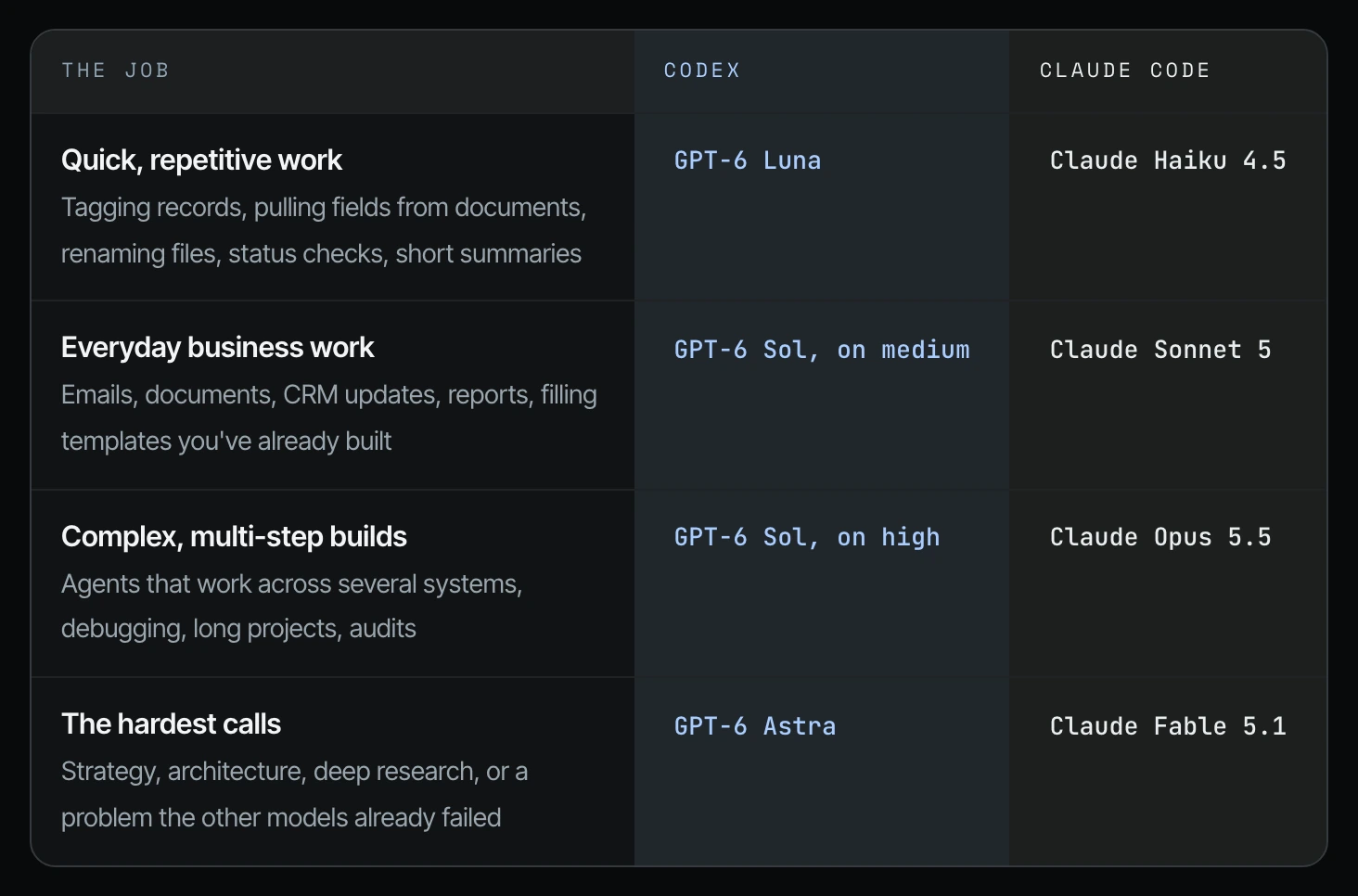
Which Codex model to use depends on the job: in my model-to-job table, GPT-6 Luna handles quick, repetitive work, GPT-6 Sol on medium handles everyday business work, and GPT-6 Astra handles the hardest calls. In Claude Code, those jobs go to Haiku 4.5, Sonnet 5.5 and Fable 5.1.
I have been creating AI tutorials for business owners since January 2023, and in one recent week I ran 550 sessions and 6.2 billion tokens (the units of text your plan meters) in Claude Code alone (video, 2:43). For almost 90 to 95% of that work, I was on Opus 5.5 at medium (17:15). So which model should you use? Match the model to the job. Use a lighter model for quick, repetitive work, an everyday model for normal business work, and save the most powerful models for complex builds and strategic calls. Simple work on the most expensive model is the leak my weekly usage helper flags.
In short: - Quick, repetitive work goes on GPT-6 Luna in Codex or Claude Haiku 4.5 in Claude Code. - Everyday work like emails, CRM updates and reports goes on GPT-6 Sol on medium or Claude Sonnet 5.5. - Complex builds go on GPT-6 Sol on high or Claude Opus 5.5; the hardest calls go on GPT-6 Astra or Claude Fable 5.1. - Start one row lower than you think you need and move up only when the work fails.
Part of the series: How to Reduce Codex and Claude Code Token Usage: 20 Ways. This is way 5. Previous: Keep reasoning on medium for most work · Next: Don't pay for faster execution unless speed matters
5. Match the model to the job
A model is the "brain" your agent runs on. Codex and Claude Code each let you pick from several, and the bigger ones use more of your weekly usage for every task. Reasoning, covered in way 4, is one dial. The model is the other.
I've shared my preferences when it comes to some of the models, but if you're doing quick, repetitive work, GPT-6 Luna is great (17:15). For everyday business work, Claude Sonnet 5.5 and GPT-6 Sol on medium. For complex multi-step jobs, you may want GPT-6 Sol on high or 6.1 Astra on high, and Claude Opus 5.5 is great. And for the strategic calls, you may want Fable 5.1 and maybe Astra 6.1 (17:47).
But I would play around with it, because everyone has their own preferences.
Which Codex model and which Claude model to use for each job
This is the table I show on screen in the video.
| The job | Codex | Claude Code |
|---|---|---|
| Quick, repetitive work: tagging records, pulling fields from documents, renaming files, status checks, short summaries | GPT-6 Luna | Claude Haiku 4.5 |
| Everyday business work: emails, documents, CRM updates, reports, filling templates you've already built | GPT-6 Sol, on medium | Claude Sonnet 5.5 |
| Complex, multi-step builds: agents that work across several systems, debugging, long projects, audits | GPT-6 Sol, on high | Claude Opus 5.5 |
| The hardest calls: strategy, architecture, deep research, or a problem the other models already failed | GPT-6 Astra | Claude Fable 5.1 |
A lot of business work doesn't need judgment. Tagging records, extracting fields from documents, filling a template, renaming files and checking a status are pattern work. Save the flagship model for strategy, judgment calls, complex debugging, and anything where the thinking is the point. Start one row lower than you think you need, and only move up when the work fails.
Which model uses fewer tokens for simple work?
In Part 2, I describe the weekly helper that audits your usage. The example note it sends every Monday says this week's biggest leak was the lead sorting agent using the most expensive model (Part 2, 24:18). To switch it, you click yes. That is this rule in action: a sorting job does not need the model you use to plan next year's budget.
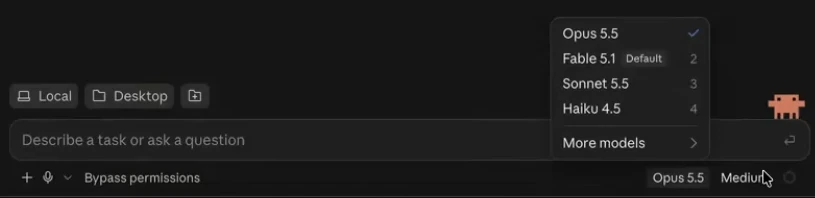
Claude Code: how to choose which model to use
Step 1. Start a new chat in the Claude Code desktop app.
Step 2. Click the model name at the bottom right of the message box. You'll see Opus 5.5, Fable 5.1, Sonnet 5.5, Haiku 4.5 and More models. I like to personally keep it on Opus 5.5, and I keep it on medium (16:43).
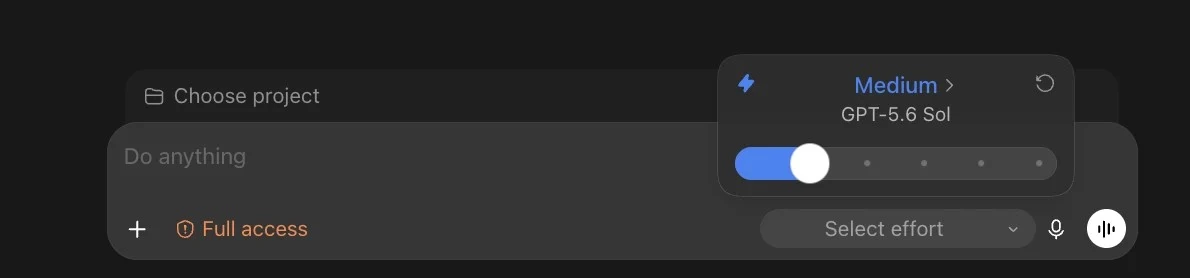
How to pick the model in Codex
Step 1. When you're starting a new chat inside of ChatGPT Work or Codex, you will see the effort and reasoning level at the bottom right (16:13).
Step 2. Click it, and then click the blue part where it says medium. That shows you all of the models.
Put the rule in your AGENTS.md
My companion field guide includes this block you can paste into your AGENTS.md or CLAUDE.md file (the onboarding page every agent reads first, covered in way 7):
## Model choice
Use the smaller, faster model for: tagging, extracting fields, filling templates,
renaming or moving files, status checks, and simple lookups.
Use the flagship model for: strategy, judgment calls, complex debugging,
and anything where the quality of the reasoning is the deliverable.
If a task on the smaller model fails twice, stop and tell me before switching.
The same logic applies when a new model launches. I give it a week or two before moving important workflows onto it, because learning a new model on live work burns usage. If you want a plan for moving between models, see how to switch between AI models and keep a backup plan.
Frequently asked questions
Which Codex model should I use?
Which Codex model to use depends on the job: in Shanee's table, GPT-6 Luna is for quick, repetitive work, GPT-6 Sol on medium is for everyday business work, GPT-6 Sol on high is for complex builds, and GPT-6 Astra is for the hardest calls.
Which Claude model should I use in Claude Code?
In Claude Code, Shanee's table puts quick work on Claude Haiku 4.5, everyday business work on Claude Sonnet 5.5, complex multi-step builds on Claude Opus 5.5, and the hardest calls on Claude Fable 5.1. She keeps her own Claude Code work mostly on Opus 5.5 at medium.
Which Codex or Claude model uses the fewest tokens?
The lighter models in Shanee's table, GPT-6 Luna in Codex and Claude Haiku 4.5 in Claude Code, are the ones she assigns to quick, repetitive work. Bigger models use more weekly usage per task.
What is the best model for Codex on complex work?
For complex, multi-step builds in Codex, Shanee's table uses GPT-6 Sol on high, and for strategy, architecture, deep research or a problem other models already failed, GPT-6 Astra.
Does my small business need the most expensive AI model?
Not for most work. Pattern work like tagging records and renaming files fits a lighter model in Codex or Claude Code. Shanee's weekly usage note flagged a lead sorting agent on the most expensive model as the week's biggest leak, so start one row lower and move up only when the work fails.
Related ways in this series
- Keep reasoning on medium for most work: the other dial that decides how much usage each task takes.
- Don't pay for faster execution unless speed matters: the lightning bolt setting that sits right next to the model picker.
- Build a weekly helper that finds waste and fixes your token usage: how to catch an agent running on the wrong model.
- Codex reasoning levels for business owners: the reasoning dial that pairs with your model choice.
- Back to the full guide: How to Reduce Codex and Claude Code Token Usage, 20 Ways
Sources
Official / Primary Sources
- Shanee Moret, "20 Ways to Use Codex and Claude Code Without Burning Your Usage (Part 1)" (YouTube, 2026-10-02) , the model-to-job table, her model picks and the Claude Code and Codex model menus.
- Shanee Moret, "20 Ways to Optimize How You Use Codex and Claude Code Part 2" (YouTube, 2026-10-03) , the weekly usage note that flags an agent on the most expensive model.
- Shanee Moret, "20 Ways to Optimize Your Token Usage in Codex and Claude Code" (GrowthAcademy.Global field guide, 2026) , the AGENTS.md model-choice block and the Codex effort screenshot.