To go from HTML slide deck to PDF, have Codex or Claude Code build the deck as an HTML file (the code a web page is written in), make every edit there, and convert to PDF once you approve. Editing a finished PDF with AI forces a rebuild on every change, costing your business time and plan usage.
I have been creating AI tutorials for business owners since January 2023, and I help established business owners build agents inside their companies. One of the most common ways I see owners burn usage is asking Claude Code or Codex to create a PDF and then asking for a long list of edits to it (video, 8:15).
In short: - A PDF is designed not to be changed, so every AI edit to a PDF means a slow rebuild that uses more of your plan. - Ask Codex or Claude Code for the deck or proposal as an HTML file first, and tell it not to create the PDF yet. - Make changes on the HTML version, with annotate in Codex's browser view or by listing them. - Convert to PDF, PowerPoint or Word once, after you approve, and have the agent check page breaks, fonts and margins.
Part of the series: How to Reduce Codex and Claude Code Token Usage: 20 Ways. This is way 13. Previous: Start a new chat for each new job · Next: On big jobs, have the agent look first and fix second
13. Why editing a PDF with AI wastes time: work in files the agent can read easily
I'll give you one great example. I see a lot of people that ask their agents, whether it be Claude Code or Codex, to create PDFs. Then they will ask for a lot of edits to the PDF to be applied (8:15). Literally what they're asking for is a document that was designed to not be changed. And then they're asking their agent to change it, which is very inefficient. It takes longer and it's just the wrong format for the agent to do these things (8:46).
HTML is the code a web page is written in. To you it looks like a normal page in your browser. To the agent it is words it can read and change one line at a time. A PDF is closer to a printed page: to change one word, the agent has to rebuild the whole thing.
What editing PDFs with AI costs a small business
I see a lot of people burning a lot of time and tokens (the units your plan counts as usage) on a variety of these examples because they want to do things that work for humans or that they got used to, and they're not really thinking about the formats that are the most efficient for the agent (9:47).
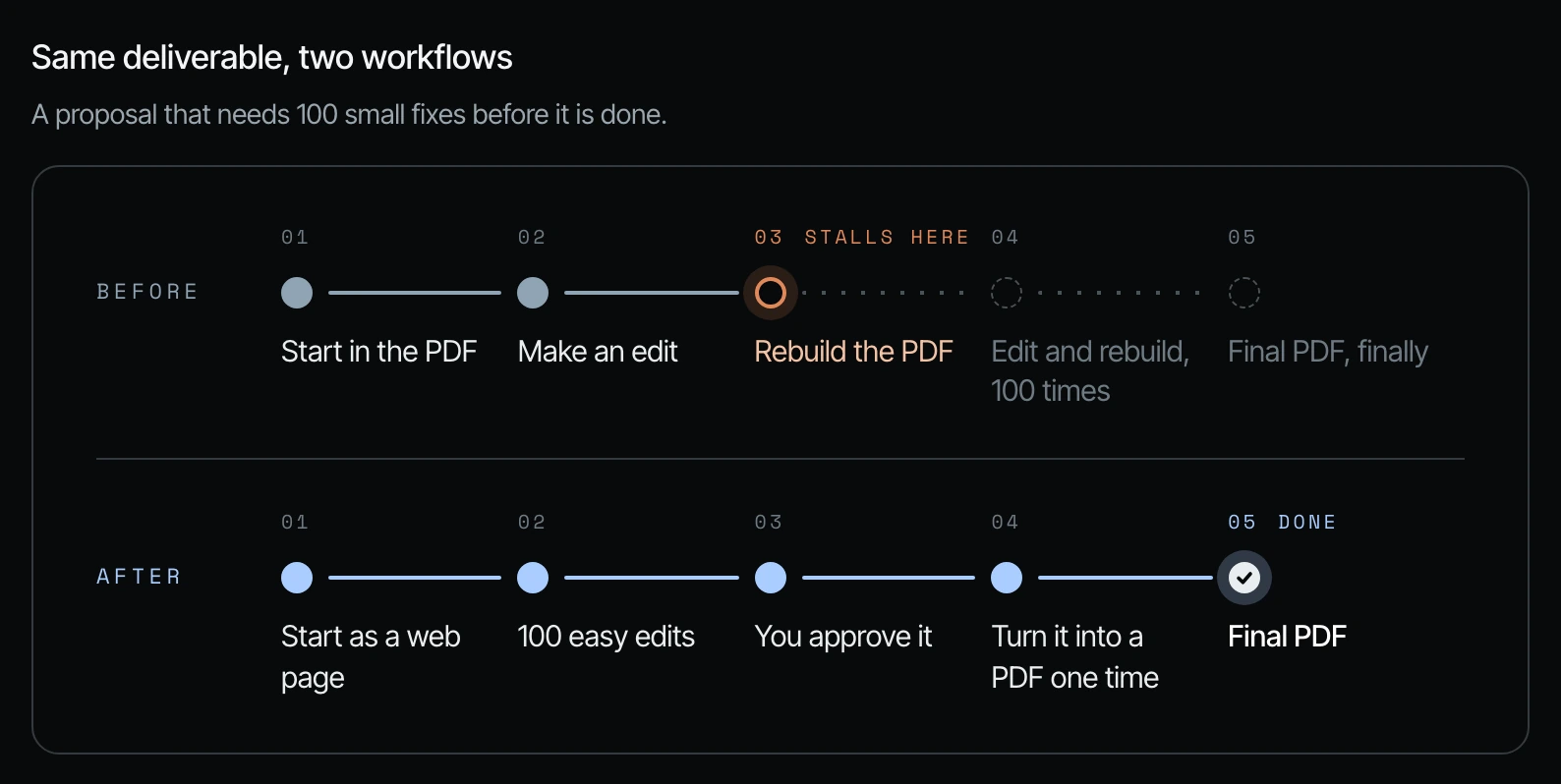
Here is the same deliverable done two ways. It is a proposal that needs 100 small fixes before it is done, from my field guide on these 20 ways.
| Step | Before: start in the PDF | After: start as a web page |
|---|---|---|
| 1 | Start in the PDF | Start as a web page (HTML) |
| 2 | Make an edit | Make 100 easy edits |
| 3 | Rebuild the PDF (this is where it stalls) | You approve it |
| 4 | Edit and rebuild, 100 times | Turn it into a PDF one time |
| 5 | Final PDF, finally | Done: final PDF |
How to make HTML slides in Codex and convert the deck to PDF
A better way to do this is to ask your agent, especially within Codex, for an HTML slide deck (8:46).
Step 1. Ask for the HTML version first. Tell the agent to build the slide deck (or proposal, or report) as HTML and to hold off on the PDF.
Build this as an HTML file first. Don't create the PDF yet.
Once I approve the content and design, convert it to PDF
and check page breaks, fonts, and margins in the final file.
Step 2. Open it in the browser and annotate. When it surfaces the HTML slide deck inside of the browser, it has something called annotate. You can click and write the changes that you want right on the page (8:46).
Step 3. Or list your changes. You could also just list the 10 changes that you need improved. Because it's now in HTML format, it will be able to do this a lot faster, you'll get the results back a lot more efficiently, and it will be able to change individual things a lot easier (9:17).
Step 4. Convert at the end. When the HTML slide deck or whatever looks great, you could say, "Okay, now convert this into a PDF," or into whatever format you want (9:17).
The video does not show a screen for this step, so there is no frame here. The click path above is the one I describe in the video.
HTML-first examples beyond slide decks: proposals, spreadsheets and recordings
That's just one example (9:47). Most business files are made for people to look at. Agents do best with files they can read as words. These are the swaps from my field guide.
| What you use now | What the agent likes better | What you still get at the end |
|---|---|---|
| PDF or Word proposals and reports | A web page (HTML) or plain text (Markdown) | A PDF or Word file, made once at the end |
| PowerPoint or Canva decks | Slides built as a web page | A PowerPoint or PDF deck |
| Spreadsheets with colors, merged cells and notes typed into cells | A plain spreadsheet or CSV: one row per thing, one column per fact | A formatted spreadsheet, if you want one |
| Screenshots of numbers, emails or settings | Copied text or a download of the data | Nothing changes for you |
| Video and audio recordings | The transcript or caption file | Edited video, clips or notes |
You don't need to know how these files work. You just need to ask for them in the right order.
| Instead of asking | Ask |
|---|---|
| "Create a PDF slide deck." | "Create the slide deck as an HTML page. Once I approve it, export it to PDF." |
| "Make me a PowerPoint for the pitch." | "Build the pitch deck as HTML slides first. Convert to PowerPoint after I sign off." |
| "Write the proposal as a Word doc." | "Draft the proposal in Markdown. When it's final, turn it into a Word doc." |
| "Fix the numbers in this screenshot." | "Here's the CSV export. Fix the numbers there." |
A quick checklist before you ask for a deliverable
- [ ] Am I asking for the final file type (PDF, PowerPoint, Word) before the content is approved?
- [ ] Can the agent build it as HTML or plain text first?
- [ ] Have I told it to wait for my approval before converting?
- [ ] When it converts, have I asked it to check page breaks, fonts and margins in the final file?
Frequently asked questions
How do I convert an HTML slide deck to PDF with AI?
Once you approve the HTML slide deck, tell Codex or Claude Code, "Okay, now convert this into a PDF," and ask it to check page breaks, fonts and margins. Shanee covers this at 9:17 in the video.
Why is editing a PDF with AI slow and expensive?
A PDF is a document that was designed to not be changed, so Codex or Claude Code has to rebuild it for every edit. Each round takes longer and uses more of your usage (8:15).
How do I make HTML slides in Codex and mark up changes?
Ask Codex for an HTML slide deck. When Codex surfaces it in the browser, Shanee shows a feature called annotate: you click on the page and write the change you want (8:46).
Can Claude Code make an HTML presentation instead of a PDF?
Yes. Shanee's advice covers both Claude Code and Codex: ask for HTML first with the prompt in this article, list your changes, and convert at the end. The annotate feature she shows is in Codex.
Can my team do this without technical skills?
Yes. You don't need to know how these files work; you just ask Codex or Claude Code for them in the right order, HTML or plain text first and the PDF, PowerPoint or Word file last.
Related ways in this series
- Start a new chat for each new job: keep each deliverable in its own short chat so the agent rereads less.
- Tell the agent where a big file is instead of uploading it: another way to stop paying for the agent to carry files it doesn't need.
- Test it on a small piece before the agent does the whole job: approve the first few slides in HTML before it builds all of them.
- When an agent creates something great, make that the standard: save the approved HTML deck as your master.
- Back to the hub: How to Reduce Codex and Claude Code Token Usage: 20 Ways
Sources
Official / Primary Sources
- Shanee Moret, "20 Ways to Optimize How You Use Codex and Claude Code Part 2" (YouTube, 2026-10-03) , the PDF editing problem, the HTML slide deck and annotate workflow, and converting at the end.
- Shanee Moret, "20 Ways to Optimize Your Token Usage in Codex and Claude Code" (GrowthAcademy.Global field guide, 2026) , the "same deliverable, two workflows" comparison, the file swap tables and the HTML-first prompt.