
AI agent vs automation comes down to who does the work each time. An agent in Codex or Claude Code reads, thinks and decides on every run, while an automation script repeats fixed steps and uses none of your AI limit. If a job is done the exact same way every time, turn it into a script. I have been creating AI tutorials for business owners since January 2023, and I help established business owners build agents inside their companies. When I ran a usage audit on my own Codex account, one hourly check had Codex run the same script 154 times in one week. If you skip this, you pay an agent to think through the same steps every day for a job that doesn't need thinking anymore.
In short: - A chat is for writing and reactive work, a script is for work done the same way every time, and an AI agent is for work that needs real thinking and decisions across your apps. - If Codex or Claude Code does a job the exact same way every time, ask it to turn that job into a script. - A script uses none of your AI limit, runs in seconds, and gives the same result every time.
Part of the series: How to Reduce Codex and Claude Code Token Usage: 20 Ways. This is way 18. Previous: Test your agent on a small piece first · Next: Audit your scheduled AI agents
1. Turn repeat work into a script
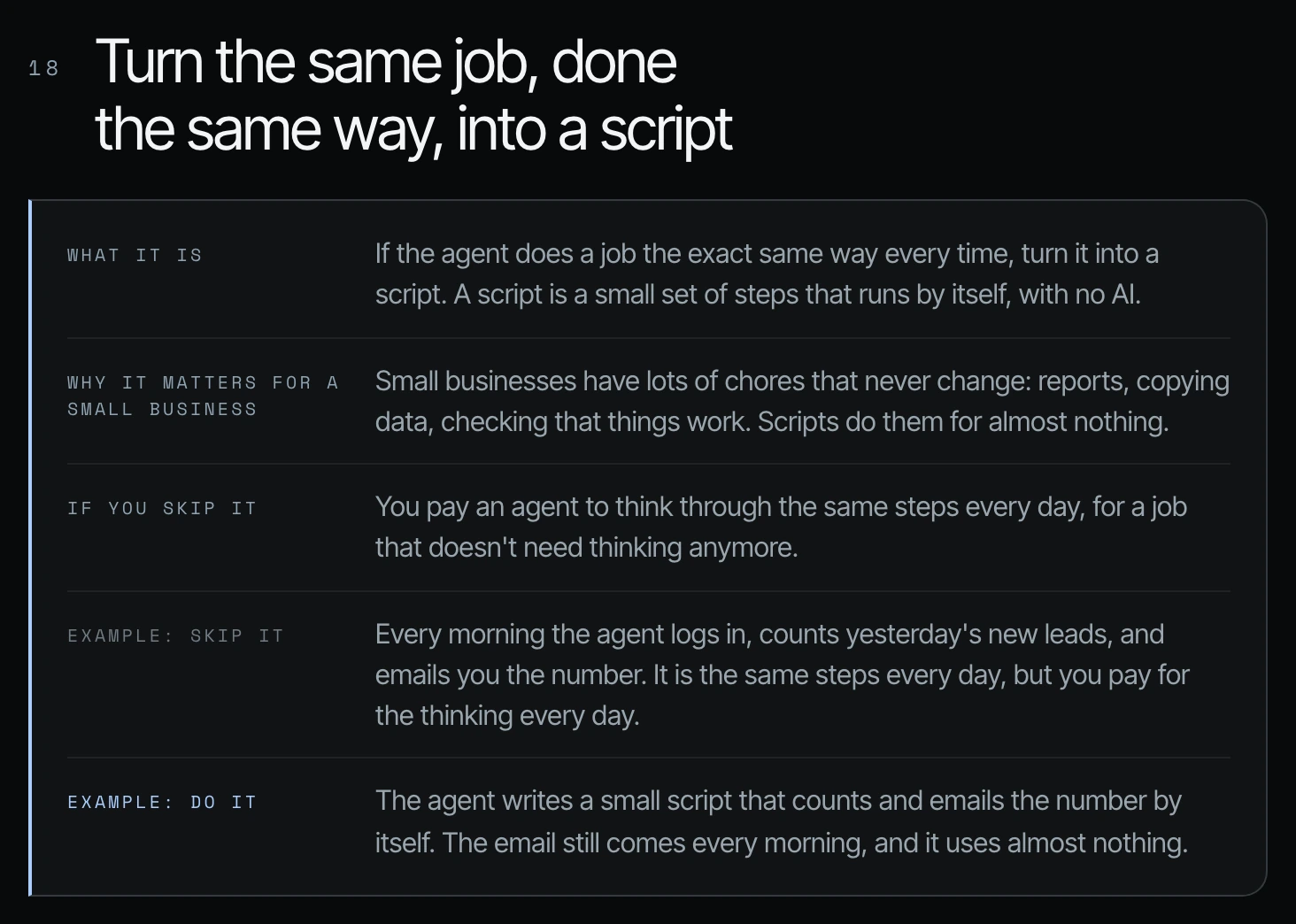
If the agent does a job the exact same way every time, turn it into a script. A script is a small set of steps that runs by itself, with no AI deciding anything along the way.
Why it matters for your business: small businesses have a lot of chores that never change. Reports, copying data, checking that things work.
What it costs when you skip it
Example: every morning the agent logs in, counts yesterday's new leads, and emails you the number. It is the same step every day, but you pay for the thinking every day. So instead, you would write a script that replaces that action. The email still comes every morning, and it uses almost nothing.
When should a small business start using scripts?
I'd say that scripts are more for once you have your baseline cleanup done. For example, a great script could be making sure that the files that were added to the SharePoint, iCloud or Google Drive today really abided by all of the rules that you have in your new agentic infrastructure. That could happen every day in the same way. (The cleanup itself is way 8 in this series.)
2. AI agent vs script vs chat: which jobs need which
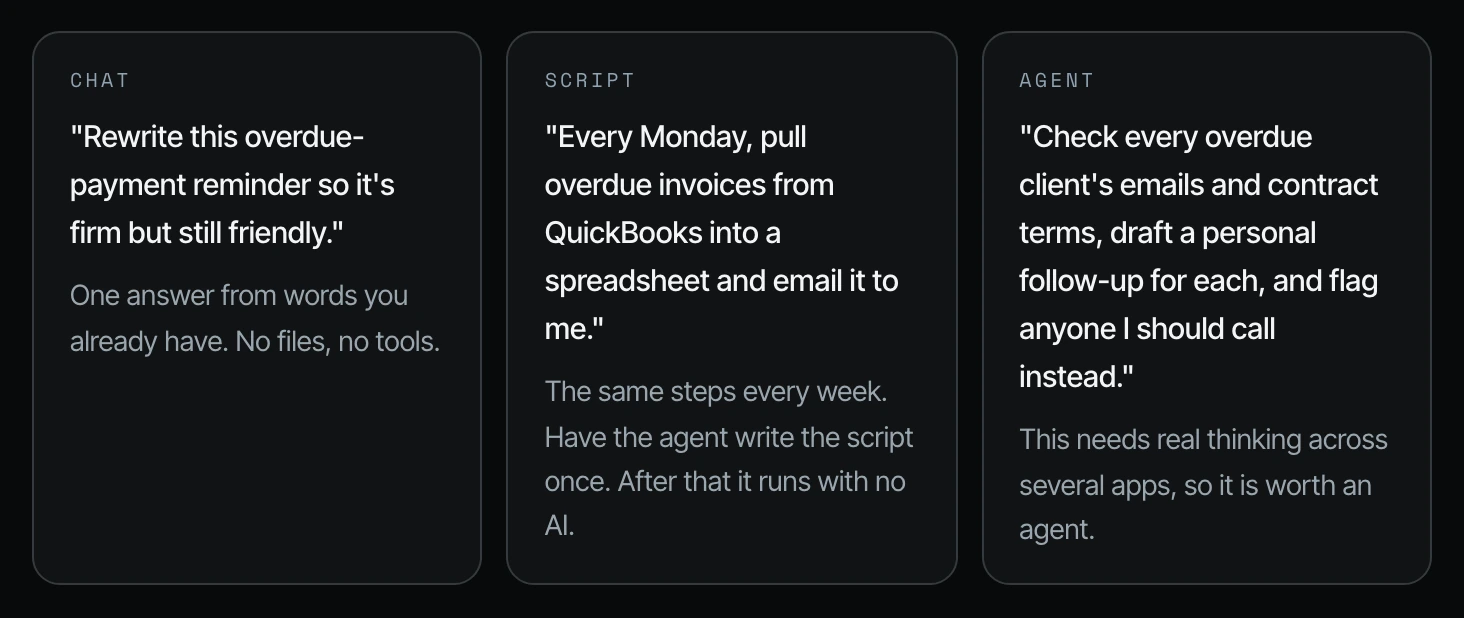
A chat is for writing and something reactive. A script is for work done in the same way every time: tidying a download, checking that your website is up, renaming files. An agent is for work that needs real thinking across your apps. It has to make decisions the way that a human would.
| Chat | Script | Agent | |
|---|---|---|---|
| What it's for | Writing and reactive work: rewriting a paragraph, coming up with ideas, summing up what you already have, thinking through a choice | Work done the same way every time: tidying a download, checking that your website is up, renaming files, copying data from one app to another | Work that needs real thinking across your apps and decisions the way a human would make them |
| Files, tools, web | None | Has the agent write it once, then runs by itself with no AI | Reads and acts across several apps |
| Late-bills example | "Rewrite this overdue-payment reminder so it's firm but still friendly." | "Every Monday, pull overdue invoices from QuickBooks into a spreadsheet and email it to me." | "Check every overdue client's emails and contract terms, draft a personal follow-up for each, and flag anyone I should call instead." |
| Uses your AI limit | Once, for one answer | No | Every time it runs |
The examples in the last two rows come from Shanee's slide and her field guide for this series.
3. AI agent vs automation workflow: a repeated Codex job compared with a script
So what actually runs? A repeated job in Codex versus a script. Both can run every Monday at 8am. The difference is who does the work each time.
| Repeated job in Codex or Claude | Script | |
|---|---|---|
| What actually runs | The AI reads your instructions, thinks, and decides what to do, every time | A fixed list of steps that runs the same way, in the same order |
| Cost each time it runs | Uses some of your limit every single time | Uses none of your AI limit |
| Same result every time? | Usually, but it can change a little each time | Yes, exactly the same every time |
| When something surprising happens | Can think its way around it | Stops or warns you, and calls you or an agent |
| Speed | Minutes, while it reads and thinks | Seconds |
| Best for | Work that needs thinking: reading emails, writing replies, deciding what matters | Work that never changes: downloads, checks, renaming, copying data between two apps |
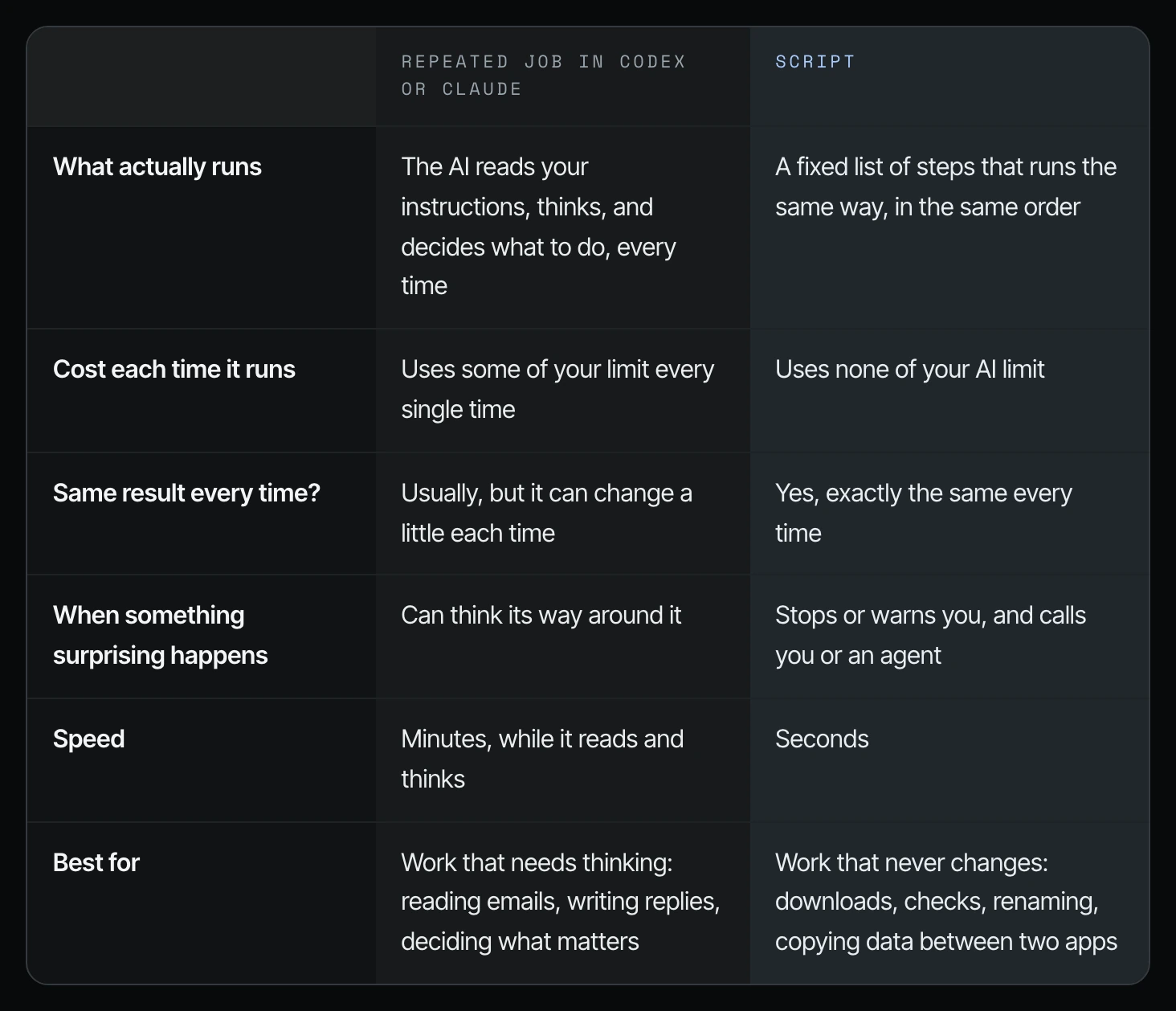
The best setups use both. A script does the boring part for free, and it calls an agent only when something needs a decision.
The reason why you want to lean towards scripts eventually for some things is that it's not going to burn through your token usage, it's going to be faster, and it's going to help you build an infrastructure where you eventually become model independent. Model independence is the same goal Shanee gives for API keys in way 3.
4. Shanee's own audit: 154 runs of the same script
From her own audit, shown on screen and in the usage report in her field guide: a check that ran every hour had Codex run the same script 154 times in one week, and it used 8.5% of her week. The recommended fix was to let a normal timer run the script, and call Codex only when something breaks, gets worse, gets fixed, or needs a decision. The full report is in way 20.
How to turn a repeat job into a script in Codex or Claude Code
Step 1. Pick one job the agent has done the same way several times.
Step 2. Ask the agent to write it as a script and recommend where it should run.
Step 3. Review the script and the schedule before anything is turned on.
You've done this same job [number] times. Turn it into a script.
- Write a script that does exactly what you've been doing, with no AI involved.
- Run it on a normal scheduler.
- Only wake me or an agent when something fails, looks wrong, or needs a decision.
Show me the script and the schedule before turning anything on.
A script is just a file, so it needs a place to run on a schedule. Shanee's field guide lists the usual places:
| Where | How it runs | Good for | Watch out for |
|---|---|---|---|
| Your own computer | The timer built into Mac or Windows runs it at a set time | Free, nothing to sign up for | Only runs when that computer is on and awake |
| A free cloud scheduler | GitHub Actions or Cloudflare Workers run it on a schedule | Runs day and night, even when your laptop is closed | You need an account there. App passwords must be stored in their safe spot, never in the script |
| An automation tool | Zapier, Make, or n8n run the steps for you | No code to look after. Easy to see each step | Monthly fee, and limits on how often it runs on cheaper plans |
| Inside an app you already use | Google Apps Script for Sheets and Gmail, or built-in automations in Airtable, HubSpot, or QuickBooks | Lives right next to the data it uses | Only works inside that one app |
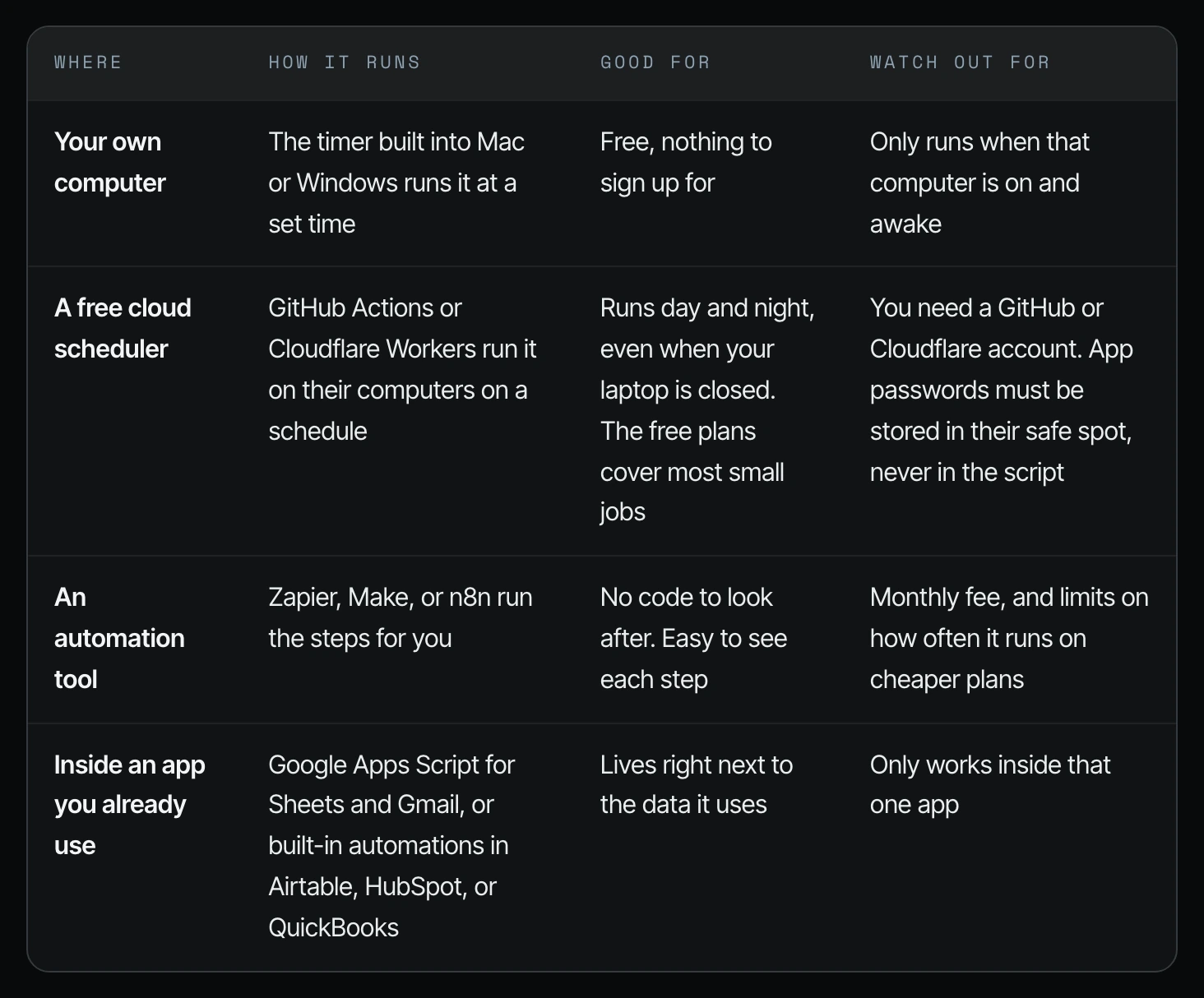
You don't have to pick. Ask the agent to write it as a script, tell you where it should run for your setup, and walk you through turning it on.
Frequently asked questions
What is the difference between an AI agent and an automation?
An AI agent in Codex or Claude Code reads your instructions, thinks, and decides what to do every time it runs, so it uses some of your limit on every run. An automation script runs a fixed list of steps the same way, in the same order, in seconds, and uses none of your AI limit.
AI agent vs script: how do I know which one a job needs?
If the agent does the job the exact same way every time, like counting yesterday's leads and emailing you the number, it should be a script. If the job needs real thinking across your apps and decisions the way a human would make them, keep it as an agent (21:11).
Do I need a developer to turn agent work into a script?
No. Codex or Claude Code writes the script. Your job is to name the repeat work, review what it wrote and where it will run, and approve it before it is turned on.
What does it cost my business to leave repeat work with an agent?
You pay for the thinking every time the job runs, even when nothing about the job changes. In Shanee's own audit, one hourly check had Codex run the same script 154 times in one week and used 8.5% of her week (22:05).
When should I start converting work to scripts?
Once your baseline file cleanup is done. Shanee's example is a daily script that checks that the files added today follow the rules of your new agentic infrastructure (20:25).
Related ways in this series
- Way 19: Audit your scheduled AI agents, because a timed job that does the same thing every time may not need to be an agent at all.
- Way 20: Build a weekly token usage audit agent, which found the 154-run script in Shanee's own account.
- Way 3: Graduate from plugins to API keys, the other half of becoming model independent.
- Way 8: Clean up your business files for AI agents, the baseline cleanup that comes before scripts.
- What are AI agents for business? A plain-English guide for owners, if you want the basics before choosing between an agent and a script.
- AI agents vs. chatbots for business, the other half of the chat vs. agent question.
- Back to the hub: How to Reduce Codex and Claude Code Token Usage: 20 Ways
Sources
Official / Primary Sources
- Shanee Moret, "20 Ways to Optimize How You Use Codex and Claude Code Part 2" (YouTube, 2026-10-03) , the script rule, the chat vs. script vs. agent split, the lead-count example and model independence.
- Shanee Moret, "20 Ways to Optimize Your Token Usage in Codex and Claude Code" field guide (GrowthAcademy.Global, 2026) , the late-bills examples, the comparison and where-it-runs tables, the script-it prompt, and the 154-run audit finding.