
Codex plan mode (type /plan) and Claude Code plan mode (press Shift+Tab) have the agent propose a plan before it works. On big business jobs, like moving your customer list or fixing your website, pair either with a discovery-only prompt: inspect, gather evidence, propose a plan, change nothing until you approve.
I help established business owners build agents inside their companies, and I have been creating AI tutorials for business owners since January 2023. I recently helped a surgeon who's also an entrepreneur move his entire CRM (his customer database) into Notion, and instead of pretending to know the exact route, I went to the agent first (video, 10:49). Have the agent look first and fix second.
In short: - On big jobs, ask Codex or Claude Code how it would approach the work before you tell it how. - Start with a discovery task only: inspect, gather evidence, propose an exact fix plan, change nothing. - Codex plan mode starts with /plan; Claude Code plan mode starts with Shift+Tab and makes no edits until you approve.
Part of the series: How to Reduce Codex and Claude Code Token Usage: 20 Ways. This is way 14. Previous: Work in files the agent can read easily, then change the file type at the end · Next: If the same thing fails twice, make the agent stop
14. Plan first on big jobs: have the agent look first and fix second
A better way to name this one would be: don't assume that you know the right plan (10:18). If you want to do something new, if you want to take on a huge task, I would highly recommend that instead of going with some master prompt and telling the agent how you think it needs to be done, you ask:
"Hey, this is what I'm trying to do. This is the big project that I want to take on. I think you could help me in these ways, but I'm not sure. How do you suggest that we attack this?"
This could be anything from data migration to a website transfer, whatever it is. You want to think of more complicated projects that could take a lot of time and that have a lot of data involved (10:49).
What skipping the plan costs a small business
You need to figure out what you're exactly doing first before doing it, or else you're going to spend a lot of tokens just trying to do it your way or the highway, and your way may not be the best way to do anything (12:24).
From my field guide on these 20 ways: a bad plan costs you one short round. A bad job you find after hours of work costs you the job and the redo. The plan also gives you a checklist. If the agent starts doing things that are not on it, stop it.
| Skip it | Do it | |
|---|---|---|
| What you say | "Fix everything wrong with my website." | "This is a discovery task only. Do not change anything." |
| What happens | One huge chat tries to do everything, runs out of room halfway, and changes things you never said yes to | The agent sends you a list of problems first. You pick the ones that matter. It fixes only those |
| What it costs | The job, the undo and the redo | One short planning round |
Two client examples
Moving a CRM into Notion. With the surgeon-entrepreneur, I said to the agent: I think this is how we would do this, but this is what we need to do. This is where the data is coming from. This is what we have at our disposal. What do you think is the best way? How should we approach this in different phases (11:22)? Because I didn't assume that I knew the answer from the start, and I almost consulted with the agent first, I didn't hit a bunch of the roadblocks along the way that come from trying to force it to do it one way.
A QuickBooks build that stopped working. Another example, from the same day I recorded this: something related to QuickBooks that a client had built just stopped working for some reason. Instead of assuming that we knew the reason from the get-go, we were open to a few options. Because of that openness, the agent was able to identify the real error, and then we were able to rectify it (11:52).
The only time I would force a route is if I absolutely knew that that was the way to do it (11:52).
How to use a plan-first prompt in Codex or Claude Code
Codex plan mode and Claude Code plan mode
The discovery prompt below works in any chat, and both tools also have a built-in plan mode to run it in. In Codex, type /plan and press Enter; you can add your prompt right after it (OpenAI Codex command reference). In Claude Code, press Shift+Tab until the status bar shows plan mode on; Claude proposes a plan and makes no edits until you approve (Claude Code docs).
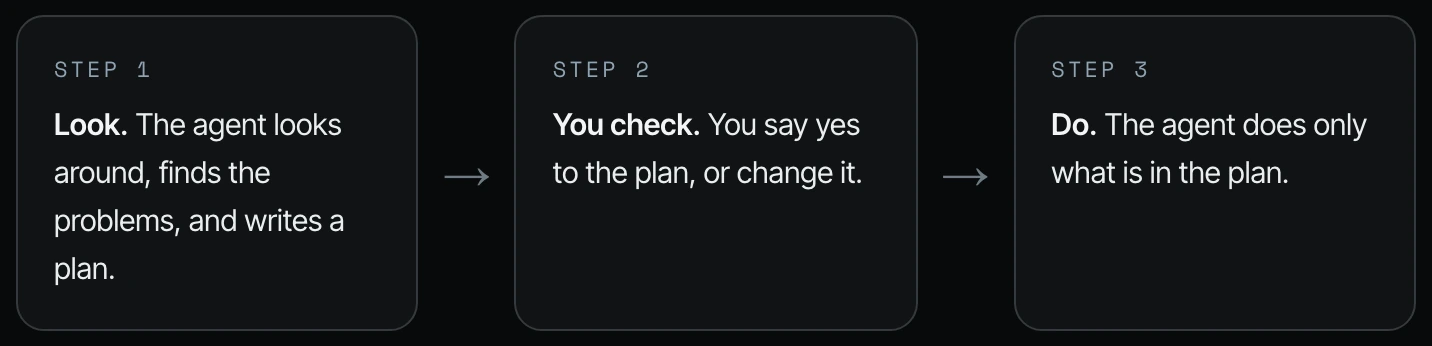
For big or risky jobs, break it into three steps.
- Look. The agent looks around, finds the problems and writes a plan.
- You check. You say yes to the plan, or change it.
- Do. The agent does only what is in the plan. If it starts doing something that is not in the plan, stop it.
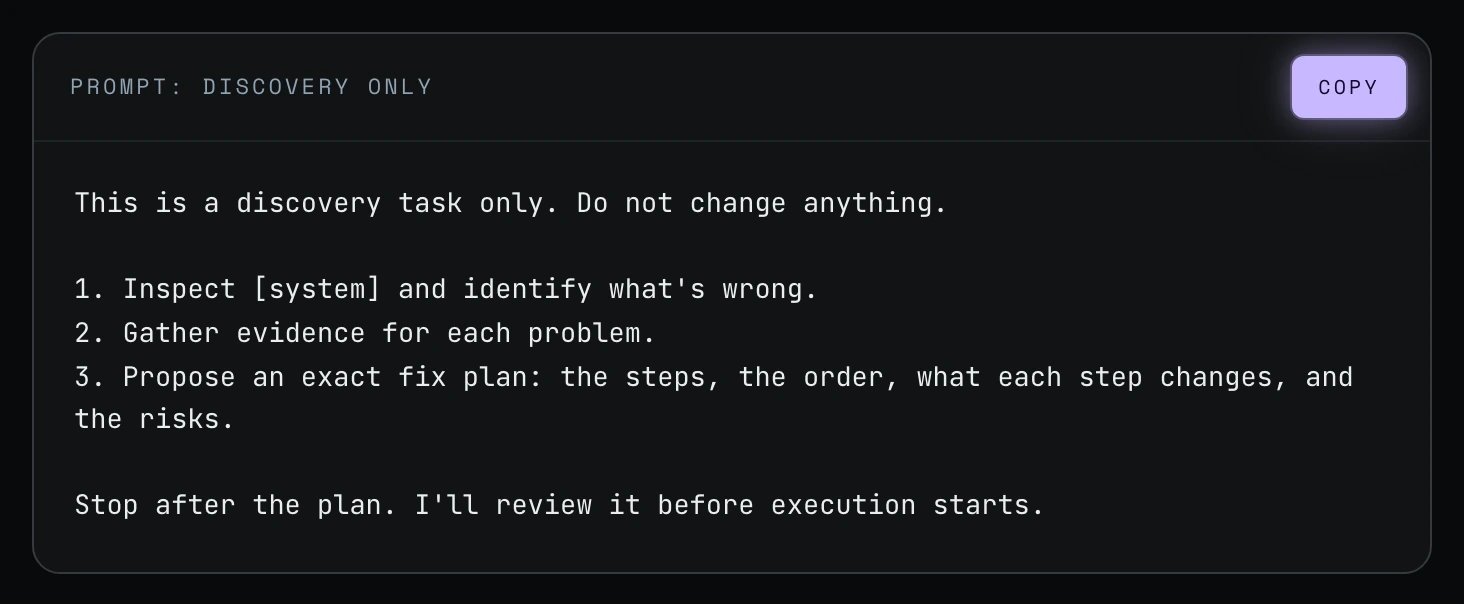
Step 1. Start with a discovery task. An example here is saying, "This is a discovery task only. Do not change anything. Inspect what's wrong. This thing broke" (11:52). This is the prompt I show on screen:
This is a discovery task only. Do not change anything.

1. Inspect [system] and identify what's wrong.
2. Gather evidence for each problem.
3. Propose an exact fix plan: the steps, the order, what each step changes, and the risks.

Stop after the plan. I'll review it before execution starts.
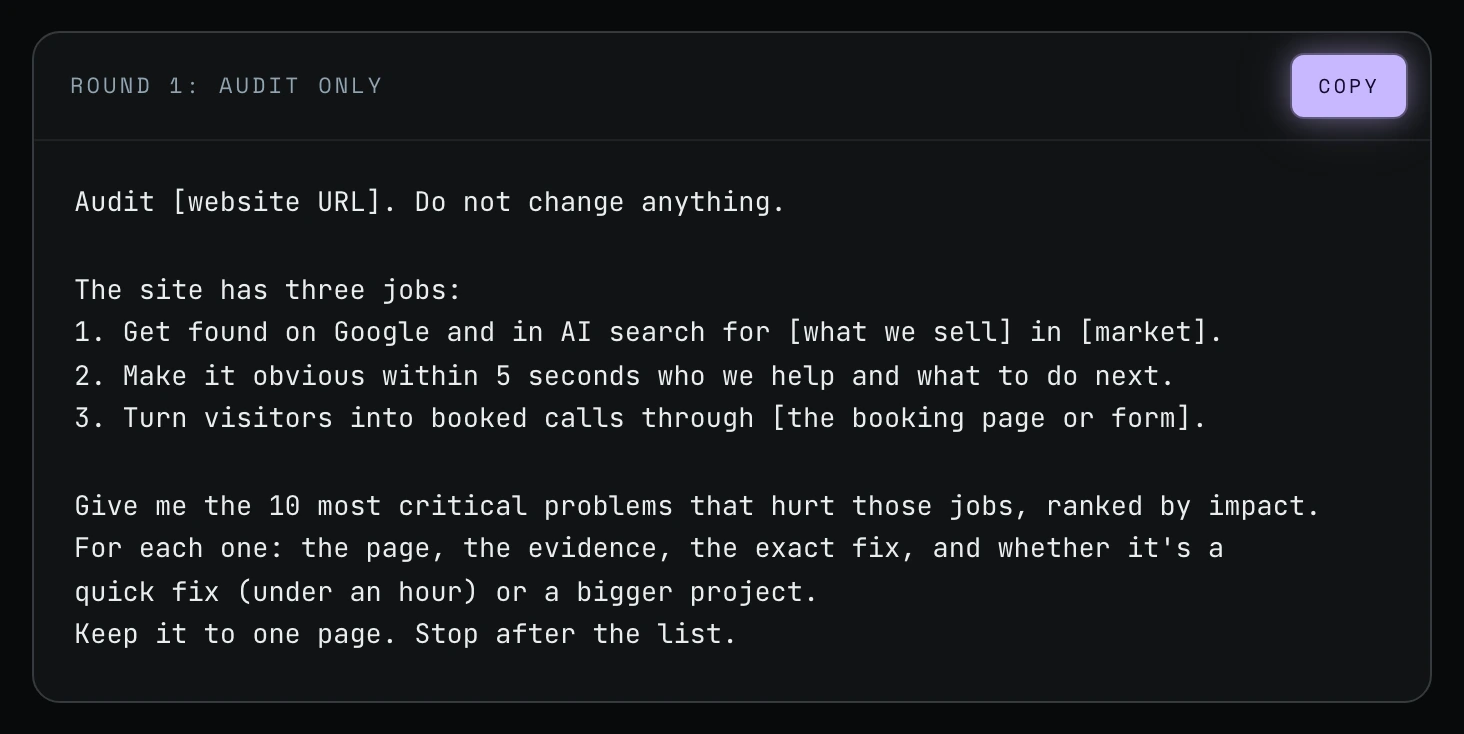
Step 2. Use rounds, each in its own short chat. Here is a real example: fixing your website. Don't say, "Check my website and fix everything." Do it in four rounds. Round 1 is the check. Tell the agent what your website is for, so it knows what matters most, and ask for no more than 10 problems.
Audit [website URL]. Do not change anything.

The site has three jobs:
1. Get found on Google and in AI search for [what we sell] in [market].
2. Make it obvious within 5 seconds who we help and what to do next.
3. Turn visitors into booked calls through [the booking page or form].

Give me the 10 most critical problems that hurt those jobs, ranked by impact.
For each one: the page, the evidence, the exact fix, and whether it's a
quick fix (under an hour) or a bigger project.
Keep it to one page. Stop after the list.
Step 3. Fix a few at a time. Round 2 is fixing in small batches. You say yes to the list, the agent fixes the top five, and after you check those it does the next five. If something breaks, you know which change broke it.
Fix items 1 to 5 from the approved audit. Nothing else.
If a fix needs something outside those 5 items, stop and ask.
For each one, show me what changed, and on which page.
Stop when the 5 are done. I'll review them before you start items 6 to 10.
Step 4. Review, then check again later. Round 3 is a review before anything goes live. Round 4 is a re-audit a week or two later.
Review the changes for items 1 to 10.
For each item, confirm it's fixed, show the evidence,
and flag anything that broke or looks different than before:
links, forms, mobile layout, page speed.
Don't fix anything new. List it for me.
Run the same audit from Round 1 again on [website URL].
Compare it with the original list:
- Which of the 10 problems are fixed
- Which ones are still there, or came back
- The next 10 problems, ranked the same way
Stop after the comparison.
Rounds 2 to 4 come from my field guide. The video shows the discovery prompt and Round 1. The same four rounds work for your customer list, your Google Drive, your email tools or QuickBooks.
Rethink your role
You have to rethink your role in a lot of the work that you do. I see a lot of people, especially at the highest level, who need to open their minds to there being a better way to do things, a more efficient way that is not necessarily the human way that they've done it for years (12:55).
Frequently asked questions
What is Codex plan mode?
Codex plan mode is a chat mode you turn on by typing /plan; OpenAI's command reference says Codex then proposes an execution plan before implementation work starts. Shanee's own method in the video is a discovery-only prompt, which works with or without plan mode.
How do I use plan mode in Claude Code?
Press Shift+Tab in Claude Code until the status bar shows plan mode on. Per Anthropic's docs, Claude proposes a plan and makes no edits until you approve.
What prompt should I use in Codex or Claude Code plan mode?
Use a discovery prompt. Shanee's starts with "This is a discovery task only. Do not change anything," then asks Codex or Claude Code to inspect, gather evidence and propose an exact fix plan before stopping (11:52).
Is planning first worth it for a small business?
Yes, on big jobs. A plan is one short round, while forcing your own route means Codex or Claude Code spends tokens (the units your plan counts) doing it your way, and then you pay to undo and redo the work.
Related ways in this series
- If the same thing fails twice, make the agent stop: what to do when the plan stalls mid-job.
- Test it on a small piece before the agent does the whole job: prove the plan on five items before running all of them.
- Start a new chat for each new job: keep each round in its own short chat.
- Clean up your files to be agent and human friendly: a cleanup is a big job that should start with an audit.
- How to supervise AI agents with work trails: check that the agent stuck to the approved plan.
- Back to the hub: How to Reduce Codex and Claude Code Token Usage: 20 Ways
Sources
Official / Primary Sources
- Shanee Moret, "20 Ways to Optimize How You Use Codex and Claude Code Part 2" (YouTube, 2026-10-03) , look first and fix second, the CRM-to-Notion and QuickBooks client examples, and the discovery and Round 1 prompts on screen.
- Shanee Moret, "20 Ways to Optimize Your Token Usage in Codex and Claude Code" (GrowthAcademy.Global field guide, 2026) , the three-step look, check, do sequence and the Round 2 to Round 4 prompts.
- OpenAI, Codex command reference (slash commands) , /plan switches the chat into plan mode and has Codex propose an execution plan before implementation work starts (checked 2026-10-05).
- Anthropic, Claude Code docs: Plan before editing , Shift+Tab plan mode; Claude reads files and proposes a plan but makes no edits until you approve (checked 2026-10-05).