
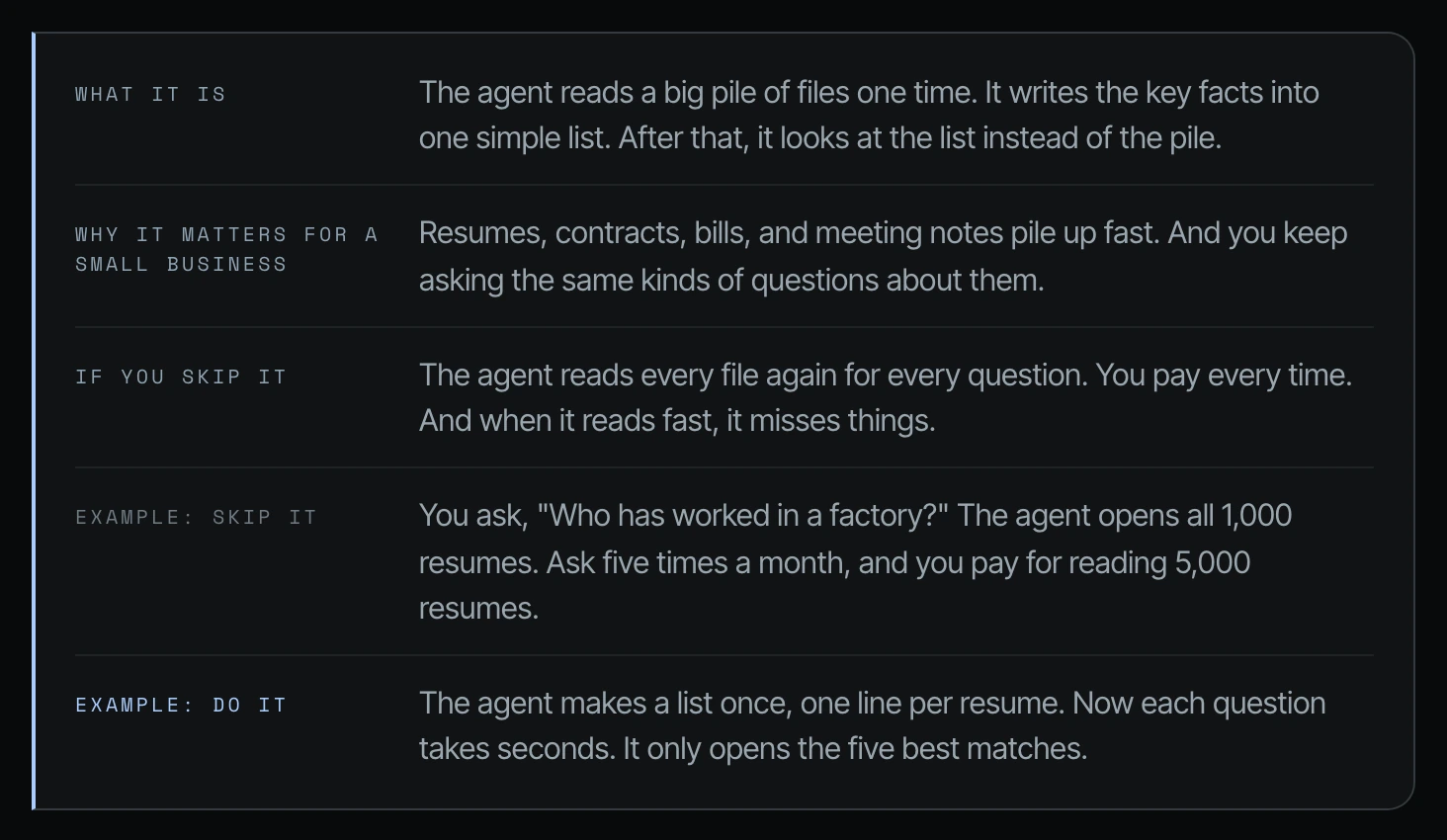
To make your data AI ready, have Codex or Claude Code read a folder once, pull the facts you search by into one simple list (an index, like a spreadsheet with one row per file), and answer later questions from that list. Your team stops paying the agent to reread the same résumés, contracts or transcripts.
I have been creating AI tutorials for business owners since January 2023, and I help established business owners build agents inside their companies. Don't make the agent read the same files over and over again. If you keep asking an agent questions about the same folder, it opens every file every time, and you pay for that every time in usage (tokens, the units your plan counts). (Video, 00:33)
In short: - Asking an agent about the same folder makes it open every file every time, and your business pays for every reread. - Have the agent read the folder once and save a spreadsheet index with the facts you search by (for résumés: state, skills, location). - Tell it to answer from the index first and open only the few matching files; in the résumé example that is five instead of a thousand. - Save the "index first" rule in your AGENTS.md or CLAUDE.md (the instruction file your agents read at the start of every chat) so your whole team's agents use it.
Part of the series: How to Reduce Codex and Claude Code Token Usage: 20 Ways. This is way 11. Previous: Point the agent to a file instead of uploading it · Next: Start a new chat for each job
1. Take your file cleanup to the next level
This is different than cleaning up your files. In that one, a business owner had a bunch of files in Dropbox, Google Drive, iCloud, and SharePoint. It was all over the place, and they moved everything over to something like Google Workspace and Google Drive, where all their files are organized. This takes it to the next level. (00:33)
2. Why AI résumé search gets expensive: the agent opens every résumé for every question
Let's say someone needs to hire people pretty often. They could have a recruiting agency, or they just need to do a lot of hiring. This person has to have their agent look at résumés pretty often. And in this case, let's pretend that they have all of the candidate résumés in a folder inside of SharePoint. (01:05)
If this person keeps asking the agent, "Hey, we need someone in this state with these particular skills," what they're forcing the agent to do is go into that folder, look at hundreds of résumés, and then surface the answer. Especially if those résumés are PDFs or documents, it's going to be extremely inefficient for the agent to do that. (01:35)
"Find the right person in this state with these skills." The agent is forced to open those thousand PDFs in that one folder every single time. And then there's room for error. It's a lot of burn and token usage that's completely unnecessary. (02:35)
3. How to make data AI ready: tag it once, then search the tags
In this case, that folder in and of itself should be improved in terms of its agentic nature. That data should become more agent friendly, so that the next time that question comes up, or if several recruiters go to that same data set within the same company, those agents don't have to go through the same thing every single time. (02:05)
The agent can help create something more agent friendly. It's able to tag people's states and tag people's skills in advance, depending on the needs of the business. Then instead of having to look through all thousand, it's only looking at five, because it's able to see that data pretty quickly. (03:06)
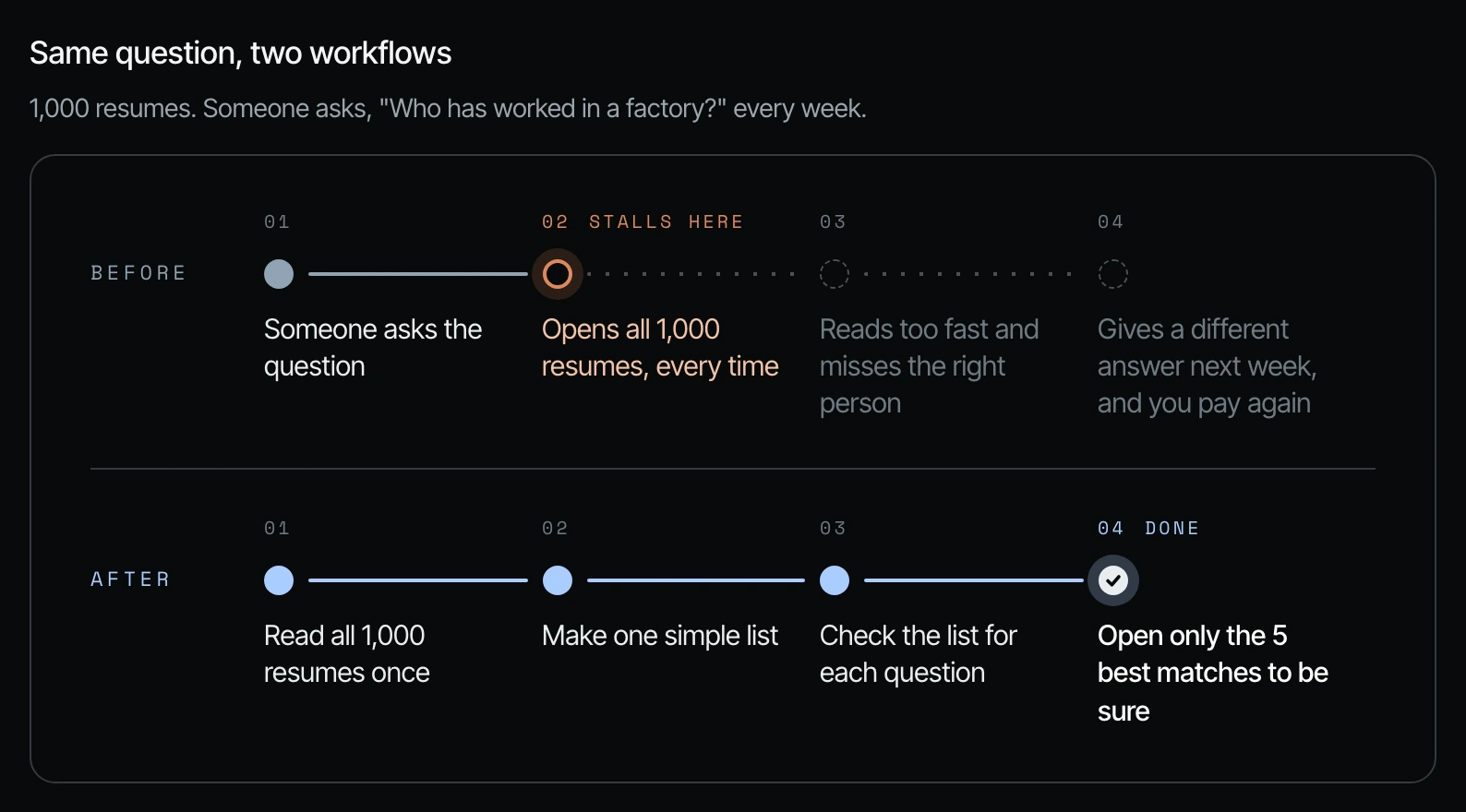
Same question, two workflows
The guide I showed on screen lays the résumé example out step by step.
| Old way (reread the pile) | New way (agent-friendly list) | |
|---|---|---|
| 1 | Someone asks the question | Read all 1,000 résumés once |
| 2 | Opens all 1,000 résumés, every time | Make one simple list |
| 3 | Reads too fast and misses the right person | Check the list for each question |
| 4 | Gives a different answer next week, and you pay again | Open only the 5 best matches to be sure |
The same idea works for other piles of files you keep asking about. Two more comparisons from the guide:
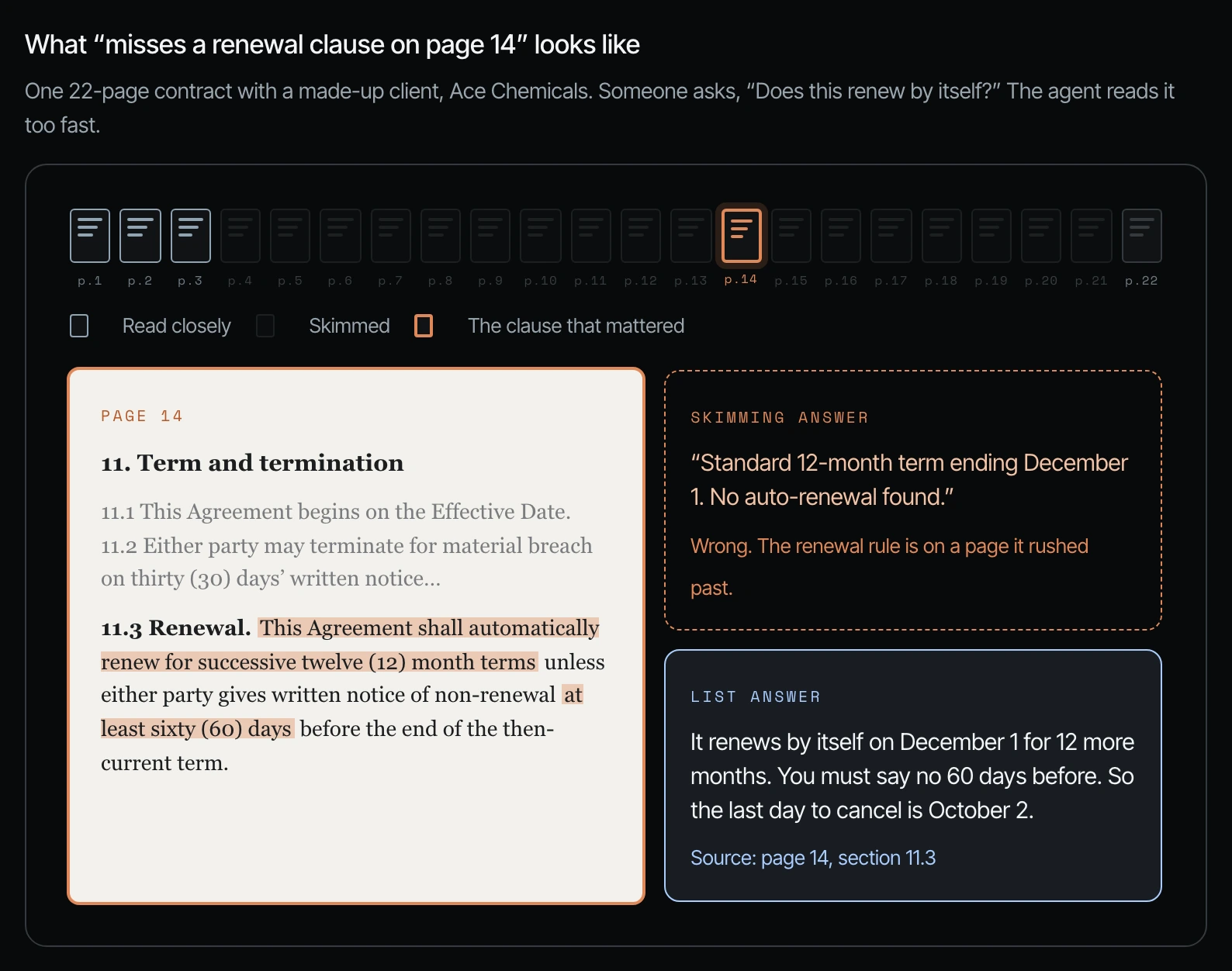
Contracts. 300 client contracts. Every month someone asks, "Which ones will renew by themselves in the next 90 days?"
| Old way | New way | |
|---|---|---|
| 1 | Someone asks the question | Read all 300 contracts once |
| 2 | Opens all 300 contracts, every time | List each client, price, renewal date, and how much notice is needed |
| 3 | Misses the renewal rule on page 14 | Look at the list for the next 90 days |
| 4 | A contract renews before anyone sees it | Open only the 6 contracts that match |
Sales calls. Two years of transcribed sales calls. Before every pitch, someone asks, "What worries do buyers bring up most?"
| Old way | New way | |
|---|---|---|
| 1 | Someone asks the question | Read the 400 calls one time |
| 2 | Reads all 400 calls again | Write down each worry, who said it, and what happened |
| 3 | The answer is based on whatever it skimmed | Count them and put the biggest first |
| 4 | Starts over for the next question | Pull 3 real quotes to double-check |
You already paid the AI to read it once. Don't pay it to read it again.
4. How to build an AI résumé database (or any document index) in Codex or Claude Code
Step 1. Ask yourself what that folder is in your business: the pile of files you or your team ask the same kinds of questions about. (03:06)
Step 2. Ask the agent to read the whole folder one time and build an index, one row per file, with the facts you search by. Here is the prompt from the guide:
Build a structured index of every resume in [folder].
For each one, extract: candidate name, industry, role, skills, certifications,
years of experience, location, availability, and a link to the original file.

Save it as a spreadsheet in [location].
From now on, answer questions about candidates from the index first.
Only open an original resume to verify a specific match.
Step 3. Save the "index first" rule where every agent will see it, like your AGENTS.md or CLAUDE.md file, so the next recruiter's agent uses the list too.
Step 4. Test it with a real question. The agent should check the list and open only the few files that match.
Then make sure that you make that entire structure more agent friendly. This is a huge one. (03:06)
Frequently asked questions
How do you make your data AI ready?
You make your data AI ready by having Codex or Claude Code read the folder once and pull the facts you search by into one simple list, like states and skills for each résumé. The agent checks the list first and only opens the original files that match.
How do I build an AI résumé database for hiring?
Ask Codex or Claude Code to read every résumé once and save a spreadsheet index with skills, experience, location, availability and a link to each file, using the prompt in this article. Then it answers candidate questions from the index and looks at five résumés instead of all thousand.
Is making data AI ready worth it for a small business?
Yes, if your team keeps asking the same questions about the same folder. Otherwise the agent opens every file every time, there's room for error, and Shanee calls that burn completely unnecessary.
Do I need a developer to index my documents for AI?
No. You ask Codex or Claude Code in plain English and it builds the index as a spreadsheet. Your job is to decide which facts your business searches by, starting with the folder your team asks about most.
Related ways in this series
- Clean up your business files for AI agents: the first step before this one.
- Point the agent to a file instead of uploading it: keep big files out of the chat.
- Turn repeat agent work into a script: keep the list up to date without paying for thinking.
- How to get your business ready for AI agents: the wider readiness steps this one fits into.
- Back to the hub: How to Reduce Codex and Claude Code Token Usage: 20 Ways
Sources
Official / Primary Sources
- Shanee Moret, "20 Ways to Optimize How You Use Codex and Claude Code Part 2" (YouTube, 2026-10-03), supports the résumé folder example, the old way and new way, and tagging states and skills in advance (00:33 to 03:37).
- Shanee Moret's companion field guide shown on screen in the video, supports the "same question, two workflows" comparisons for résumés, contracts, and sales calls, and the index prompt.