
Here is how to check Codex usage: in the Codex desktop app, click your face at the lower left, then click Usage, or type /status in any chat. To check Claude Code usage, open a new chat to see your stats, then type /usage, and before your business pays for more usage, check whether you have a free reset waiting.
I run agents across my business every day, and in one seven-day stretch my Claude Code account showed 550 sessions, 26,000 messages and 6.2 billion tokens (tokens are the units of text the AI reads and writes, and they are what your plan meters). I help established business owners build agents inside their companies, and the first thing I teach them is to look at the meter.
In short: - In Codex, click your face, then Usage, to see your plan, weekly limit, credits and resets; /status gives a quick check in any chat. - In Claude Code, a new chat shows your seven-day stats, and /usage shows the session, the week and the separate Fable limit. - Resets are free but expire, so check for one before you click Add more. - Automatic reload and usage credits charge the card on file.
Part of the series: How to Reduce Codex and Claude Code Token Usage: 20 Ways. This is way 1. Previous: the full guide · Next: Stop forcing agents to click around software
1. Learn how to check your usage before you change anything
Your "usage" is the amount of work your plan lets the agent do in a given window. Every message, every file the agent reads and every step it takes draws it down. When it runs out, the agent stops until the limit resets, or until you pay for more.
Most people react to a usage warning by buying more usage. Start somewhere cheaper: look at the meter. This is the Codex desktop app. It could also be referred to as the ChatGPT Work desktop app. The steps below show the same places I showed in the video.
| Where to look | Codex (ChatGPT Work) | Claude Code |
|---|---|---|
| Inside the tool | Type /status | Open a new chat, then type /usage |
| In your account | Your face (lower left), then Usage | Settings, then Usage |
Table adapted from Shanee's field guide on the same 20 ways. Menu names move around. If you can't find it, ask the agent: "Where do I see my usage limits?"
How to check Codex usage in the desktop app and with /status
Step 1. Click your face at the lower left, and then you will see Usage. The menu also shows how much is left before you even click it.
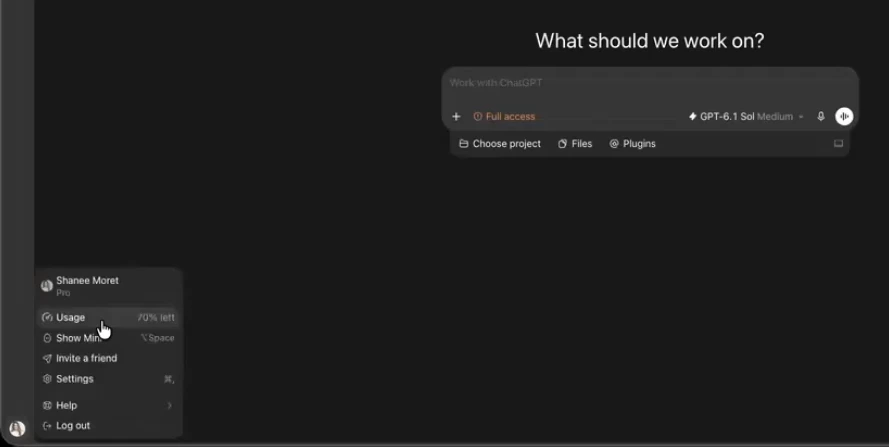
Step 2. Read the plan and the weekly limit. I have 70% of my usage left for the week. When I click this, I also see that I'm on the $200 plan and that I have 70% left, and I also see the credits that I have. Shanee says that OpenAI gave a gift of credits to everyone already on the $200 Pro plan, because, in her words, they are going to split that usage starting October 29 (00:31).
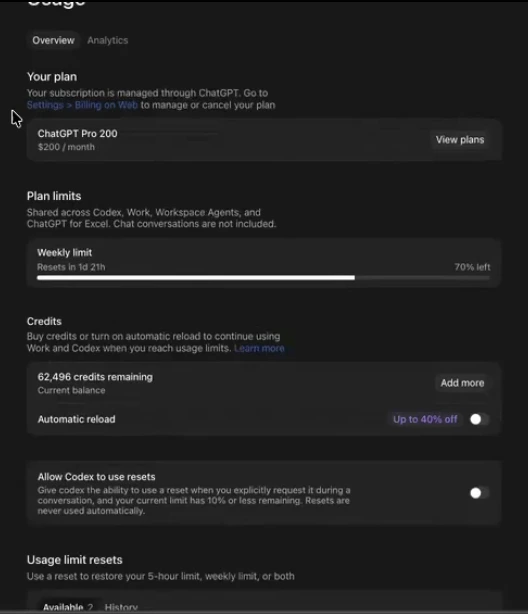
Step 3. Scroll down to resets. If I run through all this usage today, I could use a reset to continue using it for free. It does not take credits from the next month. It doesn't cost you anything. However, you do have to use these, because they expire. So before you just say "I don't have usage" and click Add more to buy, make sure you don't have resets (01:02).
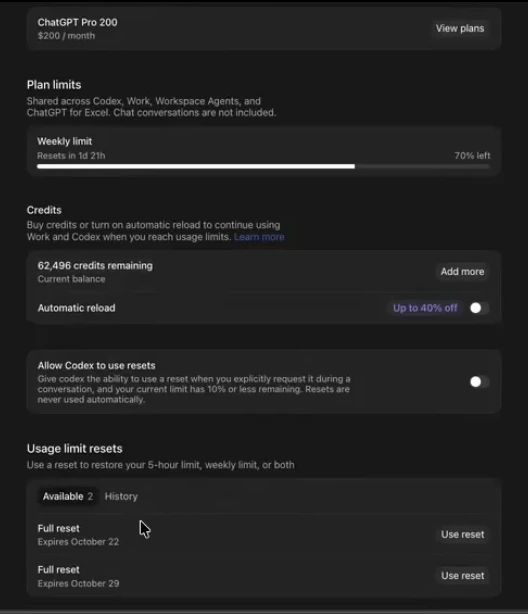
Step 4. Decide on the two switches. If you're going to do automatic reload, be very careful, because it could just charge your credit card or whatever you have on file. You can also toggle "Allow Codex to use resets" so that Codex can use a reset when you hit a usage limit (01:35).
In the video, Shanee describes this toggle as rolling into a reset automatically. The text under the toggle on her screen reads differently: it says Codex can use a reset when you explicitly request it during a conversation and your limit has 10% or less remaining, and that resets are never used automatically. Read the wording in your own account before you rely on it.
Step 5. Use the shortcut inside any chat. Another way that you can see your usage inside the ChatGPT desktop app is to type slash and then status. You see here that I have 70% left and it resets in two days (02:09).

How to check Claude Code usage with the /usage command
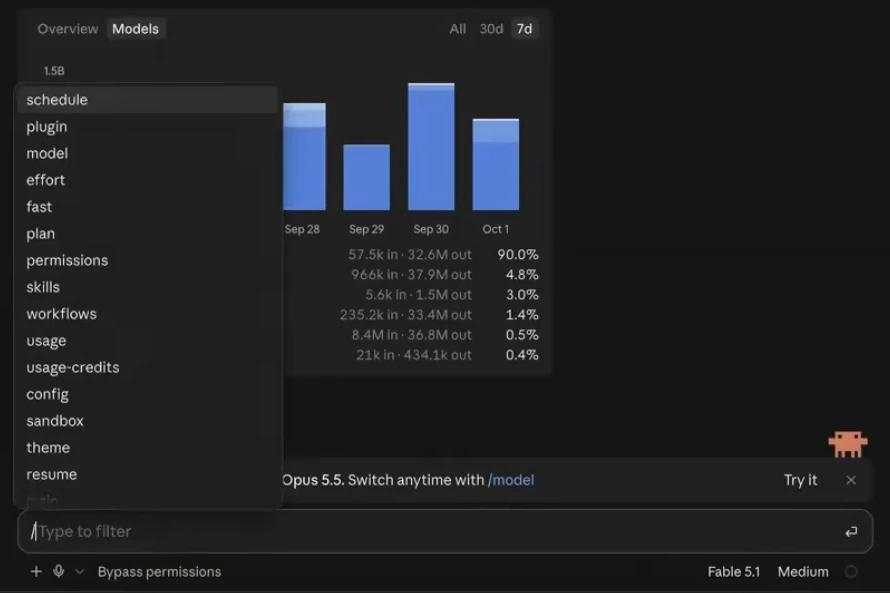
Step 1. Go to a new chat. To check your usage inside the Claude Code desktop app, all you have to do is go to a new chat and you'll see your stats at the top. You may see some chat suggestions show up. You just have to X out of them, and then you'll see this. Just in seven days I've had 550 sessions, 26,000 messages and 6.2 billion tokens. I've been really cooking with Opus 5.5. You can also see the models that you use on the Models tab (02:09).
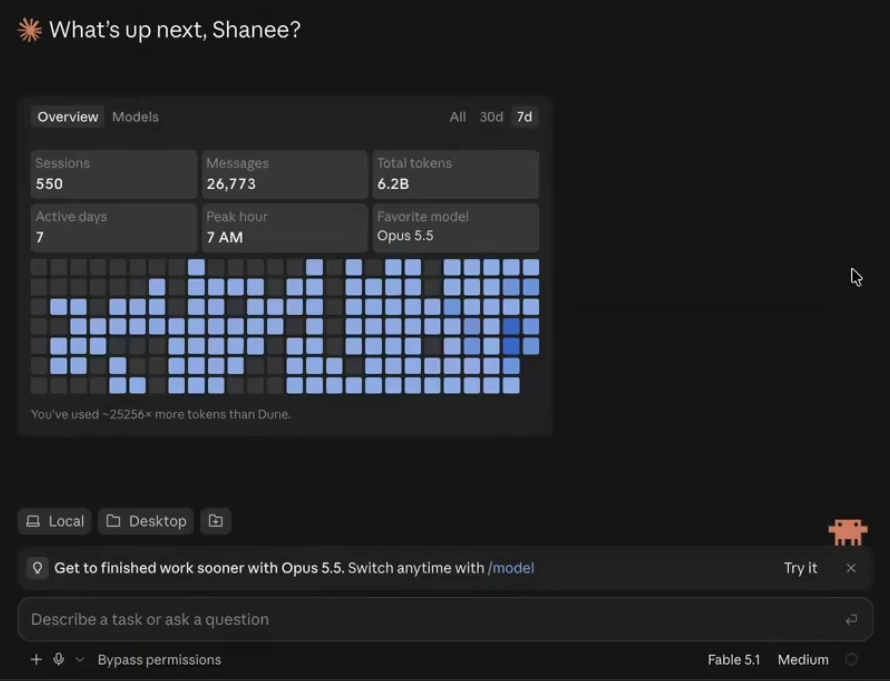
Step 2. Type slash, then usage. Down at the message box, type a slash and pick usage from the list. Shanee is on a Max 20x subscription and says she was surprised she had not reached her usage limit with Opus 5.5 in the previous week or two (02:43).
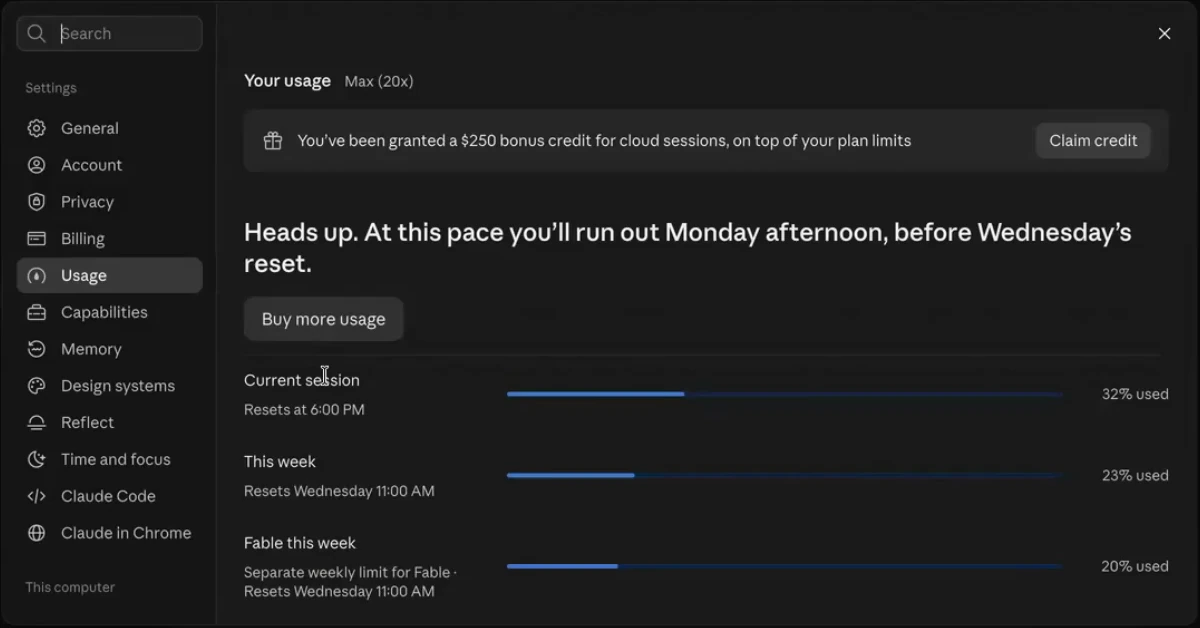
Step 3. Read the three bars. When you do slash usage inside of Claude Code, you'll see the current session, this week, and then Fable, because Fable is monitored on a different basis. My Fable resets Wednesday at 11:00 AM. Today is Thursday, and I've already used 32% of this current session. I've used 23% of the week, so there's still six days left, and I've used 20% of Fable (03:14).
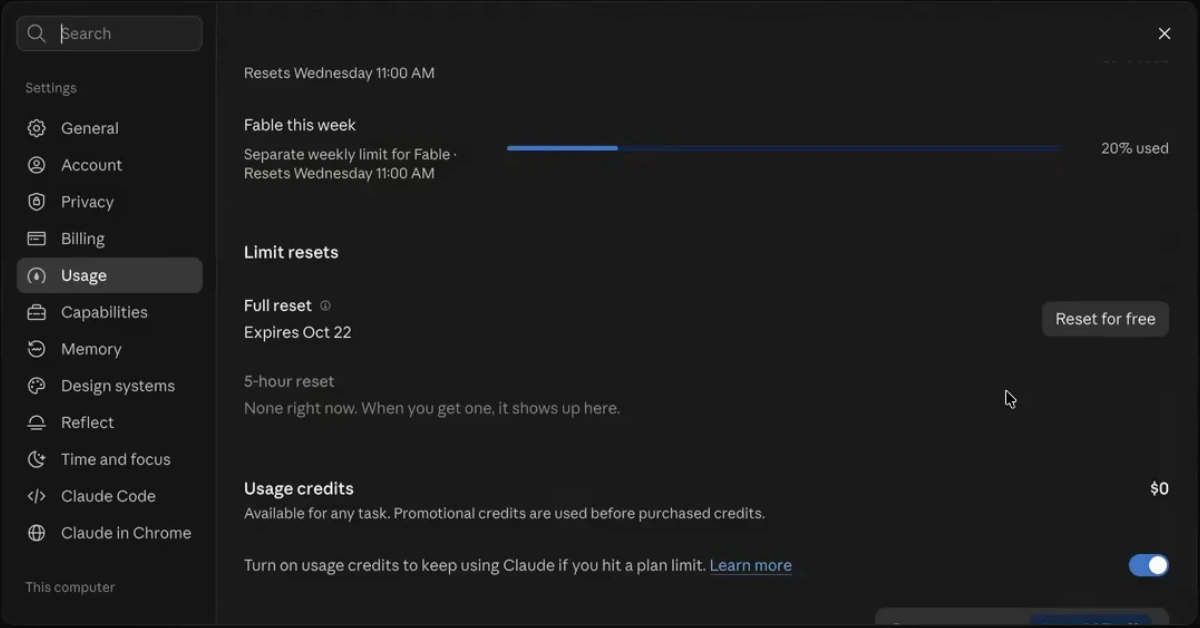
Step 4. Check for a reset and the usage credits switch. I do have one reset for free here. Claude is not as generous with their resets as Codex. With ChatGPT, you can almost expect a reset every month. On the Claude side, this is the first time I personally have ever even seen a reset. And once you hit that limit with Claude, you could put $50 in and it'll be gone in 10 minutes (03:44).
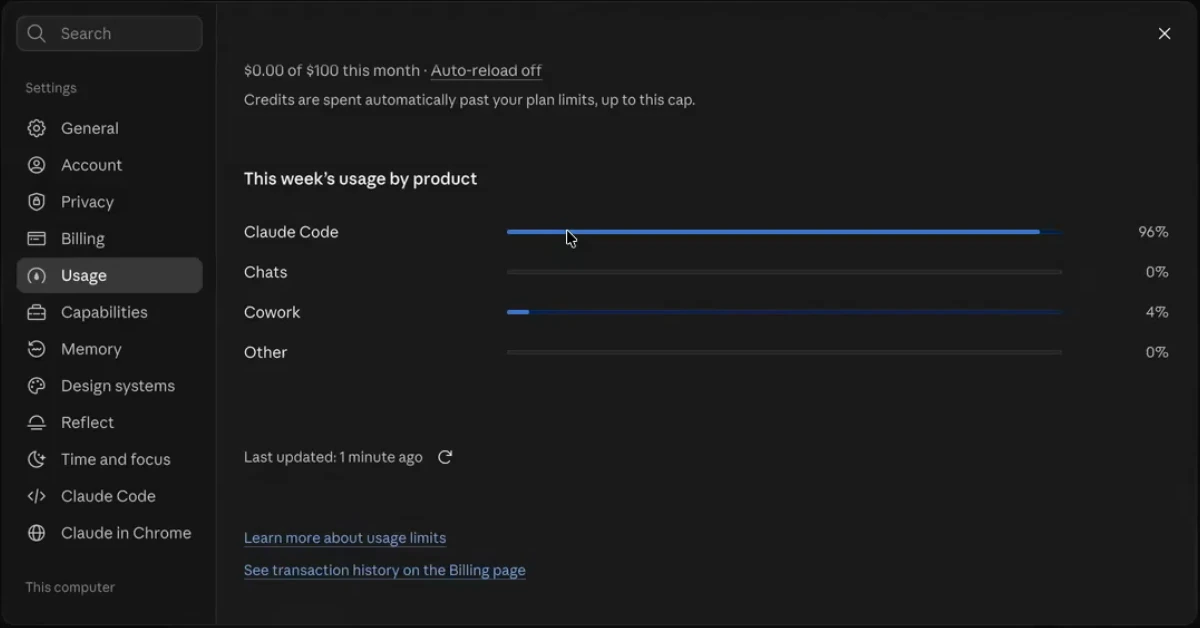
Step 5. See where the usage went. If you keep scrolling down, it shows where you're using it. 96% for me is Claude Code. If you're in the Claude desktop app, do not go to the chat side where Cowork is. Just go to Claude Code. There's no comparison (04:16).
What should a business owner look for in the usage numbers?
When you look, answer three questions:
- Which limit are you hitting? The five-hour window, or the weekly limit?
- How often? Once on a heavy day, or most days?
- What was running? One task you were sitting in, or agents working on their own?
These three questions come from Shanee's field guide on the same 20 ways. In that guide she also shares numbers from her own account: one chat ran for 1,666 turns and used 33% of a week by itself, and an hourly health check used 8.5%. A limit you hit because one runaway chat ate your week is a different problem from a limit you hit because five agents are doing real work every day.
The meter only tells you that you hit the limit. In part two of this series we build up to an agent that watches your usage every week and suggests the changes that fix it. That is way 20.
Frequently asked questions
How do I check Codex usage?
To check Codex usage, click your face at the lower left of the Codex desktop app, then click Usage. That page shows your plan, your weekly limit, your credits and any resets. Inside a chat, you can also type /status in Codex to see how much is left and when it resets.
What is the Claude Code usage command?
The Claude Code usage command is /usage: type a slash in the message box and pick usage from the list. It shows your current session, your week, and the separate Fable limit, plus any free resets and where your usage went by product.
When does Codex usage reset, and do Codex resets expire?
Codex shows your reset date on the Usage page and in /status; in Shanee's account, /status showed 70% left with a reset in two days. Codex resets are separate free top-ups listed on the Usage page, each with its own expiry date, so use them before they expire.
When does Claude Code usage reset?
Claude Code shows the reset time for each limit on the /usage screen. In Shanee's account, the session, the week and Fable each had their own bar, and her Fable limit reset on Wednesday at 11:00 AM. She says Claude gives free resets far less often than Codex; this was the first one she had seen.
Should my small business buy more usage or turn on automatic reload?
Check for a free reset in Codex or Claude Code before you buy anything. Be very careful with automatic reload, because Shanee warns it can charge the card on file, and she says $50 of extra Claude usage can be gone in 10 minutes.
Related ways in this series
- Stop forcing agents to click around software: the most common reason a weekly limit disappears in one day.
- Keep reasoning on medium for most work: the setting that changes how fast the meter moves.
- Start a new chat for each new job: why one long chat can eat a whole week.
- Build a weekly helper that finds waste: turn the meter into fixes.
- How to check your Claude Code usage: a closer look at the Claude Code usage screens.
- Check your ChatGPT usage with /status: the same /status check on the ChatGPT side.
- The full guide: How to Reduce Codex and Claude Code Token Usage, 20 Ways
Sources
Official / Primary Sources
- Shanee Moret, "20 Ways to Use Codex and Claude Code Without Burning Your Usage (Part 1)" (YouTube, 2026-10-02) , the Codex and Claude Code usage screens, /status, /usage, resets, the October 29 statement, and her own usage figures.
- Shanee Moret, "20 Ways to Optimize Your Token Usage in Codex and Claude Code" (GrowthAcademy.Global field guide, 2026) , the where-to-look table, the three questions, and her own-account chat and health-check figures.