
Codex medium vs high comes down to cost: high reasoning (how hard the model thinks before it answers) spends more of the plan you pay for thinking on every step, and medium handles most business work, like emails, CRM updates and reports. Keep Codex and Claude Code on medium, and move to high only for a hard job, such as turning messy notes into a proposal.
I run agents across my business every day, and for almost 90 to 95% of the work I've been doing recently in Claude Code, it's been Opus 5.5 at medium. That is the short answer: keep reasoning on medium for most work. Claude Code calls reasoning "effort". In Codex you'll find it at the bottom right of a new chat. In Claude Code it sits next to the model name, under the message box.
In short: - Medium handles most daily business work: emails, CRM updates, reports and filling templates. - High spends more of your usage on every step, so save it for jobs like turning messy notes into a proposal. - In Codex, click the blue Medium at the bottom right of a new chat; in Claude Code, the effort control sits next to the model name. - In Shanee's audit, 21 of 445 turns on xhigh generated 15.5% of the week's tokens.
Part of the series: How to Reduce Codex and Claude Code Token Usage: 20 Ways. This is way 4. Previous: Graduate from plugins to API keys · Next: Match the model to the job
4. Keep reasoning on medium for most work
Higher reasoning means the model spends more of your usage thinking before it acts. That is worth it for a hard problem. It is wasted on a routine one. You do want to be, for most of your work, on medium reasoning (16:43).
Shanee's field guide puts it this way: your agent does not need maximum reasoning to move a file, update a CRM field, write a routine email, check a spreadsheet, or run a process it already understands. People crank everything to the highest setting and then wonder why their usage disappears.
| Skip it | Do it | |
|---|---|---|
| What happens | You set everything to maximum because "smarter must be better." Rewriting a two-line follow-up email now costs as much as working through a pricing strategy. | Emails and CRM updates run on medium. You move up for the occasional hard question, and your usage lasts the whole week. |
Example from Shanee's field guide.
How to change the Codex reasoning effort level to medium
Step 1. When you're starting a new chat inside ChatGPT Work or Codex, you will see the effort and reasoning level at the bottom right. Click it. Just by clicking it, you can see that I'm on GPT-6.1 Sol medium (16:13).
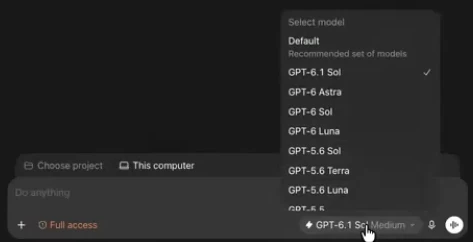
Step 2. Click the blue word that says Medium. It shows you the reasoning slider, and from there you can open the full list of models. Leave the slider on Medium for everyday work (16:43).

How to set the Claude Code effort level to medium
Step 1. On the Claude Code side, look under the message box. In my video it says Fable 5.1, because that is the default. I like to keep it on Opus 5.5. I really love Opus 5.5. It's one of their newest models (16:43).
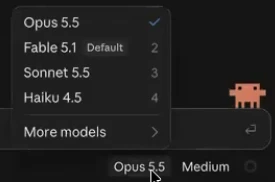
Step 2. Click the effort level next to the model name and keep it on Medium. You could also put it on Ultra Code, where it's extremely smart, or on max, extra, high, and medium (16:43). In the frame below, the slider runs from Faster to Smarter, and Medium is marked Recommended.
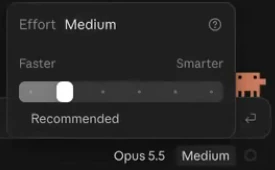
Codex reasoning effort levels explained: when to move off medium
Shanee's field guide lays out when each level earns its cost. The rule from the guide: pick the lowest level that does the job reliably, and move up one step only when it fails. For a longer walkthrough, see Codex reasoning levels for business owners.
| Reasoning level | When to use it | Codex | Claude Code |
|---|---|---|---|
| Low | Quick lookups, renaming files, simple formatting, pulling one number from a report | Low | low |
| Medium (default) | Most daily work: emails, CRM updates, reports, filling templates, routine builds | Medium | medium |
| High | A tricky bug, a multi-step workflow build, turning messy notes into a proposal | High | high |
| Extra high | Migrating your CRM, redesigning how systems connect, a security or compliance review | Extra High | xhigh |
| Max | One very hard, tangled problem that high already failed on, like books that won't reconcile | Max | max |
| Ultra | A huge job split across several agents at once, like rebuilding a 30-page site | Ultra | ultracode |
Table from Shanee's field guide, with levels as of September 2026. The exact names depend on the model you pick.
From her own account, the field guide reports that just 21 of 445 turns (a turn is one back-and-forth with the agent) used xhigh reasoning, and those 21 turns generated 15.5% of the week's tokens. That is the cost of leaving a high setting on for work that didn't need it. The weekly audit that found it is way 20.
Reasoning is one of three dials. The other two are which model you pick (way 5) and whether you pay for faster execution (way 6).
Frequently asked questions
Codex medium vs high: which should I use?
Use medium in Codex for most work, and switch to high only for a hard job, like turning messy notes into a proposal. Shanee keeps about 90 to 95% of her own Claude Code work on medium.
Does high reasoning use more tokens than medium in Codex?
Yes. Higher reasoning settings in Codex and Claude Code spend more of your usage thinking on every step. In Shanee's own audit, just 21 of 445 turns ran on xhigh reasoning, and those turns generated 15.5% of the week's tokens.
What are the Codex reasoning effort levels?
Shanee's field guide lists the Codex reasoning effort levels as Low, Medium, High, Extra High, Max and Ultra, as of September 2026, and the exact names depend on the model you pick.
How do I change the Claude Code effort level?
In Claude Code, click the effort level next to the model name under the message box. The slider runs from Faster to Smarter, Medium is marked Recommended, and the options go up through high, extra, max and Ultra Code. Shanee keeps Opus 5.5 on medium.
Does my small business need the highest reasoning setting?
Not for most work. Shanee's field guide says your agent does not need maximum reasoning to move a file, update a CRM field, write a routine email or check a spreadsheet. Setting everything to maximum makes a two-line follow-up email cost as much as a pricing strategy.
Related ways in this series
- Match the model to the job: reasoning level and model choice work together.
- Don't pay for faster execution unless speed matters: the third setting that changes how fast your meter moves.
- Check your usage and resets: see whether a high setting is eating your week.
- The full guide: How to Reduce Codex and Claude Code Token Usage, 20 Ways
Sources
Official / Primary Sources
- Shanee Moret, "20 Ways to Use Codex and Claude Code Without Burning Your Usage (Part 1)" (YouTube, 2026-10-02) , where the reasoning and effort settings are in Codex and Claude Code, and her 90 to 95% Opus 5.5 on medium.
- Shanee Moret, "20 Ways to Optimize Your Token Usage in Codex and Claude Code" (GrowthAcademy.Global field guide, 2026) , the reasoning-level table, the skip-it/do-it example, the Codex Medium screenshot, and her xhigh audit figure.