The cheapest way to have Claude Code read large files, like a 150-page contract PDF or a 5,000-row spreadsheet, is to tell the agent where the file is saved and what you need from it, instead of uploading it to the chat. The same works in Codex. I have been creating AI tutorials for business owners since January 2023, and I help established business owners set up agents in Codex and Claude Code. One habit I keep seeing burn through usage is pasting big files into the chat. I see a lot of people pasting 100-page things into the chat, and then they're wondering why they're burning through usage, because 50 messages later it's still costing them. Tell the agent where a big file is instead of uploading it. A file in a folder costs nothing until the agent opens it. (Video, 31:31)
In short: - Tell Codex or Claude Code the folder, the file name and the one thing you need, instead of uploading the file. - A pasted file keeps costing you as long as the conversation runs, because the agent rereads it with every message. - For recordings, point the agent to the transcript, not the video. - Add a "Large files" rule to your AGENTS.md or CLAUDE.md so every agent asks where a file is saved.
Part of the series: How to Reduce Codex and Claude Code Token Usage: 20 Ways. This is way 10. Previous: Make great agent output the standard · Next: Make your business data agent friendly
1. Point the agent to the file's location and say what you need from it
Instead of dropping a 150-page vendor contract into the chat and saying, "Hey, can you check this PDF for the clause about XYZ?", you could just say, "Hey, I need you to review the addendums in the contract for XYZ client in the Drive. Tell me what each addendum changes from the original and flag anything that affects price." (31:31)
Or you could say, "Pull the transcript from Tuesday's sales call with XYZ. You know where to find it." That's better than pasting a 90-minute conversation into the chat, because that's going to burn tokens in the output, in the replies, in the messages back and forth. It will have to reread that. (32:05)
Why uploading a large PDF to ChatGPT, Codex or Claude Code keeps costing you
A token is the unit your AI plan measures usage in. Every message you send makes the agent read the conversation again, and an uploaded file is part of that conversation. So the whole file rides along in every message after that, even when you've moved on to something else.
A file in a folder costs nothing until the agent opens it. A file pasted into the chat keeps costing you as long as the conversation runs. (32:36)
2. Use "instead of, say this" prompts
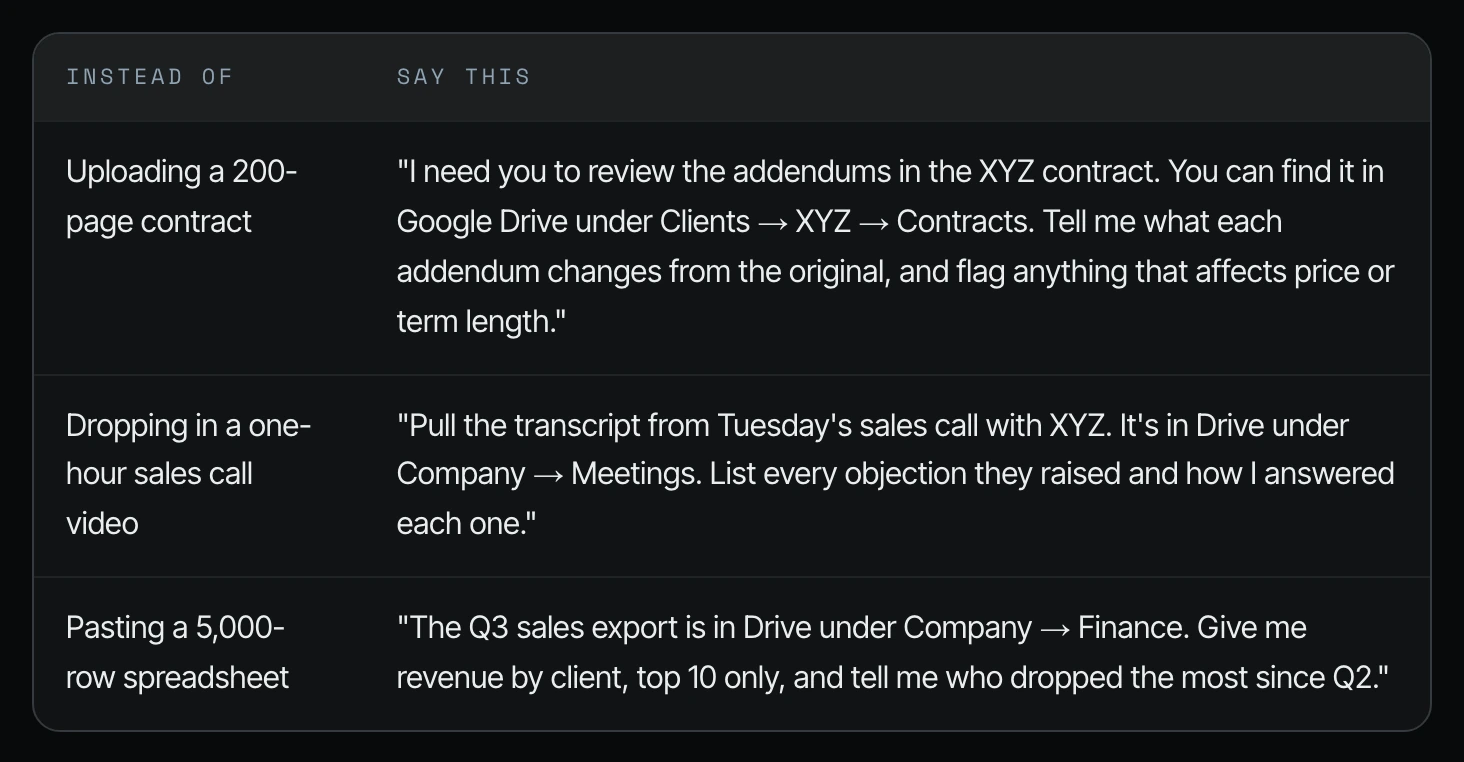
Here are the before and after examples from the guide I showed on screen. Each one names where the file lives and what to pull out of it.
| Instead of | Say this |
|---|---|
| Uploading a 200-page contract | "I need you to review the addendums in the XYZ contract. You can find it in Google Drive under Clients → XYZ → Contracts. Tell me what each addendum changes from the original, and flag anything that affects price or term length." |
| Dropping in a one-hour sales call video | "Pull the transcript from Tuesday's sales call with XYZ. It's in Drive under Company → Meetings. List every objection they raised and how I answered each one." |
| Pasting a 5,000-row spreadsheet | "The Q3 sales export is in Drive under Company → Finance. Give me revenue by client, top 10 only, and tell me who dropped the most since Q2." |
How to make Claude Code or Codex read a large file or PDF
Step 1. Save the file where it belongs in your shared drive or project folder, not in the chat.
Step 2. In a new chat, tell the agent the folder path, the file name, and the one thing you need from it.
Step 3. Ask for a short answer: the addendum changes, the objections, the top 10 clients. The agent opens the file, pulls out the part it needs, and leaves the rest alone.
Step 4. For a recording, ask for the transcript, not the video. The guide on screen says to work from the transcript, not the media file.
3. Make it a rule in your AGENTS.md
AGENTS.md (or CLAUDE.md in Claude Code) is the onboarding page your agents read at the start of every session. Add a short "Large files" rule so every agent asks where a file is saved instead of asking you to upload it. Copy this block:
## Large files
- Don't ask me to upload or paste large files. Ask me where they're saved.
- Open only the pages, sections, or rows the task needs.
- For video or audio, work from the transcript, not the media file.
- If a file is too big to handle in one pass, tell me and propose how to split the work.
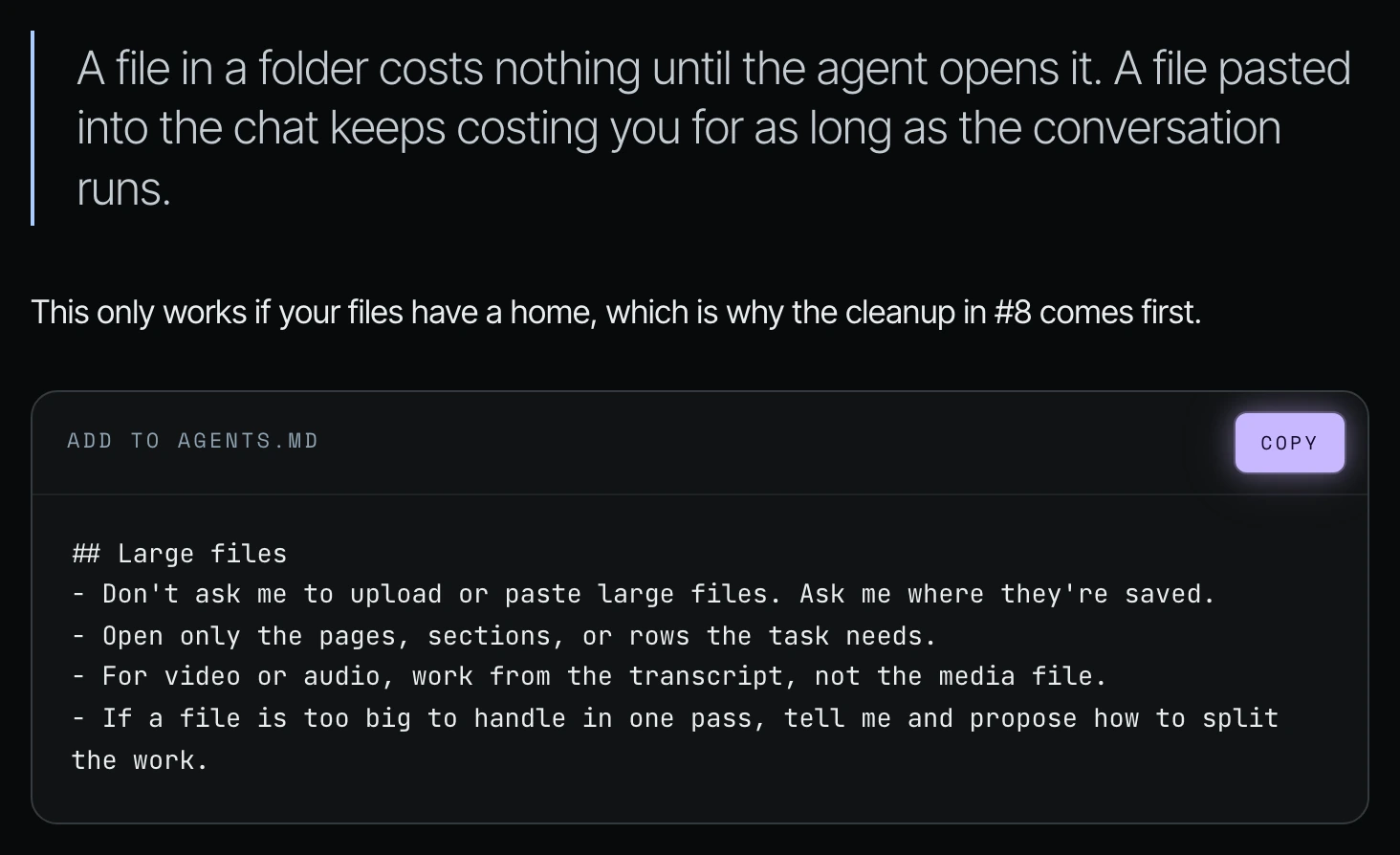
This only works if your files have a home, which is why the cleanup in way 8 comes first. If you have critical files in five to seven different places, the agent has to go looking every time.
Frequently asked questions
How do I get Claude Code to read large files?
Tell Claude Code where the file is saved, its name, and the one thing you need from it, instead of uploading it. Shanee's rule: a file in a folder costs nothing until the agent opens it.
What should I do when Claude Code says a PDF file is too large?
Point Claude Code to where the PDF is saved and ask only for the pages or sections the task needs. Shanee's "Large files" rule also tells the agent to propose how to split the work when a file is too big for one pass.
Can Codex read PDF files without uploading them?
Yes. In Shanee's method you give Codex the folder or Google Drive location, like Clients, then XYZ, then Contracts, and say what you need. Codex opens the file where it lives instead of carrying it in the chat.
Why does uploading a large PDF to ChatGPT, Codex or Claude Code use so much usage?
An uploaded file becomes part of the conversation, and the agent rereads the conversation with each message. Fifty messages later, the file is still costing you.
Can my team do this without technical skills?
Yes. It is a plain-English request: where the file is saved and what you need from it. Adding Shanee's "Large files" block to your AGENTS.md makes every agent follow the habit for everyone.
Does this work if my files are scattered?
Not well, because Codex and Claude Code need to know where the file lives. Pick one home for your files and name them clearly first.
Related ways in this series
- Clean up your business files for AI agents: give every file one home first.
- Make your business data agent friendly: stop the agent rereading the same pile of files.
- Start a new chat for each job: long chats carry old files and messages forward.
- Write a good agents.md or claude.md: where the Large files rule goes.
- Back to the hub: How to Reduce Codex and Claude Code Token Usage: 20 Ways
Sources
Official / Primary Sources
- Shanee Moret, "20 Ways to Use Codex and Claude Code Without Burning Your Usage (Part 1)" (YouTube, 2026-10-02), supports the contract and sales-call examples and "a file in a folder costs nothing until the agent opens it" (31:31 to 33:11).
- Shanee Moret's companion field guide shown on screen in the video, supports the "instead of, say this" table and the Large files AGENTS.md block.