
The simplest way to track Claude Code usage, and Codex usage, is a weekly audit: one read-only prompt that shows where the last seven days of usage went, why it was expensive, and the top three fixes, which you approve or reject. Your usage screen tells you that you hit a limit. This tells you why. I have been creating AI tutorials for business owners since January 2023, and I help established business owners build agents inside their companies. This week I ran a usage audit on my own account, and it found that I had regenerated a client's thumbnails about 20 times because I never gave the agent a reference photo. If you skip it, the waste does not get better, your behaviors don't get better, and your agents.md doesn't get better either.
In short: - Track Claude Code or Codex usage by running a read-only audit prompt on the last seven days: where usage went, why it was expensive, which limit you hit, and what to change. - The audit labels each expensive session with a cause, such as browser use where a connector or API (a direct connection to your software) exists, a heavier model than the job needed, long chats, or retries. - It ranks the top three fixes by how much usage each would save, and nothing changes until you approve. - Add the Token Tracker block to agents.md, the one-page rule book your agents read, so the check runs every week on medium reasoning and stays under one page.
Part of the series: How to Reduce Codex and Claude Code Token Usage: 20 Ways. This is way 20, the last one. Previous: Audit your scheduled AI agents · Back to the full series
1. Build a weekly helper that finds waste and fixes your token usage
You could easily do this in something like Codex, and it doesn't necessarily need to be an advanced prompt. What it is: an agent that looks at your usage every week, finds the biggest waste, and suggests a fix for you to say yes to.
This may not seem like a lot in the short term. But when you have 10, 25, 50, 100 plus agents running, you want these good habits to also compound. You don't want to have to learn them the hard way.
Here is the example on Shanee's slide: every Monday you get a one-page note. This week's biggest leak was the lead-sorting agent using the most expensive model. Okay to switch it? You click yes.
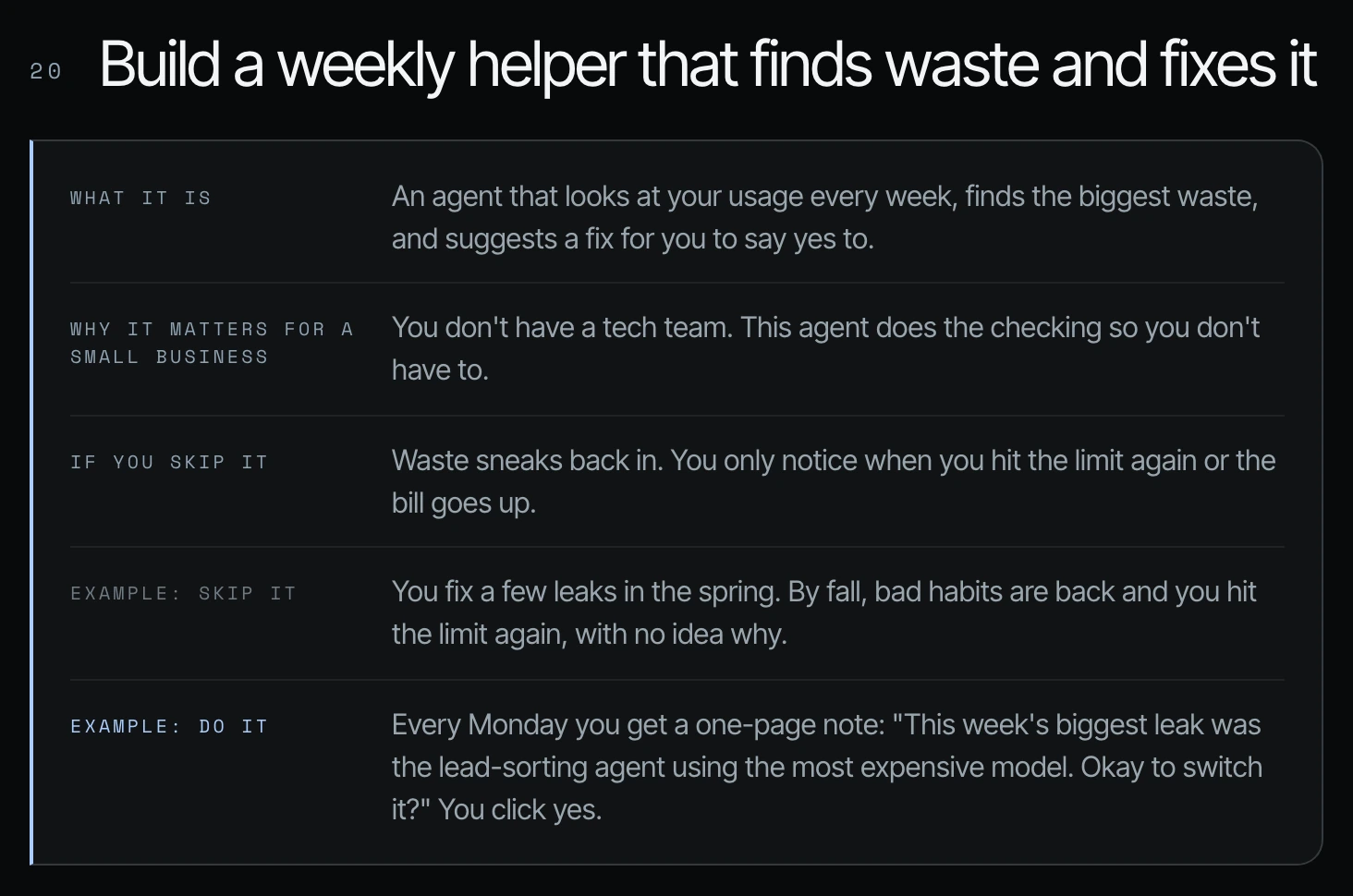
Your usage screen (way 1) tells you that you hit your limit. It doesn't tell you why. As Shanee's field guide puts it, it is a scoreboard, not a doctor.
2. How to track Claude Code and Codex usage: run the audit prompt on the last seven days
Start with a one-time check before you build anything. Here's one way to do this prompt. Read aloud, it says: audit my Codex or Claude Code usage for the last seven days. Where did it go? Why was it expensive? What limit did I hit? What should I change? Keep it one page. Show your evidence. Don't apply any fix until I approve.
The full version on screen breaks each question down:
Audit my Codex or Claude Code usage for the last 7 days.
This is read-only. Don't change any settings, files, or schedules.

1. Where did it go?
 List the 10 sessions, chats, or scheduled runs that used the most.
 For each: date, what it was doing, number of turns, and its share
 of the week's total usage.

2. Why was it expensive?
 Label each one with the main cause:
 - Disconnected: browser or computer use where a connector or API exists
 - Rethinking: reasoning, speed, or model heavier than the job needed
 - Rediscovering: re-learning what AGENTS.md or a template should cover
 - Rereading: long chats, big pasted files, broad searches, unused connectors
 - Retrying: the same action failing again and again
 - Unused work: output nobody used, or scheduled runs that found nothing

3. What limit did I hit?
 Tell me which limit I hit, how often, and what was running each time.

4. What should change?
 Give me the top 3 fixes, ranked by how much usage each would save.
 For each: the exact change, where it goes (AGENTS.md, settings,
 schedule, connector, script), and the estimated savings.

Keep it to one page. Show your evidence. Don't apply any fix until I approve.
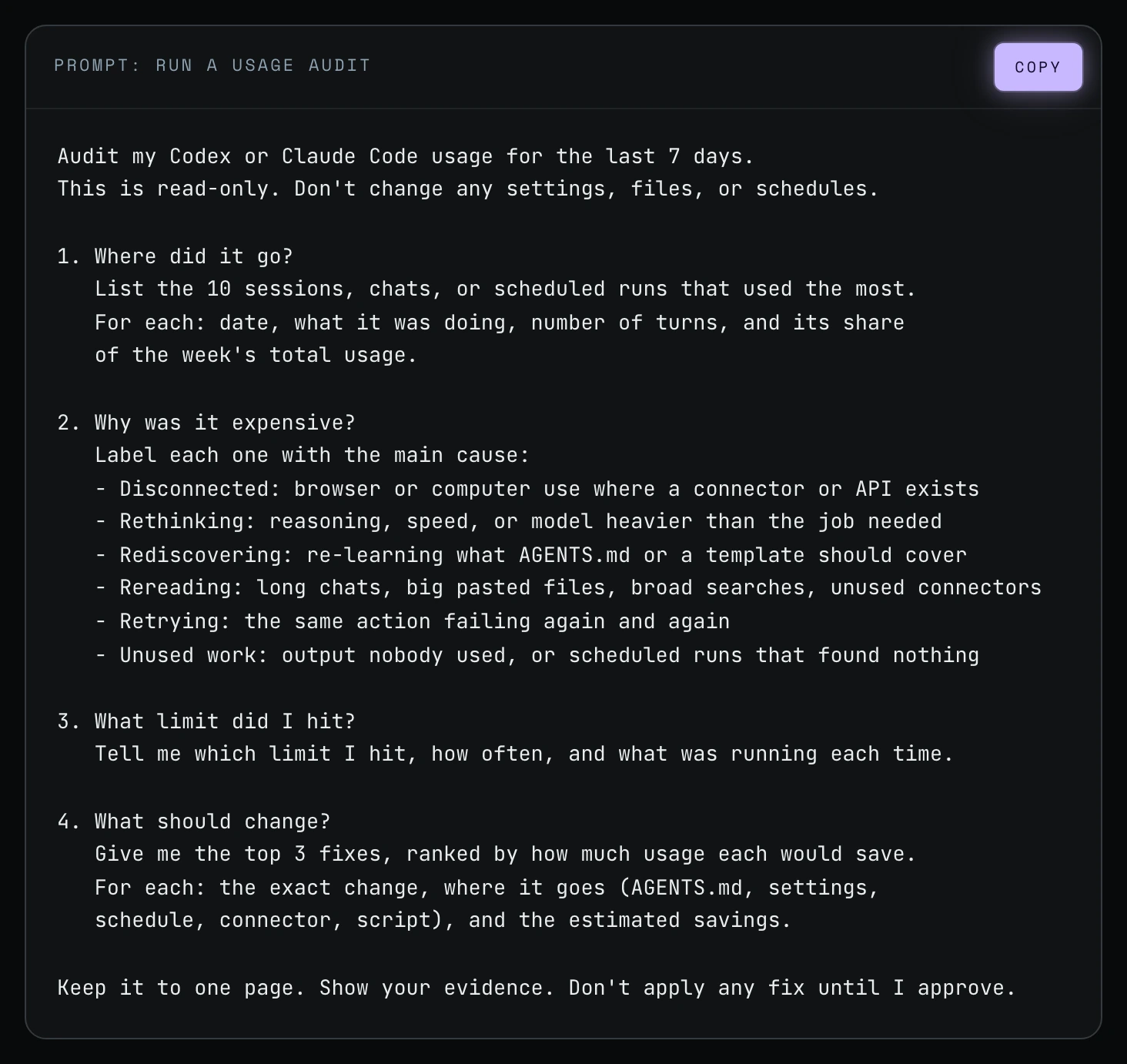
How to get a Claude Code or Codex usage report
Step 1. Open a new chat in Codex or Claude Code and paste the prompt.
Step 2. Let it run read-only. You would copy this and get the first report for the first seven days inside of your Codex or your Claude Code.
Step 3. Read the evidence for each finding before you approve any change.
Step 4. Approve the rule changes you agree with, and pick the habits you will test this week.
3. Shanee's own report: what it found this week
So for me personally, I did it this week, and the biggest thing for me was the fact that I was creating thumbnails for a client, and I didn't really have this client's reference photo.
Thumbnail regenerations. There were a lot of regenerations for this client's thumbnails because we're migrating her site. The article thumbnails for the site all needed to be redone because the quality of them before was terrible. But to get them right took about 20 times, and it was because I didn't have a defined reference photo and I really didn't give it an example from the start.
The YouTube browser upload. It realized that, and it listed a couple of other things, like the browser trouble. There was a browser error that I shared in the first video, where it tried to upload a video to YouTube via the browser when it had the API key, and that burned a lot. (That story is way 2.)
Long chats. And then there was one chat where different jobs stayed in long chats. (That is way 12.)
As you could see, it listed the tokens, with a plain note on each line about how much of it was really waste:
| Work checked (as shown in her report) | Recorded token use | What the report says it means |
|---|---|---|
| Thumbnail correction period | About 6 million | Includes fixes and useful work. Not all waste. |
| Caption correction period | About 21 million | Includes fixes, tests and other work. Not all waste. |
| Article revision period | About 93 million | Includes content changes, browser recovery and other work. The costs can't be split exactly. |
| Frozen-browser recovery period | About 8.1 million | Already inside the 93 million above. Do not add it again. |
| Start of the article phase in a long chat | About 699,000 input tokens per message at the middle of the range | Shows how much text was being sent in. Does not prove all of it was needed or wasted. |
| Video work before the source was corrected | About 20 million | Includes setup that may still have been useful. Not all waste. |
Three changes to the agent rules
Then it listed three changes to the agent rules and three habits. The proposed rule changes are for the agents.md, which is a one-page rule book for your agents.
| Proposed rule | Plain meaning (from her report) |
|---|---|
| Check before saying "done." | Use a short checklist for the task. Look at the actual result. Fix failed checks before delivery. |
| Carry forward only needed details. | When the job changes, make a short note. Keep useful facts without dragging along the whole old chat. |
| Do not repeat failed steps without a change. | After two matching errors, find the cause. Retry when the tool, page or plan has changed. |
The first rule came straight from the thumbnails. The thumbnail QA was just not strong enough, so it would deliver the thumbnails to me and I would have to correct, correct, correct. So I had to strengthen my QA for this particular client's set of thumbnails.
Three habits for me to test
| Habit | Example from her report |
|---|---|
| Review one sample first. | "Show one thumbnail before making the full batch." |
| Separate different jobs. | "Write a short note so we can start the article in a new chat." |
| Name the exact source. | "Use this Zoom file. Check that it is the black-shirt recording before editing." |
The last one came from a video edit. It was the Zoom video for today, there were two Zoom videos, and it chose the one in the wrong shirt. So that's a good correction for me.
The report ends with what to check next week: repeated corrections (you repeat fewer rules), first-pass quality (more work meets your needs the first time), and tool failures (agents stop repeating steps that cannot work yet).
A second report from Shanee's Codex account
Shanee's field guide shows an earlier weekly check from her Codex account. It found three things, changed nothing without asking, and showed her usage improved 33.5% week over week.
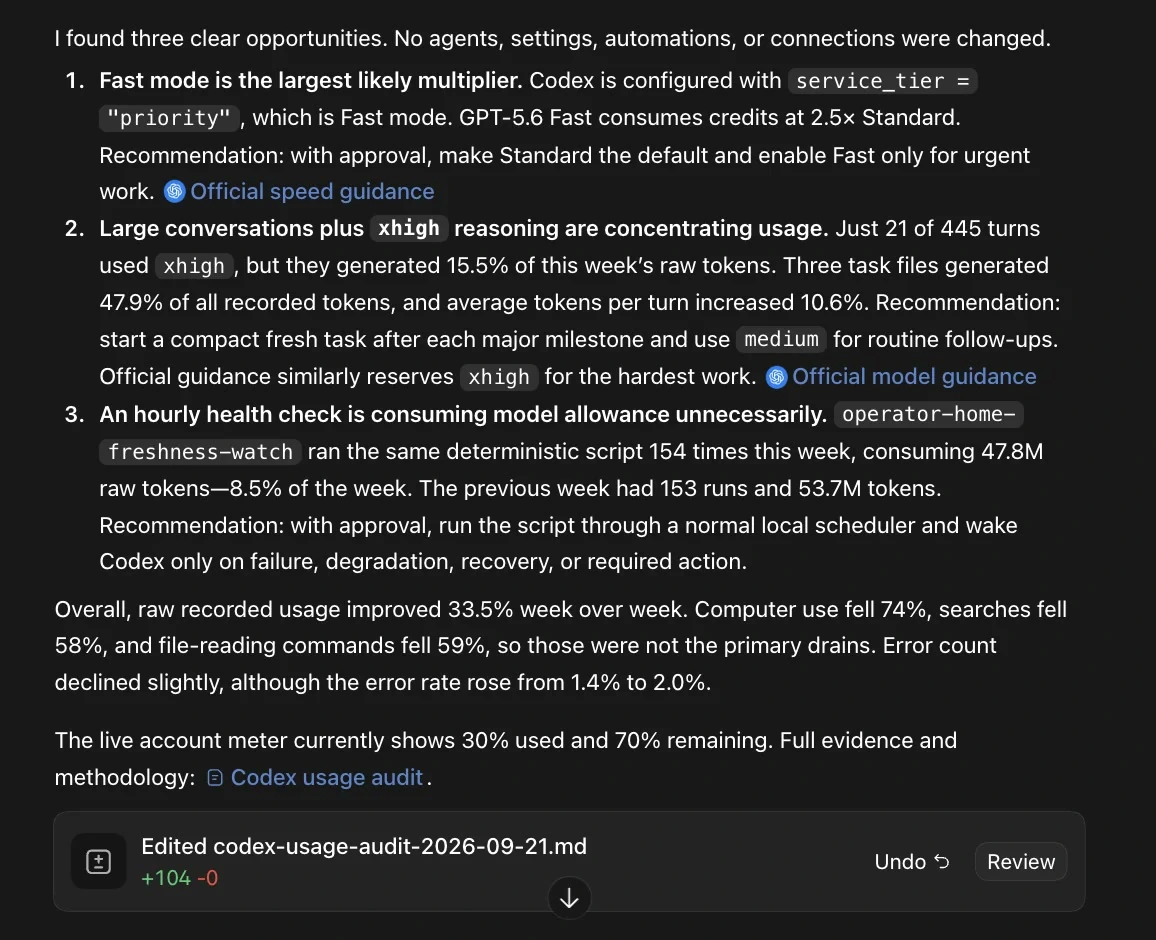
That report's three findings line up with earlier ways in this series: Fast mode on by default (way 6), heavy reasoning on routine follow-ups (way 4), and a script that should run on a normal timer instead of waking Codex every hour (way 18).
4. Make it a weekly usage monitor in your agents.md
Then what I could do is either improve the way that I want to see this report, like saying, "Email me this report every Friday evening," and do this on a weekly basis, or on a daily basis. But you do want to have this, so that your agents.md corrects the bad things that you're doing in terms of token usage, and so that your behavior also changes.
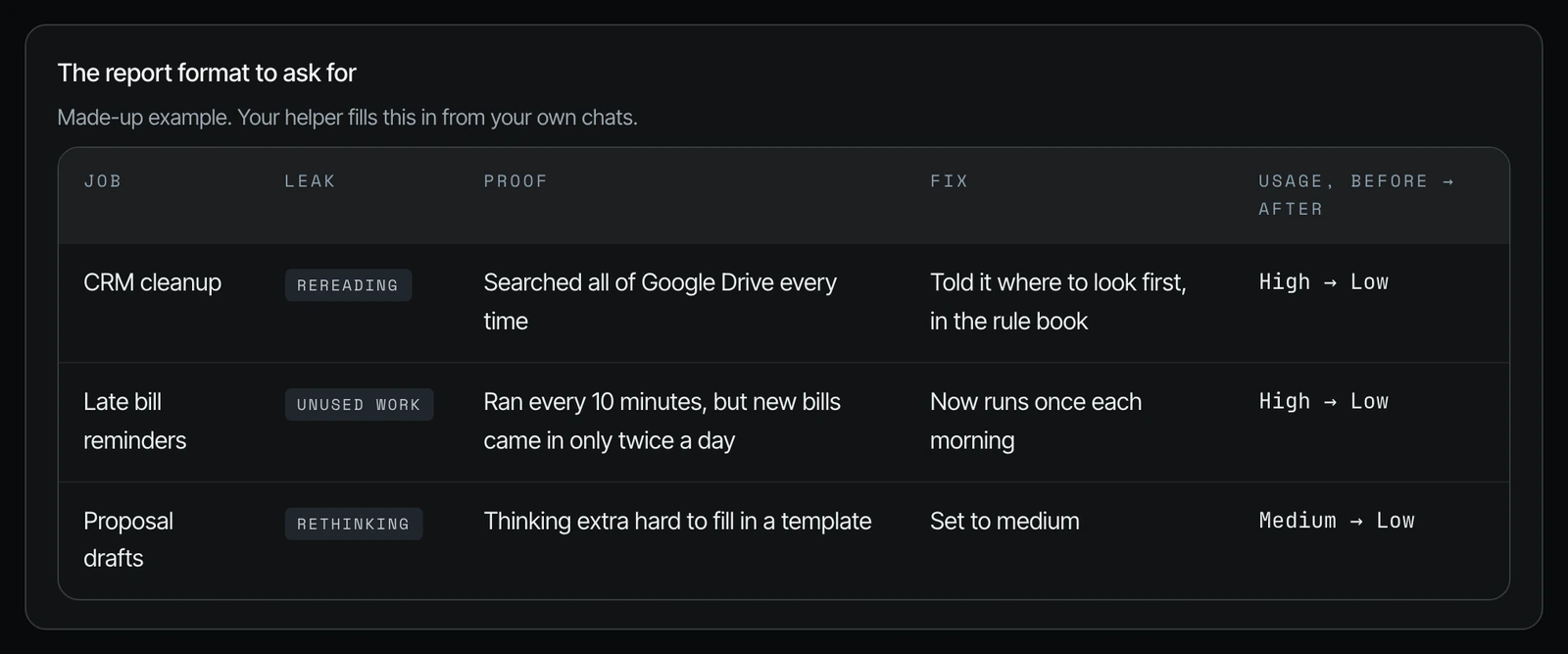
Shanee's field guide gives a block you can add to your agents.md so the check runs every week:
## Token Tracker: weekly
Every Monday, review the 5 most expensive sessions from the past 7 days.

For each session, label the spend:
- Disconnected: browser or computer use where a plugin, connector, or API exists
- Rethinking: reasoning or model heavier than the task needed
- Rediscovering: time spent learning what AGENTS.md or a template should cover
- Rereading: long chat replay, large files in the chat, broad searches, unused connectors, repeat document reads
- Retrying: the same action failing more than twice
- Unused work: output nobody used, or scheduled runs that found nothing

Report the top 3 leaks only. For each one:
workflow, date, approximate usage, dominant leak, evidence, proposed fix,
and where the fix goes (AGENTS.md, template, index, integration, schedule, settings).

Do not apply fixes without approval.
Next week, re-check every approved fix and report usage before vs. after.
Run on medium reasoning. Keep the report under one page.
The last two lines matter. The helper should not become the next leak.
Your weekly checklist
- [ ] Run the audit on the last seven days, read-only.
- [ ] Read the evidence for each of the top findings.
- [ ] Approve only the rule changes you agree with.
- [ ] Pick the habits you will test this week.
- [ ] Next week, check whether usage on the same job went down.
Frequently asked questions
How do I track Claude Code usage?
Run a read-only usage audit in Claude Code on the last seven days, then make it weekly. The usage screen tells you that you hit your limit but not why, so the audit lists the sessions that used the most, labels the cause of each, and ranks the top three fixes. Shanee runs hers weekly, and you can ask for it every Friday evening by email (27:57).
Can I monitor Codex usage the same way?
Yes. The same prompt works in Codex, and Shanee's field guide shows an earlier weekly Codex audit from her own account. It found Fast mode on by default, heavy reasoning on routine follow-ups, and an hourly check that ran the same script 154 times, and her usage improved 33.5% week over week.
Do I need a developer or an advanced prompt to build a usage tracker?
No. Shanee says you could easily do this in something like Codex, and it doesn't need to be an advanced prompt (23:17). Paste the audit prompt, read the evidence, and approve the fixes you agree with.
Will the usage audit change my settings on its own?
Not with this prompt. It says the audit is read-only and not to apply any fix until you approve. In Shanee's report, the rule changes were proposals for her to accept.
Is a weekly usage audit worth it for a small business with only a few agents?
Yes. The habits compound, and once you have 10, 25, 50 or 100 plus agents running, you don't want to learn them the hard way (23:48).
Related ways in this series
- Way 2: Stop agents clicking around software, the YouTube browser-upload story her report flagged.
- Way 12: Start a new chat for each job, or compact, the fix for different jobs staying in long chats.
- Way 15: Stop when an AI agent fails twice, the same idea as "do not repeat failed steps without a change."
- Way 17: Test your agent on a small piece first, the "one thumbnail before the full batch" habit.
- How to check Claude Code usage (slash command), the quick check to run before and after you apply a fix.
- Back to the hub: How to Reduce Codex and Claude Code Token Usage: 20 Ways
Sources
Official / Primary Sources
- Shanee Moret, "20 Ways to Optimize How You Use Codex and Claude Code Part 2" (YouTube, 2026-10-03) , the weekly helper, the usage audit prompt, and her own report with its rule changes and habits.
- Shanee Moret, "20 Ways to Use Codex and Claude Code Without Burning Your Usage (Part 1)" (YouTube, 2026-10-02) , the YouTube upload through the browser when an API key existed.
- Shanee Moret, "20 Ways to Optimize Your Token Usage in Codex and Claude Code" field guide (GrowthAcademy.Global, 2026) , the full audit prompt, the agents.md tracker block, and the earlier Codex usage audit screenshot.