In the last week of August 2026, Anthropic and OpenAI shipped the same headline capability within days of each other: an AI agent that browses the web for you, signs into the portals you already use, and works across real websites to completion.
Claude in Chrome reached general availability on August 26 and 27. OpenAI documents secure website login for ChatGPT's cloud browser. If you run a business, the practical question arrived with them: which one gets access to your logged-in world?
Claude in Chrome works inside your existing Chrome profile and uses the logins you already have. The ChatGPT Work agent runs tasks in its own managed session and pauses at each login wall so you can enter credentials in a secure form the model never sees. Run the same three tests on both, give the winner read-heavy work first, and keep a human approval step on anything that submits, spends, or sends.
What Shipped, and When
Anthropic's Claude in Chrome extension is now generally available on every paid Claude plan: Pro, Max, Team, and Enterprise. Anthropic announced the rollout on August 26, and Gigazine covered it the following day.
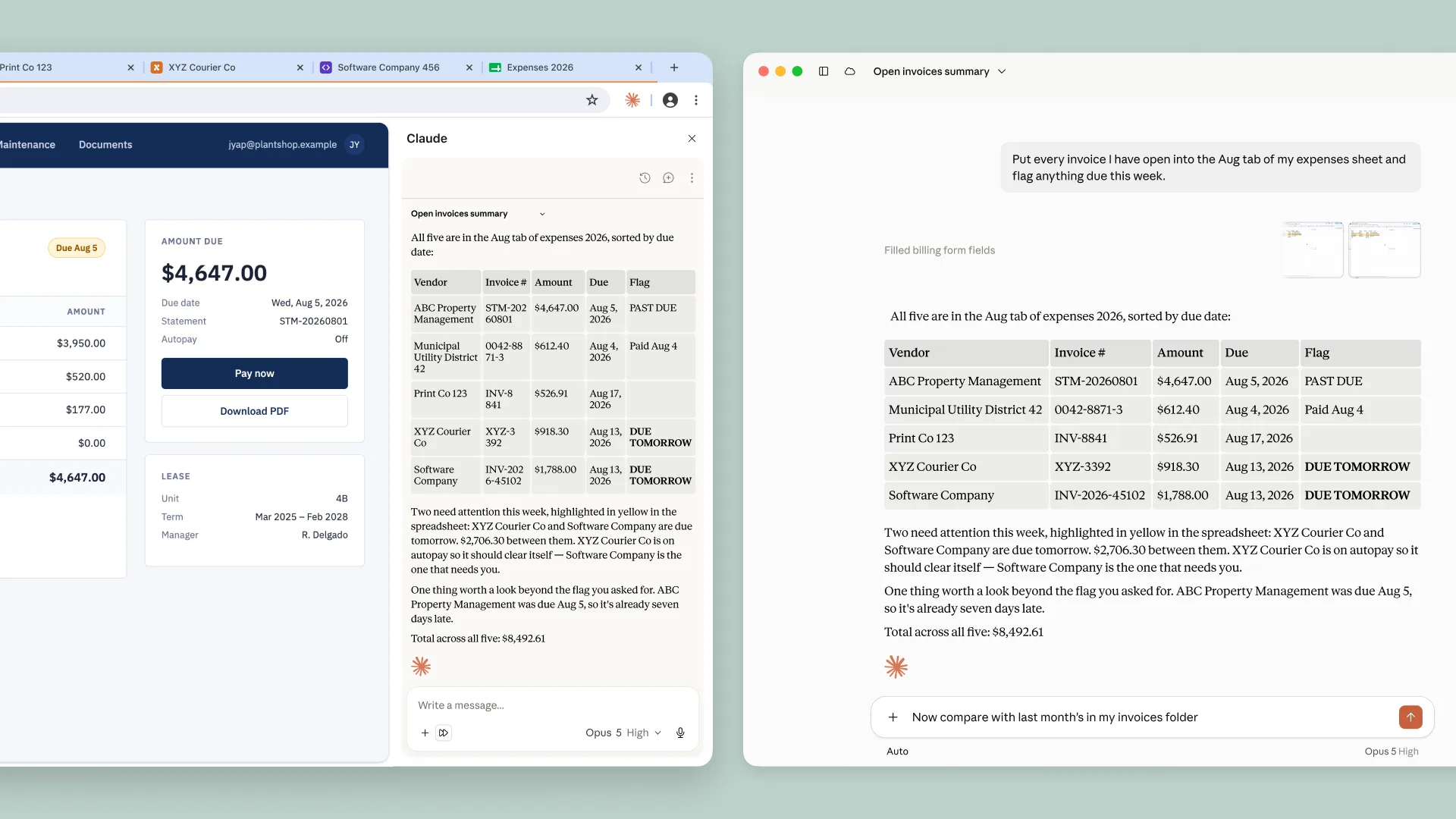
The headline change is autonomous mode. Claude can take a sequence of browser actions without you approving each individual step, and Anthropic says a safety classifier validates every action before it runs.
In practice, Claude can read the page you are on, type, click links, navigate between pages, and fill forms. It uses your existing logins, and there is nothing to install beyond the Chrome extension.
OpenAI's cloud-browser documentation says the agent can pause at a login wall so the user can take over and authenticate before the task continues. Neowin independently reported the late-August rollout and plan availability.
Within one week, business owners got two competing autonomous web agents that can enter portals, navigate dashboards, fill forms, and pull data from sites they are signed into.
Where Each Agent Actually Runs
This is the structural difference that should drive your decision, because it shapes both convenience and risk.
Claude in Chrome lives inside your real browser. Your profile, your open sessions, your saved logins. That is extremely convenient, since the agent can start work immediately on any site you are already signed into.
That closeness deserves deliberate boundaries. An agent operating in your everyday browser operates next to your email, your banking tabs, and every session you carry. Decide which sites it may touch, and when autonomous mode is appropriate, before you hand it real work.
The ChatGPT Work agent takes the opposite approach. It runs the task in its own managed session, separate from your browser, and when it hits a login wall it stops and hands you a secure credential form.
You trade some convenience for separation. Each login becomes a deliberate act, which slows the agent down and also makes it very clear what it can reach.
Side by Side
Here is the comparison in one place, based on Anthropic's announcement and Neowin's coverage of the OpenAI release.
| What to compare | Claude in Chrome | ChatGPT Work agent |
|---|---|---|
| Install path | Chrome extension, nothing else to install | Built into ChatGPT Work |
| Where it runs | Inside your existing Chrome profile | In its own managed session, separate from your browser |
| Login model | Uses the logins already in your browser | Pauses at each login wall; you enter credentials in a secure form the model never sees |
| Plan requirement | All paid Claude plans: Pro, Max, Team, Enterprise | ChatGPT Plus, Pro, and Business |
| Approval model | Autonomous mode runs action sequences without per-step approval; a safety classifier validates each action before it runs | Works the task to completion once signed in, pausing wherever a site requires your login |
Plans and behavior can change quickly in this category. Verify against your own account before you build a process around either column.
The Three-Test Evaluation
Thirty minutes of hands-on testing will settle this faster than any spec sheet. Run the same three tasks on both platforms, using the same sites, and keep score.
Pull a report from a client portal
Pick a portal you or your team check every week. Ask the agent to open it, navigate to a specific report, and bring back the numbers. This is read-heavy work with no send risk, and it tests navigation, login handling, and extraction in one pass.
Judge it on two things: whether it found the right page without coaching, and whether the numbers match what you see when you open the same report yourself.
Fill a vendor intake form
Give the agent your standard company details and point it at a vendor intake or onboarding form. Let it fill every field, then have it stop before submission so you can review.
The stop matters as much as the filling. You are testing whether the agent respects an instruction that limits it, because every future workflow will depend on that.
Extract data from a legacy dashboard
Point the agent at the oldest web tool you still depend on, the one with no API and no export worth using. Ask for a specific set of numbers.
Legacy interfaces are where browser agents earn their keep, and where misreads surface. Check every figure on the first run.
Score both platforms on completion, accuracy, and how often you had to step in. The whole exercise fits in under 30 minutes per platform.
Plenty of owners will land on the platform their team already pays for, and that is a legitimate outcome. Switching costs are real, and both architectures can do this work.
The House Rule, Whichever You Pick
Autonomous browsing is new for every vendor shipping it, and your business should treat it that way.
Whichever agent you pick, it gets read-heavy tasks first: reports, lookups, monitoring, data extraction. Anything that submits, spends, or sends keeps a human approval step until that exact workflow has a tested track record.
A safety classifier and a secure credential form are real protections, and they are also vendor promises. Your client relationships should never be the test environment for a vendor promise.
Expand authority slowly, based on logged results, one workflow at a time.
Frequently Asked Questions
Do I need to install anything to use these browser agents?
Claude in Chrome needs the Chrome extension and nothing else, per Anthropic's announcement. The ChatGPT Work capability is built into the product on eligible plans, with the agent running the task in its own managed session.
Does the ChatGPT Work agent see my passwords when it logs in?
Per Neowin's report, the agent pauses at the login wall and you enter credentials in a secure form the model never sees. Once you are signed in, the agent continues the task to completion.
Which plans include the new browsing capabilities?
Claude in Chrome is generally available on all paid Claude plans: Pro, Max, Team, and Enterprise. The ChatGPT Work login capability covers Plus, Pro, and Business plans, per Neowin.
Should the winning agent get purchasing and outbound email next?
Only after a tested track record on that exact workflow. Keep a human approval step on anything that submits, spends, or sends, and expand authority one workflow at a time based on logged results.
Sources
Official / Primary Sources
- Anthropic: Claude in Chrome is generally available
- OpenAI Help Center: Using cloud browser in ChatGPT