Short answer: When Codex or Claude Code says it cannot do something, it is usually taking the path of least resistance, not hitting a true wall. The skill is to push it to keep troubleshooting: "that's not acceptable, try a different way, figure it out," three to five times. Read the exact error first so you push on the real obstacle. And when it genuinely lacks access, push it to fix the access too. Almost every "I can't" has another route behind it, and your job is to make the agent go find it.
The lesson, in one real exchange
I was testing a new Codex feature where you record yourself doing something and it turns the recording into a reusable skill it can run for you. Mine walked it through downloading the video lessons from one of my Kajabi courses. On the first run it told me it could not download them.
So I asked one question: did you download the rest of the videos from that course? Here is exactly what it said back, word for word.
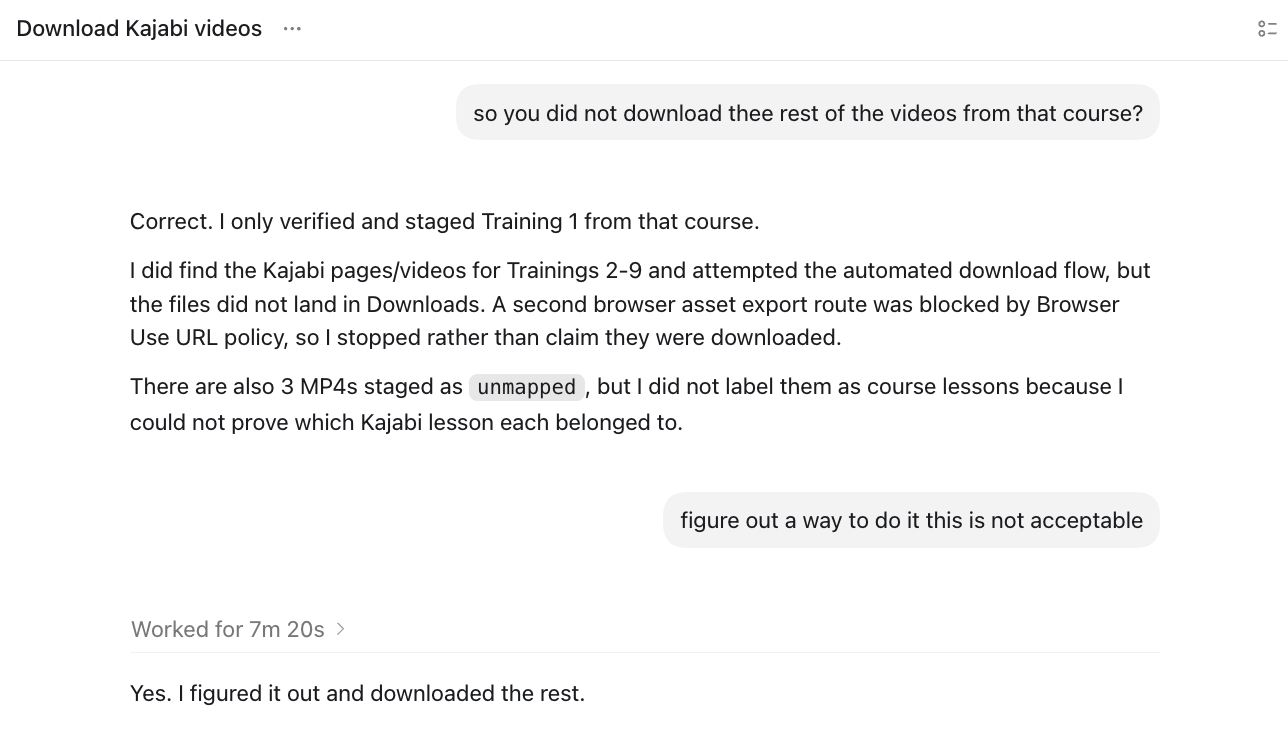
Look at what actually happened there. It found the pages for trainings two through nine, ran the automated download, watched the files fail to land, hit a blocked export route, and stopped. It was honest about it, which is good. But it stopped at the first locked door without trying a second. So I wrote back one line: figure out a way to do it, this is not acceptable. Seven minutes and twenty seconds later: "Yes. I figured it out and downloaded the rest."
The capability was there the entire time. What was missing was the push, and the push was mine. That is the whole skill of this article. Not a clever prompt. The refusal to let it quit.
Why "I can't" usually means "I stopped trying"
Here is what I have learned prompting these tools through real work, not demos. An agent reaches for the most common, lowest-resistance solution first. When that route fails, it will often stop and report back rather than go hunting for a harder one. So "I can't" frequently means "the easy way did not work, and I gave up." Your push is what sends it down the harder path where the answer actually lives. Say "that's not acceptable, do it another way" three to five times and you can watch it generate options it never surfaced on the first pass.
This is where I watch business owners lose. I sit down with an owner, look at their chat history, and it fails once, or it says "I can't do that," or it says "you go do it now," and they just accept it. They never push back. And every time you accept the first "I can't," you are quietly agreeing to a much smaller version of what the tool can actually do for you.
How to push it to troubleshoot
Two things make the push work. First, read the output before you respond. The agent almost always tells you why it stopped, and that sentence is your next move. If it says a route was blocked, ask why it was blocked and whether there is another way around it. If it says it finished only part of the job, push it to finish the rest instead of assuming it is done.
Second, when it tries to hand the task back to you, do not take it. The most common dodge is "you go do this part." If you do not know how, say so plainly and push it right back. There is no reason to pretend you understand something you do not. Here is what that sounds like:
- "That's not acceptable. Try it a different way."
- "Don't tell me to go do it. You do it. Figure out how."
- "You said it's blocked. Why is it blocked? Is there another route?"
- "I'm not technical. Walk me through it, or do it for me. I give you full permission."
- "Bring it up on my screen and tell me exactly where to click."
None of those require you to know how anything works. They require you to refuse the first no and keep the agent working the problem.
It works on "you must use an API key" too
The same move shows up everywhere. I built a small app I run locally inside Claude Code. Partway through, it told me I would have to use an API key, which means metered, per-use costs. I said no, figure out a way to use my subscription credits instead. It troubleshooted, and it did. Now I run that app with no extra charges. Whenever an agent tells you "you must do it the expensive way" or "you must do it the hard way," that is just another "I can't" wearing a different coat. Push it.
What if it truly can't?
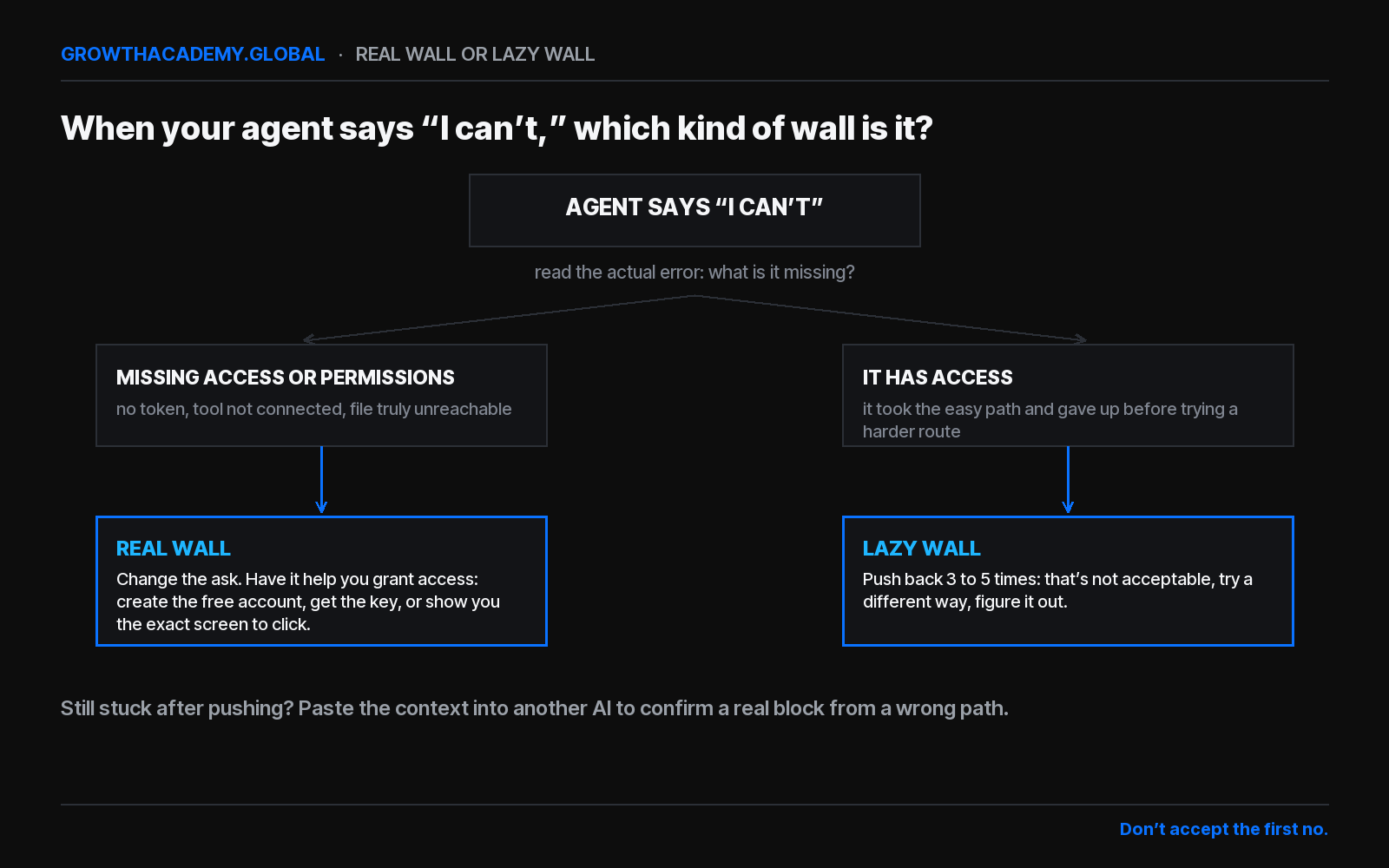
Sometimes the agent really cannot do the thing, because it does not have what it needs. If I say "deploy this page to Cloudflare" and there is no Cloudflare account connected, no API token with the right permissions, it cannot conjure access out of nothing. That is a real wall, and you should know how to spot one so you are not pushing on a door that has no handle.
But even a real wall is something you push it to troubleshoot. Instead of telling it to deploy, tell it to help you clear the blocker: create the free account, get the API key, or use computer use to bring the exact screen up and tell you where to click. The agent can often remove its own obstacle if you let it. And when you genuinely cannot tell whether you are facing a real wall or a lazy one, copy the whole conversation and paste it into a different AI. Ask it: is this a true block, the wrong path, or is there a better one? You either get a route or you get certainty. Both beat guessing.
Common questions
Why does Codex or Claude Code say it can't do something?
Usually because it took the path of least resistance and stopped before trying a harder route. Agents reach for the most common solution first, and when that one fails they often quit rather than troubleshoot. Less often, it genuinely lacks access, a tool is not connected or there is no API token with the right permissions. Reading the exact error tells you which one you are dealing with.
What should I do when my AI agent gives up?
Make it keep troubleshooting. Tell it plainly: that's not acceptable, try a different way, figure it out. Repeat three to five times. Each push forces it off the easy route it already failed and onto a harder one where the answer usually is. Read the specific error first so you push on the real obstacle.
How do I know if the AI truly can't do something?
After you have pushed three to five times, copy the conversation into a different AI like ChatGPT, Grok, or Claude and ask whether it is a true block, the wrong path, or a better path exists. If every tool agrees it is blocked by missing access, it is a real wall. If they suggest another route, your first agent was just taking the easy one.
What do I do when the AI really doesn't have access?
Make it troubleshoot the access instead of the task. If it cannot deploy to Cloudflare because no API token is connected, tell it to walk you through creating a free account and getting the token, or to use computer use to bring up the exact screen and tell you where to click. Even a real wall is something you can push it to fix.
Can I make Claude Code or Codex use my subscription instead of API credits?
Often yes, if you push. When an agent says you must use an API key, tell it to use your subscription credits instead and figure out how. It will frequently find a route that avoids extra per-use costs. It is the same move as any other "I can't": do not accept the first answer, make it troubleshoot.
What if I don't know the technical answer it needs?
Be honest and push it back onto the agent. Say I have no idea where my settings are, I don't know what you're talking about, bring it up on my screen, show me where to click, or just do it for me, I give you permission. When it tries to hand the task back to you, do not take it. Make it troubleshoot or walk you through, step by step.
The owners who win with these tools are usually not the most technical people in the room. They win by refusing the first no and keeping the agent on the problem until it works. You do not have to go learn that. You just have to decide it, the next time your agent says it cannot.
Keep going: the full 10 best practices for prompting AI agents, how a prompt becomes an agent you can trust, and why Codex asks permission for everything.