Short answer: Codex stops at every step because its approval setting is on "Ask for approval," the cautious default that checks with you before it edits external files or uses the internet. Open the approval dropdown at the bottom of the Codex composer, the small control next to the model name, and switch it to "Full access" for a machine you control, or "Approve for me" for a safer middle ground. That is the whole fix, and it takes about two minutes.
It is 11 at night. You handed Codex a real job three hours ago: read the inbox, find the late invoices, draft the follow-ups. You come back to check on your new hire, and it is sitting exactly where you left it, asking, "Can I go to the next step?" It has been asking for three hours. Nobody answered. Nothing got done.
Here is the part that stings. Most owners look at that screen and decide the tool failed. They tell me, "I tried Codex, it just could not do it." And I have to be the one to say it: it could not do it because it is set to Ask for approval, the cautious default, so it checks with you before every external step. You hired an employee, handcuffed them to the desk, and then blamed the employee.
The whole point of Codex is that it does things
ChatGPT writes the landing page copy. Codex publishes it. ChatGPT drafts the collections email. Codex finds the thread, writes it in your voice, and sends it. That is the entire difference, and it is the reason you are here. But doing things means changing things: files, drafts, settings, pages. When Codex is set to ask before every action, it stops and waits instead of doing, so it narrates what you should go click instead of clicking. That is not an agent. That is a more expensive ChatGPT. If you have not set Codex up at all yet, start with what Codex is and the sandbox setup walkthrough, then come back here.
The 2-minute fix
- Look at the bottom of the Codex composer, the bar where you type. There is a small dropdown that probably says Ask for approval. That is the one.
- Click it. Codex asks, "How should Codex actions be approved?"
- Choose Full access for a machine you control, or Approve for me if you would rather it ask only on risky actions. The default, Ask for approval, is what makes it stop and check before every step.
The change takes effect right away, no restart needed, and a checkmark appears next to the option you picked. That is the whole fix. Everything you have heard about agents doing real work for a business sits on the other side of it.
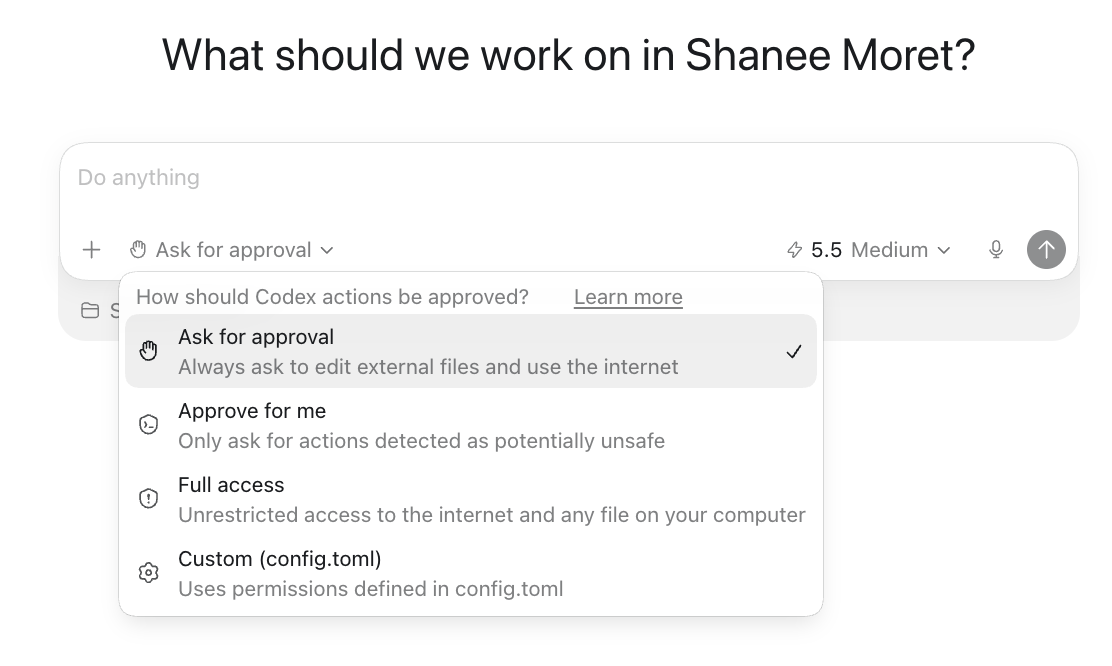
What each approval setting actually does
| Setting | What it does | Use it when |
|---|---|---|
| Ask for approval | Always asks before it edits external files or uses the internet (the default) | Almost never. This is the setting that makes it stop and ask constantly. |
| Approve for me | Only asks for actions it detects as potentially unsafe | You want a safe middle ground |
| Full access | Unrestricted access to the internet and any file on your computer | You control the machine and have the security basics in place |
| Custom | Uses the permissions you define in a config file (config.toml) | You are technical and want fine-grained control |
A few more settings worth finding
While the approval mode lives in the composer, a few other settings live in Codex Settings and are worth turning on. Switch on Memories so it stops forgetting your business between sessions. Under Personalization, set Personality to Pragmatic, because friendly is a little annoying and pragmatic gets to work. Then open Computer Use and turn on computer and browser control so it can click around when an app has no clean connection. That same Computer Use section holds one more worth knowing: use your computer when locked, so you can hand Codex a job from the ChatGPT app on your phone and it keeps running with your screen off. One caveat, that locked feature is not available in the UK, EU, or Switzerland yet.
"But isn't Full access dangerous?"
Right question, wrong fix. Handcuffs are not security. Seatbelts are: a password on your computer, two-factor on everything in case something goes a little rogue, your files backed up off the machine (Drive, iCloud, Dropbox, your pick), and every credential in a real password manager like 1Password, Bitwarden, or Apple Keychain, never pasted in a chat. Do those four and let the agent drive. Constrict it so hard it needs a permission slip for one action, and you are not safer. You have just guaranteed it cannot help you. The risk to fear is not the agent doing too much. It is paying for an agent allowed to do nothing. If Full access feels like too much at first, start on Approve for me, which only stops you for genuinely risky actions.
If the setting fights you
On some machines, Windows especially or anything an IT company manages, Full access greys out or snaps back. Do not troubleshoot it yourself. You have an agent. Put it to work:
Troubleshoot these restrictions for me. Use computer use and browser use. I give you permission. I am non-technical, so show me exactly where to click.
It brings up the right screens and draws arrows where you click. Usually the only thing it needs is your password. And if your environment is so locked down that even this fails, that is not a Codex problem. It is a business decision from years ago that is now blocking you, and it is worth revisiting.
The test tonight
Give Codex one small job that changes something, not just reads something. If it runs without stopping at every step, you are set. If it stalls, check that approval dropdown again. Because the owners who give their agents room to work are quietly rebuilding their businesses to run agentically, and the gap between them and everyone still clicking approve forty times a night compounds every week. The setting takes two minutes. The handcuffs cost you the whole thing.
Common questions
Why does Codex ask permission for everything?
Because its approval setting is on Ask for approval, the default that checks with you before it edits external files or uses the internet. Open the approval dropdown at the bottom of the Codex composer and switch it to Full access, or Approve for me for a safer middle ground, and it stops asking before every move.
Which approval setting should a business owner use?
Full access for a personal machine you control, or Approve for me for a safer middle ground that only asks on potentially unsafe actions. The Ask for approval default is what makes Codex stall. You change it in the approval dropdown at the bottom of the composer, no settings menu required.
Is giving Codex Full access safe?
It is, if you have the basics in place: a password on your computer, two-factor on your accounts, your files backed up to the cloud, and your credentials in a real password manager. Those protect you far better than crippling the agent. Constraining Codex so tightly that it cannot act does not make you safer, it just makes it useless.
Why does Codex still stall on my work computer?
On Windows or a machine managed by an IT company, the Full access option can be greyed out or blocked. Ask Codex to troubleshoot it for you with computer use and browser use, and it will show you where to click. If even that fails, your machine is locked down by company policy, which is a business decision worth revisiting if you plan to run agents.
Can I run Codex from my phone?
Yes. Codex runs on your computer, and you control it from the ChatGPT app on your phone after pairing it once. If you also turn on the use-your-computer-when-locked setting under Computer Use, tasks you send from your phone keep running even when your Mac is locked. That feature is not available in the UK, EU, or Switzerland yet.
The setting is not the interesting part. What is interesting is what happens after you change it: Codex stops asking and starts finishing. Give it room, keep your seatbelts on, and let it work.
Set up the right way from the start: see what Codex is, the sandbox setup, and why you are early, not late. This came from Day 1 of the live training.