
You handed Codex a real assignment. Reconcile a quarter of invoices, rebuild a report, work through a folder of contracts. Somewhere past the halfway mark it stopped: limit reached, task incomplete.
Most owners who hit that wall blamed themselves. The prompt was too long, or the ask was too big, or the plan was too small.
The last week of August brought a different explanation.
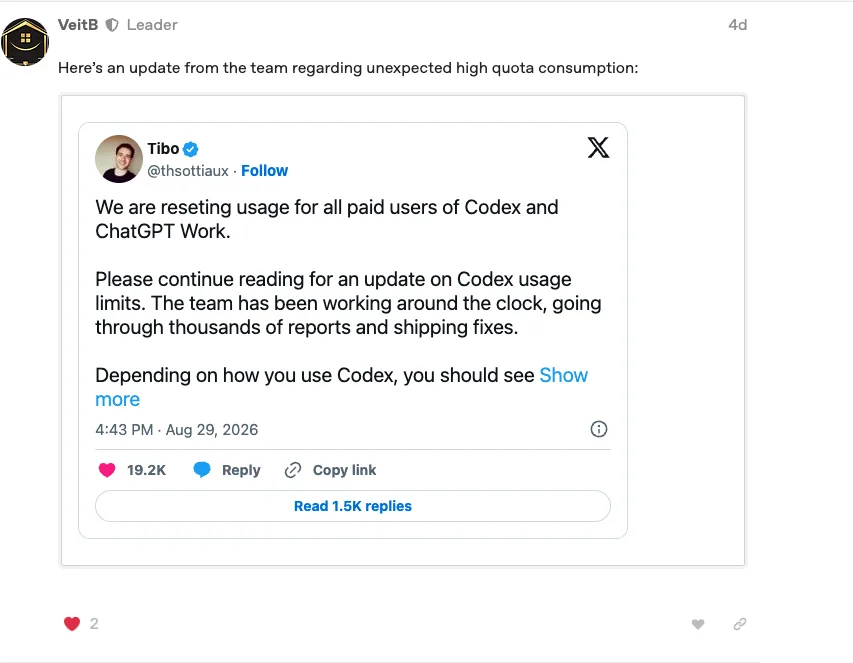
Between August 23 and 30, 2026, OpenAI shipped a batch of fixes to the Codex harness, the runtime layer that manages memory, compaction, and tool execution. Bugs in that layer had been silently burning quota on overhead instead of actual work. OpenAI claims the combined fixes deliver 10 to 50 percent more completed work per quota unit, and a fresh quota reset shipped to all paid plans alongside them.
The Symptom You Were Seeing
The pattern was consistent enough that owners compared notes on it. Long tasks stalled midway. Quota drained faster than the visible work explained. A job that finished on Tuesday ran out of room on Thursday.
When a tool behaves that way, the natural move is to edit your own inputs. Shorter prompts. Smaller asks. Splitting one workflow into five.
Some of that discipline is healthy anyway. But in this case, a meaningful share of the waste was happening in a layer you cannot see and could never have fixed from the prompt box.
What Actually Changed
ExplainX reported a batch of Codex harness fixes between August 23 and 30, 2026. A non-staff user on OpenAI's community forum relayed a public post attributed to Codex product lead Tibo Sottiaux; treat that forum entry as community evidence, not an OpenAI announcement.
Harness is the technical word for the runtime layer that manages the agent while it works. Three of the fix categories translate cleanly into owner language.
Compaction
Compaction is how the agent condenses a long session so it can keep working. When compaction misfires, the agent loses its place or spends effort repeating itself, and you pay for both.
Memory
Memory is what the agent carries between steps. Memory failures meant work done early in a task was effectively forgotten by the time it mattered later in the same task.
MCP timeouts
MCP timeouts are stalled tool connections. The agent sat waiting on a connection that had quietly died, and the wait burned quota while producing nothing.
The rest of the batch covered goals, automations, subagents, computer history, and rolling summaries: the plumbing that keeps a long, multi-step assignment on track.
Why Your Quota Drained Without Much to Show
An agent spends quota on two kinds of effort. There is the work you asked for, and there is the overhead of managing itself: condensing context, carrying memory, keeping tool connections alive.
When the overhead layer has bugs, the meter runs while the work stands still. From your side it looked like an expensive tool getting less done, which is why the experience felt like a personal failure of prompting.
Nothing you typed caused it, and nothing you typed could cure it. The fix had to come from the vendor, and when it arrived it required nothing from you.
What to Do Now
- Re-try the long workflows you gave up on. The assignments that stalled in July and August are the best test of whether the fixes matter for you, and the fresh quota reset gives you room to run them.
- Batch related tasks into one session. Context reuse pays off when compaction and memory behave. Give the agent a connected block of work rather than ten cold starts.
- Watch your completion rate before buying a bigger plan. Track how many assignments finish inside your current quota for two weeks. Upgrade because your measured ceiling says so, if it still says so.
The Caveat That Keeps You Honest
The 10 to 50 percent range is OpenAI's own estimate of the improvement, and vendors grade their own homework generously. Hold it as a claim, and treat your mileage as the fact.
Your actual gain depends on how much harness overhead your tasks were hitting. Heavy multi-step workflows with lots of tool calls likely lost the most to the bugs, so they likely stand to gain the most from the fixes.
Run your own before-and-after. A simple note of what you assigned, whether it finished, and how much quota it took will tell you more than any launch summary.
Frequently Asked Questions
What is the Codex harness?
The harness is the runtime layer that manages an agent while it works: how it condenses long sessions, what it carries between steps, and how it talks to external tools. The August fixes landed in that layer rather than in the model itself.
Did I need to change anything to get the fixes?
No. The fixes shipped in the runtime layer on OpenAI's side, and a fresh quota reset applied to all paid plans. Your existing prompts and workflows pick up the improvement automatically.
Where does the 10 to 50 percent figure come from?
From OpenAI. Treat it as the vendor's own estimate of more completed work per quota unit, and check it against your own completion rate rather than taking the number on faith.
Should I upgrade my plan now that quota goes further?
Measure first. If the workflows you abandoned now finish inside your current quota, the fixes bought you capacity for free. Upgrade when two weeks of your own numbers show you are still hitting the ceiling.
Sources
Community Evidence / Independent Coverage
- OpenAI Developer Community user post relaying the reported update
- ExplainX: OpenAI Codex capacity boost from the August 2026 harness fixes
- ExplainX: Why Codex quota drains fast, and the August reset
The Bigger Lesson
When an agent underperforms, you now have two suspects instead of one. Your instructions, and the vendor's runtime.
You control the first. For the second, the best defense is a lightweight record of what you assigned and what actually finished, so a change in the tool shows up in your numbers instead of your mood.
That habit costs five minutes a week. It also turns every vendor announcement from something you take on faith into something you can check.