Short answer: The live room matters, but the registration list is the bigger asset. It tells you who is active, interested, qualified, and reachable after the event ends.
Day 3: LinkedIn Live Video Events
See the original replay this article is based on.
Watch the Replay →If you have ever hosted a LinkedIn Live event, watched 600 people register, and then seen 70 show up on the day, you have probably experienced some version of disappointment. Maybe you refreshed the viewer count every few minutes. Maybe you told yourself the format does not work, or your topic was off, or your audience just does not show up for lives.
What you were actually looking at was not underperformance. It was 600 people raising their hand.
You were measuring the wrong thing.
For the complete framework, read the full guide.
In This Article
- The Metric Most Hosts Are Optimizing For Is the Wrong One
- What Registrations Actually Are
- The Follow-Up Opportunity Most Hosts Never Activate
- Why the 50% Show-Up Rate Is Actually Exceptional
- How to Use Registration Data as an ICP Filter
- The Registration Signal in Practice
- The Reframe That Changes Every Future Live
- FAQ
The Metric Most LinkedIn Live Hosts Are Optimizing For Is the Wrong One
When business owners evaluate a LinkedIn Live event, they almost always anchor to one number: how many people showed up live. If that number feels lower than expected, they assume something failed.
That is the wrong framework. Live attendance is a tactical variable. It shifts with time zones, day of week, calendar conflicts, attention, and simple life friction. The registration is the strategic signal. That is where the information lives.
When someone registers for your LinkedIn Live event, four things are simultaneously true:
| What Registration Reveals | Why It Matters |
|---|---|
| They are active on LinkedIn | They see content, they engage, and they are reachable. |
| They are interested in your specific topic | They pre-qualified themselves against your ICP criteria. |
| They are a first-degree connection | You can message them directly with no new connection request. |
| They raised their hand publicly | This is intent behavior, not passive scrolling. |
None of that disappears because they did not show up to watch you live on a Tuesday at 11 a.m.
What Registrations Actually Are: A Segmentation List You Did Not Have to Build
A traditional email marketer works hard to build a segmented list. They create lead magnets, optimize landing pages, and spend months building a list of people interested in a specific topic.
Your LinkedIn Live registration list does most of that work automatically, and it is built from people who already have a relationship with you.
Every person who registers has:
- seen your name and your topic
- made an active decision to register instead of scroll past
- already connected with you, which means some trust already exists
- opted into receiving LinkedIn event reminders around that topic
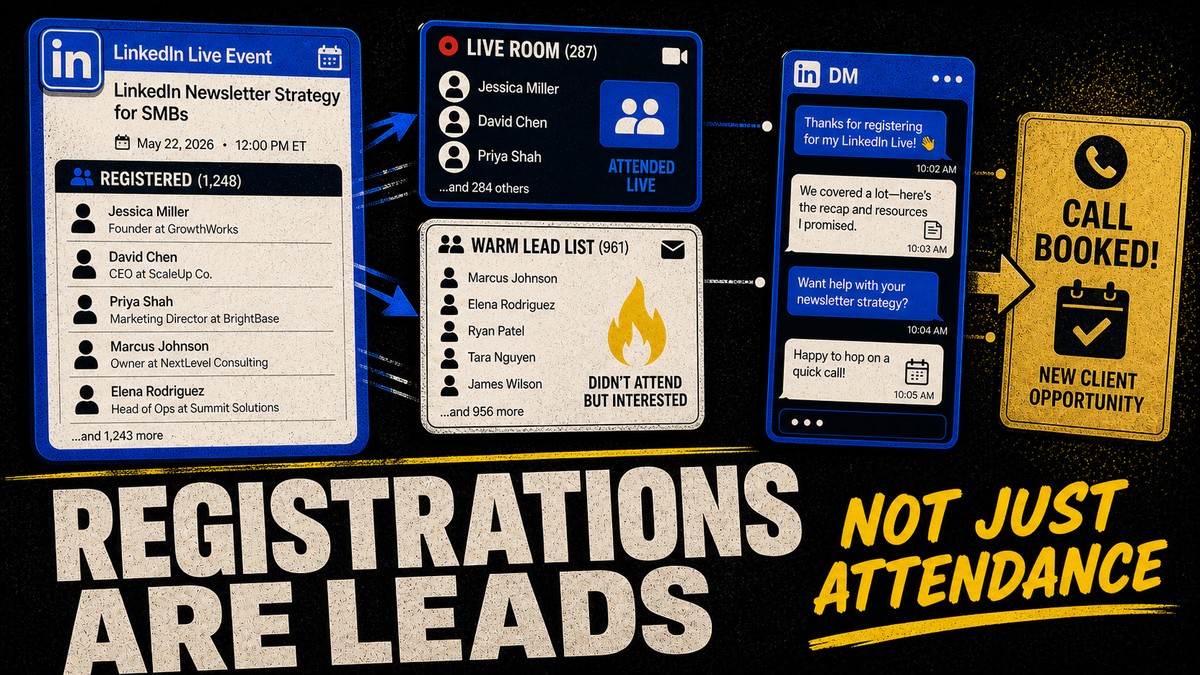
The 70 who showed up live are your highest-intent audience in that moment. The 530 who registered and did not attend are not a failed metric. They are a warm follow-up list.
The Follow-Up Opportunity Most Hosts Never Activate
This is where many hosts leave the most money on the table. They see the live attendance, feel deflated, and move on. They never go back to the registration list.
That is a structural mistake.
Every person who registered and did not attend is still:
- a first-degree connection
- reachable by LinkedIn message
- on record as having expressed interest in that exact topic
A simple follow-up does not need to be salesy. It can be as direct as:
That is not cold outreach. It is a warm continuation of a conversation they already started when they clicked register.
Why the 50% Show-Up Rate Is Actually Exceptional
Most first-time hosts panic because they compare live attendance to the wrong mental benchmark. They imagine that everyone who registered should appear live. That is not how live events work.
Shanee treats a 50 percent show-up rate as exceptional by industry standards. The point is not to obsess over perfection. The point is to understand that the live room is only one slice of the signal.
The people who show up live are your highest-intent audience for that moment because they prioritized your event over everything else competing for their attention. But the non-attendees are still meaningful because they told you the topic matters to them.
Go deeper on the funnel: LinkedIn Live Event Conversion Rates →
How to Use Registration Data as an ICP Filter
If you are doing this right, your LinkedIn Live topics are specific enough that the wrong person self-selects out before registration ever happens.
A generic topic like “five LinkedIn tips for 2026” creates a broad, vague list. A specific topic like “how established B2B consultants close $50K+ clients from a single monthly LinkedIn Live event” creates a smaller but far more valuable registration pool.
That means your registration list is not just a quantity signal. It is a quality signal.
- They self-identify with the kind of problem your topic describes.
- They are actively thinking about the issue you solve.
- They are active enough on LinkedIn to see the invite and act on it.
- They are worth a follow-up conversation.
The specificity of your title determines the quality of your registration signal. And the quality of that signal determines how valuable your follow-up list becomes.
Go deeper on topic selection: What to Talk About and How to Structure It →
The Registration Signal in Practice: What to Do With It
Here is the minimum viable follow-up sequence:
Within 24 hours after the event:
- send the replay link to registrants
- keep the message short and useful
- personalize it if they asked questions or engaged during the live
Within 48 to 72 hours:
- review the registration list for the strongest ICP matches
- send a short, direct conversation-starter
- open dialogue instead of pitching
In the following weeks:
- use your feed and newsletter to continue the same conversation
- treat registrations as a warm signal, not a one-day stat
You do not need a CRM or a sales team to use this well. You need the discipline to stop treating the viewer count as the only metric that matters.
The Reframe That Changes How You Plan Every Future Live
Once you understand that registrations are ICP signals, not just attendance precursors, your planning changes.
You stop asking, “How do I get more people to show up live?”
You start asking, “How do I attract more of the right people to register?”
That question pushes you toward stronger topics, better invite targeting, clearer event pages, and more intelligent follow-up. The 70 who showed up live matter. The 600 who registered are the broader signal your business should be acting on for the next 30 days.
Read next: LinkedIn Live Event Conversion Rates →
Frequently Asked Questions
Sources and references
- Shanee Moret: Day 3 LinkedIn Growth Masterclass replay
- LinkedIn Help: Invite your connections to attend a LinkedIn Event
- LinkedIn Help: Invitation limits for your LinkedIn Event
- Observed registration, show-up, and follow-up patterns from Shanee Moret's live events and client accounts.
Supporting article in the LinkedIn Live cluster. Start from the beginning →
Know who to follow up with after your LinkedIn Live.
If you have a LinkedIn Live replay, transcript, invite list, comment list, or upcoming topic, the $97 LinkedIn Live Follow-Up Kit gives you a simple tracker, message templates, and AI instructions so you know what to send next.
Buy the $97 Follow-Up Kit →